
Multi Stopwatch
In-app purchases
3.9star
187 reviews
10K+
Downloads

Everyone
info
About this app
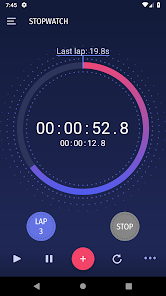
Introducing Multi StopWatch: The Ultimate Tool for Juggling Multiple Timelines. Fits for any type of measurements: sports, cooking, gym, running and other activities.
Key Features:
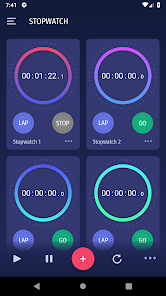
- Create and manage multiple stopwatches independently or altogether
- Track elapsed time with millisecond accuracy
- Start, stop, and lap individual or all stopwatches simultaneously
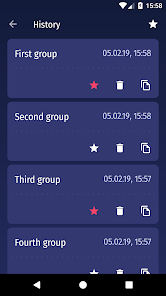
- Save and share stopwatch results
- Use stopwatch sets multiple times
With its intuitive interface and powerful features, Multi StopWatch empowers you to manage multiple timers simultaneously, ensuring you never miss a beat. Whether you're tracking your workout intervals, monitoring cooking times, or keeping tabs on study sessions, Multi StopWatch seamlessly adapts to your needs.
Download Multi StopWatch today and experience the freedom of effortlessly juggling multiple timelines!
Additional Benefits:
Easy-to-use interface
Background operation.
Even reboot doesn't stop the time.
Compatible with various devices
Regular updates and bug fixes
Join the Multi StopWatch Community and Let's Conquer Time Together!
Key Features:
- Create and manage multiple stopwatches independently or altogether
- Track elapsed time with millisecond accuracy
- Start, stop, and lap individual or all stopwatches simultaneously
- Save and share stopwatch results
- Use stopwatch sets multiple times
With its intuitive interface and powerful features, Multi StopWatch empowers you to manage multiple timers simultaneously, ensuring you never miss a beat. Whether you're tracking your workout intervals, monitoring cooking times, or keeping tabs on study sessions, Multi StopWatch seamlessly adapts to your needs.
Download Multi StopWatch today and experience the freedom of effortlessly juggling multiple timelines!
Additional Benefits:
Easy-to-use interface
Background operation.
Even reboot doesn't stop the time.
Compatible with various devices
Regular updates and bug fixes
Join the Multi StopWatch Community and Let's Conquer Time Together!
Updated on
Safety starts with understanding how developers collect and share your data. Data privacy and security practices may vary based on your use, region, and age. The developer provided this information and may update it over time.

No data shared with third parties
Learn more about how developers declare sharing

This app may collect these data types
App info and performance

Data is encrypted in transit

Data can’t be deleted
Ratings and reviews
4.0
182 reviews

Joost Voorhaar
- Flag inappropriate
- Show review history
November 14, 2025
nice, does what it says on the tin. Can't find price information in the app though, so won't pay for a pro version. Love that you can freely add new stopwatches and that there are controls to synchronize start / stop events over all stopwatches.

Anurag Mukherjee
- Flag inappropriate
November 15, 2025
The app has the least amount of features hidden behind a paywall. Even the advertisements on the app are fair, one per stopwatch expansion. It fulfills all my time tracking needs for different tasks.

GrandpaToothless
- Flag inappropriate
December 20, 2025
one good affordable app for all time recording needs. includes sets, set stopwatch name individually, share results as text
What’s new
* Translated the app into 10 languages.
* Added 'current lap' counter for multiple items view
* Added 'current lap' counter for multiple items view
App support
About the developer
Vereshchak Nataliia Mytrofanivna
support@bitrif.com
17 vul. Slobozhanska
Mykhailivka
Ukraine
64663
+380 93 802 1205


