
Bigin by Zoho CRM
In-app purchases
4.5star
1.3K reviews
100K+
Downloads

Everyone
info


About this app
"Bigin by Zoho CRM is a solid pipeline-based CRM solution for small business that is equally effective on PCs and on mobile devices." - PCMag
Bigin is the #1 choice for small business owners looking for a CRM that can be set up in under 30 minutes, seamlessly integrate with your favourite apps, help you manage your customer relationships, and ultimately grow your business faster.
Plug and play simplicity
Easy to use, with almost no learning curve.
Ready-made templates for any business type. No customisation needed, and definitely no tedious setup!
Straightforward layout and design
Simple and predictable navigation
Data migration is a breeze
Seamless integration with Google Workspace, Microsoft Office 365, Mailchimp, Zoho CRM, Zoom, and other top business apps.
Features tailored to the needs of small businesses
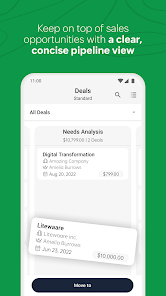
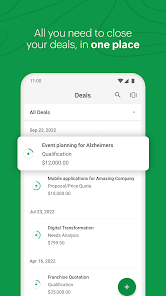
Create and manage individual deal pipelines for each of the different processes in your day-to-day sales cycle.
Look up deal and contact data instantly
Add notes and update records with ease
Schedule events, tasks and calls, and set reminders from your app
Capture leads from your website through customisable webforms
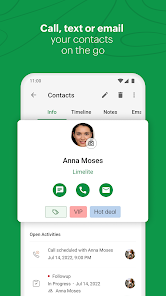
Make every call more personal and productive with the built-in telephony feature
Pick a template for your business and get started right away
Set up or schedule workflows and let Bigin handle your daily routine automatically
A dashboard that gives you a visual overview of business performance using analytics charts, KPIs, and other critical metrics.
Business on the go
Continue working away from your desk with dedicated mobile and tablet apps.
Access to important information on the move, such as customer interactions and contact history
Keep your business-critical information available at a glance with widgets
Enjoy the pipeline view on the device of your choice
Get push notifications on all customer and user activity
Customer support round the clock
Assistance from our customer-focused staff of technical engineers
A handy knowledge base that includes resources such as FAQs and Help Docs.
The Bigin community is always ready to provide a helping hand.
Get to know which contact calls you via the caller ID functionality.
Bigin is the #1 choice for small business owners looking for a CRM that can be set up in under 30 minutes, seamlessly integrate with your favourite apps, help you manage your customer relationships, and ultimately grow your business faster.
Plug and play simplicity
Easy to use, with almost no learning curve.
Ready-made templates for any business type. No customisation needed, and definitely no tedious setup!
Straightforward layout and design
Simple and predictable navigation
Data migration is a breeze
Seamless integration with Google Workspace, Microsoft Office 365, Mailchimp, Zoho CRM, Zoom, and other top business apps.
Features tailored to the needs of small businesses
Create and manage individual deal pipelines for each of the different processes in your day-to-day sales cycle.
Look up deal and contact data instantly
Add notes and update records with ease
Schedule events, tasks and calls, and set reminders from your app
Capture leads from your website through customisable webforms
Make every call more personal and productive with the built-in telephony feature
Pick a template for your business and get started right away
Set up or schedule workflows and let Bigin handle your daily routine automatically
A dashboard that gives you a visual overview of business performance using analytics charts, KPIs, and other critical metrics.
Business on the go
Continue working away from your desk with dedicated mobile and tablet apps.
Access to important information on the move, such as customer interactions and contact history
Keep your business-critical information available at a glance with widgets
Enjoy the pipeline view on the device of your choice
Get push notifications on all customer and user activity
Customer support round the clock
Assistance from our customer-focused staff of technical engineers
A handy knowledge base that includes resources such as FAQs and Help Docs.
The Bigin community is always ready to provide a helping hand.
Get to know which contact calls you via the caller ID functionality.
Updated on
Safety starts with understanding how developers collect and share your data. Data privacy and security practices may vary based on your use, region, and age. The developer provided this information and may update it over time.

No data shared with third parties
Learn more about how developers declare sharing

This app may collect these data types
Personal info, Contacts, and App info and performance

Data is encrypted in transit

You can request that data be deleted
Ratings and reviews
4.5
1.26K reviews

Chris Gibbons (Gibby)
- Flag inappropriate
January 24, 2023
Excellent product so far. Very few clicks and screens to enter deal information and have it associate with the company and people involved. Excellent at tracking deals and very helpful with following up deals. The app for phones works great! It shows you the most important information that you need as you move through your day. Very quick and easy to update accounts on the fly.
14 people found this review helpful

G Middleton
- Flag inappropriate
May 21, 2024
Our first month with Bigin. Its ease of use, speed, and productivity features have are impressive so far. Only a couple of issues/bugs but the interface is easy enough to grasp and work around. We are embracing Bigin as a CRM and Mass Email system. Bigin's mobile app is equally as easy to use and fast, allowing us to manage our pipelines anytime, anywhere. The notifications work and are useful. Next step, assessing forms and integrations.
4 people found this review helpful

Joy Kagwiria
- Flag inappropriate
June 17, 2024
The interface is clean and easy to navigate, allowing users to quickly access and manage contacts, deals, and activities. One of the standout features is the mobile app, which ensures that users can manage their CRM tasks on the go. Additionally, Bigin integrates well with other Zoho products and popular third-party applications, providing flexibility and enhancing productivity.
What's new
Air Actions
- Control the app like a remote by waving your S Pen to switch & refresh tabs for a seamless workflow.
Air Views
- Hover your S Pen for instant image & record previews, enhancing your efficiency.
Galaxy AI - Note Assist
- Note Assist takes care of formatting, translating, and summarizing your texts as you write notes and compose emails from the app.
DeX Mode
- Right-click for a context menu with essential actions, maximizing productivity on the big screen.
- Control the app like a remote by waving your S Pen to switch & refresh tabs for a seamless workflow.
Air Views
- Hover your S Pen for instant image & record previews, enhancing your efficiency.
Galaxy AI - Note Assist
- Note Assist takes care of formatting, translating, and summarizing your texts as you write notes and compose emails from the app.
DeX Mode
- Right-click for a context menu with essential actions, maximizing productivity on the big screen.


