Bluetooth Keyboard & Mouse
In-app purchases
4.1star
43.1K reviews

Everyone
info
10M+
Downloads

Everyone
Learn more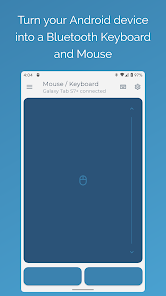

About this app
Elevate your workflow with the most powerful and secure Bluetooth remote control for your devices. Turn your Android phone into a serverless keyboard, mouse, and presentation tool—no additional software needed.
Seamlessly control your computer, tablet, or media center with unparalleled versatility. Our direct Bluetooth connection ensures instant response and requires no server software, keeping your connection private and secure.
Your Professional Toolkit Includes:
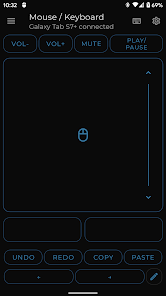
• Precision Control: A highly responsive keyboard, mouse, and multi-touch trackpad with intuitive scrolling.
• Keep-Alive / Jiggler Mode: Prevent your computer from sleeping or locking. Keep your status active on communication platforms during long tasks or when working remotely.*
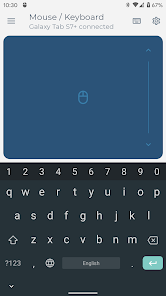
• Full PC Keyboard: Type efficiently with a standard layout and switch instantly between over 100 international language layouts.*
• Presenter Mode: Command your presentations with confidence. Navigate slides, control your pointer, and engage your audience from anywhere in the room.*
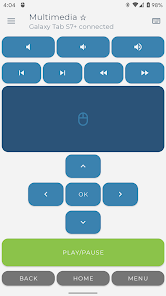
• Multimedia Control: Effortlessly manage playback, volume, and navigation for media players and streaming services.*
• Integrated Scanner: Scan QR codes and barcodes directly to your connected device, streamlining data entry and inventory tasks.*
• Voice & Clipboard Sync: Use voice-to-text for quick input or send copied text from your phone to your computer in a single tap.*
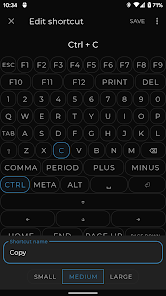
• Custom Layouts: Engineer the perfect remote interface. Build custom controls tailored to your specific software, applications, or games.
* Pro Feature
Universal Compatibility:
The receiving device requires only a standard Bluetooth connection. Tested and verified on the following operating systems:
• Windows 8.1 and higher
• Apple iOS and iPad OS
• Android and Android TV
• Chromebook Chrome OS
• Steam Deck
Support & Feedback:
Have a feature request or require assistance? Join our developer and community-led Discord channel for professional support.
https://appground.io/discord
Seamlessly control your computer, tablet, or media center with unparalleled versatility. Our direct Bluetooth connection ensures instant response and requires no server software, keeping your connection private and secure.
Your Professional Toolkit Includes:
• Precision Control: A highly responsive keyboard, mouse, and multi-touch trackpad with intuitive scrolling.
• Keep-Alive / Jiggler Mode: Prevent your computer from sleeping or locking. Keep your status active on communication platforms during long tasks or when working remotely.*
• Full PC Keyboard: Type efficiently with a standard layout and switch instantly between over 100 international language layouts.*
• Presenter Mode: Command your presentations with confidence. Navigate slides, control your pointer, and engage your audience from anywhere in the room.*
• Multimedia Control: Effortlessly manage playback, volume, and navigation for media players and streaming services.*
• Integrated Scanner: Scan QR codes and barcodes directly to your connected device, streamlining data entry and inventory tasks.*
• Voice & Clipboard Sync: Use voice-to-text for quick input or send copied text from your phone to your computer in a single tap.*
• Custom Layouts: Engineer the perfect remote interface. Build custom controls tailored to your specific software, applications, or games.
* Pro Feature
Universal Compatibility:
The receiving device requires only a standard Bluetooth connection. Tested and verified on the following operating systems:
• Windows 8.1 and higher
• Apple iOS and iPad OS
• Android and Android TV
• Chromebook Chrome OS
• Steam Deck
Support & Feedback:
Have a feature request or require assistance? Join our developer and community-led Discord channel for professional support.
https://appground.io/discord
Updated on
Safety starts with understanding how developers collect and share your data. Data privacy and security practices may vary based on your use, region, and age. The developer provided this information and may update it over time.

No data shared with third parties
Learn more about how developers declare sharing

This app may collect these data types
Financial info, App activity, and App info and performance

Data is encrypted in transit

Data can’t be deleted
Ratings and reviews
4.2
41.6K reviews

Linus Porter
- Flag inappropriate
August 29, 2025
Great job. Good app. I'm about to buy the upgrade. Note: the free keyboard is confusing—you can type directly (hit the ⌨️ icon then use your phone's keyboard), but if you tap in the text box, it says that's Pro only. The box you clicked in is the precompose entry, allowing you to prepare a block of text and then send it all at once when ready. Don't let it confuse you. The free keyboard still exists. I recommend making a custom layout for yourself immediately, especially for the free version.
79 people found this review helpful

Aaron H
- Flag inappropriate
March 29, 2026
It's a great app! At first I was confused about the keyboard portion. I didn't realize that when I clicked the keyboard option, the keyboard pop up was actually directly inputting via Bluetooth. I thought I had to click in the box that says "Enter text and...", you need the pro version to paste from your phone, but not to type directly. The messaging around this could be better.
1 person found this review helpful

Rhey Bhey
- Flag inappropriate
March 28, 2026
It works really well, and it pairs with my tablet seamlessly. I've been using it almost every day, replacing the need to buy a 3rd party keyboard. The mouse also works well, and I've been using it as a presentation clicker so I'm not glued to my tablet. I am a pretty busy college student btw :P Not needing to use the almost unresponsive tablet keyboard has been amazing to me.
2 people found this review helpful
What’s new
Optimized mouse response and more stable connections for older Android devices.
Everyone
Learn moreApp support
About the developer
Sebastian Zabel
support@appground.io
Blockdammweg 39
10318 Berlin
Germany


