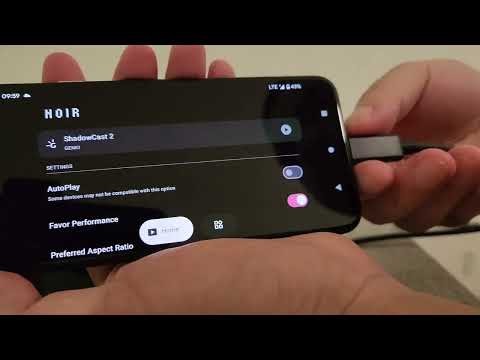

Noir Pro: USB Camera HDMI Link

star
165 reviews

Everyone
info
5K+
Downloads

Everyone
Learn more


About this app
PRO FEATURES
• No Ads, Zero Tracking
• 3D LUTs
• Waveform Monitor & Histogram
• Edge Detection
• False Color
• Zebra
• Color Separation
• CRT Filters
• FSR 1.0
• Pinch to Zoom
• Stretch, Crop & Anamorphic Lens Support
• Brightness, Contrast, and Saturation Adjustments
• App-specific Volume Control
• Picture-in-Picture Mode
• In-app Screenshot
• Rule of Thirds, Center Marker & Aspect Marker
• NDI® Streaming & Monitoring (Experimental)
NDI® is a registered trademark of Vizrt NDI AB.
To use your device as a portable display for a gaming console, laptop, camera, or any other HDMI-output device, you need a USB-C capture card (not USB-C hub nor USB-C to HDMI cable).
Camera, Endoscope and Microscope with USB streaming feature are also supported.
Noir supports UVC video streaming and UAC audio streaming, offering a choice between OpenGL ES and Vulkan for the graphics backend.
COMMON USE CASES
1. Camera Monitor
2. Primary Monitor for Gaming Console & PC
3. Secondary Monitor for Laptop
4. Drone Monitor
5. Compatible with any device with HDMI Output or USB Streaming
RECOMMEND VIDEO CAPTURE CARD
Hagibis UHC07(P) #AD
Rec. Reasons: Affordable, I recommend the UHC07P if available. It supports convenient PD charging.
https://bit.ly/noir-hagibis-uhc07
Genki ShadowCast 2 #AD
Rec. Reasons: Portable, Elegant, and Beautiful.
Known issue: Needs USB adapter to work with Pixel devices (Tensor SoC).
https://bit.ly/noir-genki-shadowcast-2
FAQ
1. Why doesn't Noir recognize my device?
Possible reasons are that your phone or tablet does not support USB Host (OTG) or the device you are using isn't a Video Capture Card.
In some rare cases, you may need a USB adapter or USB hub to ensure the capture card works properly.
2. Why is the preview so laggy?
This is often due to the USB version.
If you are using a USB 3.0 capture card, ensure that both the USB data cable and the USB port on your phone or tablet are USB 3.0 compatible.
If you are using a USB 2.0 capture card, ensure the video format is MJPEG and does not exceed 1080p30fps. Note that some capture cards may support up to 1080p50fps.
3. Why did my capture card, which was working fine, suddenly fail to connect?
This issue is often caused by system problems. The simplest and most effective solution is to restart your phone or tablet and try again.
4. Why does my gaming console or Video playback device show a black screen when connected?
This issue is more common among PS5 and PS4 users and is caused by the gaming console enabling HDCP. To resolve it, go to the PS console interface: Settings > System > HDMI, and disable the 'Enable HDCP' option. Note that the PS3 does not allow you to turn off HDCP. Other devices may also automatically enable HDCP when playing video content, which can result in a black screen. Some HDMI splitters can bypass HDCP restrictions and may serve as a workaround.
LINKS
Official website
https://noiruvc.app/
Special thanks to Genki for helping Noir grow
https://www.genkithings.com/
Special thanks to Hagibis for recommending Noir
https://www.shophagibis.com/
Font
https://www.fontspace.com/munro-font-f14903
https://fonts.google.com/specimen/Doto
Bottom Bar Design
https://dribbble.com/shots/11372003-Bottom-Bar-Animation
High-Quality USB Camera Viewer & HDMI Display
Updated on
Safety starts with understanding how developers collect and share your data. Data privacy and security practices may vary based on your use, region, and age. The developer provided this information and may update it over time.
- No data shared with third partiesLearn more about how developers declare sharing
- No data collectedLearn more about how developers declare collection


Ratings and reviews
85 reviews

Michael Webb
- Flag inappropriate
September 25, 2026
Great app for using your phone as a camera monitor. I just wish it could push an rtmp stream to YouTube.

Corvin Raphael Seidel
- Flag inappropriate
August 5, 2026
good app. but a good extra feature would be a way to add custom visual effects with options to use RetroArch shaders plus an Android TV layout for people that wanna use it to add extra ports with capture cards they own or to add overlays for stuff like retro games with a cheap capture card and a source menu button for multiple capture card users allowing them to easily switch between them (especially useful for Android TV)

Joe X
- Flag inappropriate
September 26, 2026
just stopped working with my Samsung a54? it forces my phone to reset. ridiculous, please fix!
GuoPing He
September 26, 2026
What do you mean "it forces my phone to reset"?
What’s new
This release introduces Vectorscope, redesigned Histogram and Waveform monitors, movable and resizable analyzer panels, and a rebuilt preview control bar. Please share your feedback and suggestions with us.
Many refinements were inspired by our work on Noir for iPad, check it out if you use an iPad.
Everyone
Learn moreApp support
About the developer
何国平
dt4dev@gmail.com
瓜沥镇官一村14组48号
萧山区, 杭州市, 浙江省
China
610000
+86 186 6801 2550


