
Noir: USB Camera HDMI Monitor
Contains adsIn-app purchases

star
284 reviews

Everyone
info
50K+
Downloads

Everyone
Learn more


About this app
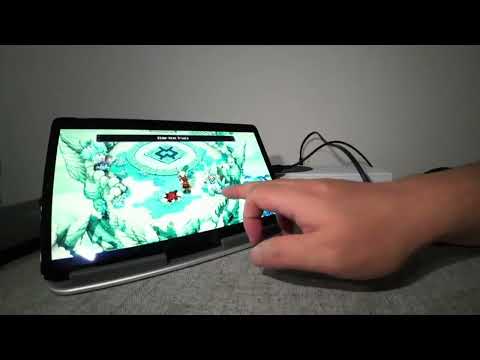
To use your device as a portable display for a gaming console, laptop, camera, or any other HDMI-output device, you need a USB-C capture card (not USB-C hub nor USB-C to HDMI cable).
Camera, Endoscope and Microscope with USB streaming feature are also supported.
Noir supports UVC and UAC, with a choice of OpenGL ES or Vulkan for the graphics backend.
The free version offers basic functions and immersive experience (It contains ads but not in the preview). Get the pro version for more features and to support Noir's development.
MORE PRO VERSION FEATURES
1. No Ads, Zero Tracking
2. 3D LUTs
3. Waveform Monitor
4. Histogram
5. Edge Detection
6. False Color
7. Zebra
8. Color Separation
9. CRT Filters
10. FSR 1.0
11. Pinch to Zoom
12. Stretch and Crop
13. Anamorphic Lens Support
14. Brightness, Contrast and Saturation Adjustments
15. App-specific Volume Control
16. Picture in Picture Mode
17. In-app Screenshot
COMMON USE CASES
1. Camera Monitor
2. Primary Monitor for Gaming Console & PC
3. Secondary Monitor for Laptop.
4. Drone Monitor
5. Compatible with any device with HDMI Output or USB Streaming.
RECOMMEND VIDEO CAPTURE CARD
Hagibis UHC07(P) #AD
Rec. Reasons: Affordable, I recommend the UHC07P if available. It supports convenient PD charging.
https://bit.ly/noir-hagibis-uhc07
Genki ShadowCast 2 #AD
Rec. Reasons: Portable, Elegant, and Beautiful.
Known issue: Needs USB adapter to work with Pixel devices (Tensor SoC).
https://bit.ly/noir-genki-shadowcast-2
FAQ
1. Why doesn't Noir recognize my device?
Possible reasons are that your phone or tablet doesn't support USB Host (OTG) or the device you are using isn't a Video Capture Card.
In some rare cases, you may need a USB adapter or USB hub to ensure the capture card works properly.
2. Why is the preview so laggy?
This is often due to the USB version.
If you are using a USB 3.0 capture card, ensure that both the USB data cable and the USB port on your phone or tablet are USB 3.0 compatible.
If you are using a USB 2.0 capture card, ensure the video format is MJPEG and does not exceed 1080p30fps. Note that some capture cards may support up to 1080p50fps.
3. Why did my capture card, which was working fine, suddenly fail to connect?
This issue is often caused by system problems. The simplest and most effective solution is to restart your phone or tablet and try again.
4. Why does my gaming console or Video playback device show a black screen when connected?
This issue is more common among PS5 and PS4 users and is caused by the gaming console enabling HDCP. To resolve it, go to the PS console interface: Settings > System > HDMI, and disable the 'Enable HDCP' option. Note that the PS3 does not allow you to turn off HDCP. Other devices may also automatically enable HDCP when playing video content, which can result in a black screen. Some HDMI splitters can bypass HDCP restrictions and may serve as a workaround.
LINKS
Official website
https://noiruvc.app/
Special thanks to Genki for helping Noir grow
https://www.genkithings.com/
Special thanks to Hagibis for recommending Noir
https://www.shophagibis.com/
Font
https://www.fontspace.com/munro-font-f14903
https://fonts.google.com/specimen/Doto
Bottom Bar Design
https://dribbble.com/shots/11372003-Bottom-Bar-Animation
Camera, Endoscope and Microscope with USB streaming feature are also supported.
Noir supports UVC and UAC, with a choice of OpenGL ES or Vulkan for the graphics backend.
The free version offers basic functions and immersive experience (It contains ads but not in the preview). Get the pro version for more features and to support Noir's development.
MORE PRO VERSION FEATURES
1. No Ads, Zero Tracking
2. 3D LUTs
3. Waveform Monitor
4. Histogram
5. Edge Detection
6. False Color
7. Zebra
8. Color Separation
9. CRT Filters
10. FSR 1.0
11. Pinch to Zoom
12. Stretch and Crop
13. Anamorphic Lens Support
14. Brightness, Contrast and Saturation Adjustments
15. App-specific Volume Control
16. Picture in Picture Mode
17. In-app Screenshot
COMMON USE CASES
1. Camera Monitor
2. Primary Monitor for Gaming Console & PC
3. Secondary Monitor for Laptop.
4. Drone Monitor
5. Compatible with any device with HDMI Output or USB Streaming.
RECOMMEND VIDEO CAPTURE CARD
Hagibis UHC07(P) #AD
Rec. Reasons: Affordable, I recommend the UHC07P if available. It supports convenient PD charging.
https://bit.ly/noir-hagibis-uhc07
Genki ShadowCast 2 #AD
Rec. Reasons: Portable, Elegant, and Beautiful.
Known issue: Needs USB adapter to work with Pixel devices (Tensor SoC).
https://bit.ly/noir-genki-shadowcast-2
FAQ
1. Why doesn't Noir recognize my device?
Possible reasons are that your phone or tablet doesn't support USB Host (OTG) or the device you are using isn't a Video Capture Card.
In some rare cases, you may need a USB adapter or USB hub to ensure the capture card works properly.
2. Why is the preview so laggy?
This is often due to the USB version.
If you are using a USB 3.0 capture card, ensure that both the USB data cable and the USB port on your phone or tablet are USB 3.0 compatible.
If you are using a USB 2.0 capture card, ensure the video format is MJPEG and does not exceed 1080p30fps. Note that some capture cards may support up to 1080p50fps.
3. Why did my capture card, which was working fine, suddenly fail to connect?
This issue is often caused by system problems. The simplest and most effective solution is to restart your phone or tablet and try again.
4. Why does my gaming console or Video playback device show a black screen when connected?
This issue is more common among PS5 and PS4 users and is caused by the gaming console enabling HDCP. To resolve it, go to the PS console interface: Settings > System > HDMI, and disable the 'Enable HDCP' option. Note that the PS3 does not allow you to turn off HDCP. Other devices may also automatically enable HDCP when playing video content, which can result in a black screen. Some HDMI splitters can bypass HDCP restrictions and may serve as a workaround.
LINKS
Official website
https://noiruvc.app/
Special thanks to Genki for helping Noir grow
https://www.genkithings.com/
Special thanks to Hagibis for recommending Noir
https://www.shophagibis.com/
Font
https://www.fontspace.com/munro-font-f14903
https://fonts.google.com/specimen/Doto
Bottom Bar Design
https://dribbble.com/shots/11372003-Bottom-Bar-Animation
High-Quality USB Camera Viewer & HDMI Display
Updated on
Safety starts with understanding how developers collect and share your data. Data privacy and security practices may vary based on your use, region, and age. The developer provided this information and may update it over time.
- This app may share these data types with third partiesDevice or other IDs
- No data collectedLearn more about how developers declare collection
- Data is encrypted in transit
- Data can’t be deleted


Ratings and reviews
162 reviews

KURASAKI RISHI
- Flag inappropriate
August 22, 2026
thanks for this perfect app for gamers i love you I can help you with small amount of donation

Anthony Reina
- Flag inappropriate
August 1, 2024
I like the app a lot. It has allowed me to connect my ps5 to my tablet. The only thing that you should check after you download is that it has a lot of permissions you should disable. One of the permissions was to allow the app to access my banking app, among other apps. So be careful and check the permissions before you open the app. Other then the permissions the app works great.
9 people found this review helpful
GuoPing He
August 1, 2024
What are you talking about? Why my app need to access your banking app? The app only require camera permission.

Farseen Ahmed
- Flag inappropriate
November 14, 2024
Absolutely buttery smooth and doesn't interfere with much ads in it..I tried using my cheap usb capture card by connecting ps4 to my phone with this app and it worked very well..I did had to tinker a bit since it was USB 2.0 and it's perfect..There was screen-tearing but that was the cheap capture card doing its thing..Although, i wish you could view it as picture-to-picture mode..Overall, the best app for viewing tv onto the phone..
3 people found this review helpful
What’s new
This release introduces Vectorscope, redesigned Histogram and Waveform monitors, movable and resizable analyzer panels, and a rebuilt preview control bar. Please share your feedback and suggestions with us.
Many refinements were inspired by our work on Noir for iPad, check it out if you use an iPad.
Many refinements were inspired by our work on Noir for iPad, check it out if you use an iPad.
Everyone
Learn moreApp support
About the developer
何国平
dt4dev@gmail.com
瓜沥镇官一村14组48号
萧山区, 杭州市, 浙江省
China
610000


