
Joplin

4.0star
5.66K reviews
100K+
Downloads

Everyone
info




About this app
Privacy-first app
Capture your thoughts freely and without distractions, tracking, or ads. With Joplin’s end-to-end encryption and open-source code, you can concentrate on your ideas and tasks without worrying about your privacy.
Capture multimedia notes
Capture multimedia notes effortlessly. In Joplin you can :
• create manuscript notes,
• transcribe speech to note,
• add multimedia: photos, videos, PDFs, and images,
• insert documents as attachments,
• create math expressions, add tables, write code and insert diagrams,
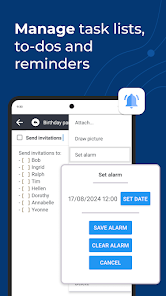
• create to-dos and add reminders.
Organise your ideas
Organise your notes into notebooks. Connect your notes with tags by subject or priority. Use colours and rich text editor to format your notes with ease. Make task lists, create to-dos and add reminders. Effortlessly find your notes, even within PDFs and images, thanks to the powerful search feature enhanced by Optical Character Recognition (OCR) technology. Use Joplin to store your bills, lecture notes, photos or receipts.
Reliable synchronisation
Access your notes from computer, phone or tablet by synchronising with various services including Joplin Cloud, Dropbox and OneDrive. Seamlessly move from one device to another.
Offline-first
You can access your notes anytime and anywhere, even without Internet. If you’re using Joplin on multiple devices, they will synchronise and update once you regained the connection.
Enhance your productivity across devices
Extend your note-taking experience by using Joplin on additional devices such as a desktop computer or tablet. Make the most of each device by using its specific features. On the desktop app, use a web clipper extension, wide-range of community plugins and a Markdown editor. Experience flawless handwriting and drawing on your tablet.
Join active community
Connect with Joplin’s vibrant community on Joplin Forum. It’s a place where users can share ideas, ask questions, exchange information and give feedback. Joplin’s dynamic community also develops powerful plugins, so you can customise your app to suit your needs.
Capture your thoughts freely and without distractions, tracking, or ads. With Joplin’s end-to-end encryption and open-source code, you can concentrate on your ideas and tasks without worrying about your privacy.
Capture multimedia notes
Capture multimedia notes effortlessly. In Joplin you can :
• create manuscript notes,
• transcribe speech to note,
• add multimedia: photos, videos, PDFs, and images,
• insert documents as attachments,
• create math expressions, add tables, write code and insert diagrams,
• create to-dos and add reminders.
Organise your ideas
Organise your notes into notebooks. Connect your notes with tags by subject or priority. Use colours and rich text editor to format your notes with ease. Make task lists, create to-dos and add reminders. Effortlessly find your notes, even within PDFs and images, thanks to the powerful search feature enhanced by Optical Character Recognition (OCR) technology. Use Joplin to store your bills, lecture notes, photos or receipts.
Reliable synchronisation
Access your notes from computer, phone or tablet by synchronising with various services including Joplin Cloud, Dropbox and OneDrive. Seamlessly move from one device to another.
Offline-first
You can access your notes anytime and anywhere, even without Internet. If you’re using Joplin on multiple devices, they will synchronise and update once you regained the connection.
Enhance your productivity across devices
Extend your note-taking experience by using Joplin on additional devices such as a desktop computer or tablet. Make the most of each device by using its specific features. On the desktop app, use a web clipper extension, wide-range of community plugins and a Markdown editor. Experience flawless handwriting and drawing on your tablet.
Join active community
Connect with Joplin’s vibrant community on Joplin Forum. It’s a place where users can share ideas, ask questions, exchange information and give feedback. Joplin’s dynamic community also develops powerful plugins, so you can customise your app to suit your needs.
Updated on
Safety starts with understanding how developers collect and share your data. Data privacy and security practices may vary based on your use, region, and age. The developer provided this information and may update it over time.

No data shared with third parties
Learn more about how developers declare sharing

No data collected
Learn more about how developers declare collection
Ratings and reviews
4.0
5.3K reviews

Tom Rodman
- Flag inappropriate
December 1, 2024
Unlike others, I've had zero problems syncing with my PC (that works great via Dropbox) However, when I share things TO Joplin on my Pixel phone, things get wonky After every three or four shares, it just loses it's mind, and stops adding anything. I have to force stop, clear the cache, and then it works great again For three or four more times Rinse and repeat Really smells like a memory management issue
9 people found this review helpful

Angie Ellis
- Flag inappropriate
January 21, 2025
I needed a second notes app on my home device as my main app is synced to both my home and outside device. There are a few notes I don't want to leave the house, in case I lose my phone This app will sync, but I don't want that feature, so I haven't tried it. It's easy to use and view notes. When viewing a note,you can't accidentally edit it, you have to click top right 'EDIT'. It's easy and quick to click edit and saves accidental editing. Would benefit from an in-document word search.
1 person found this review helpful

Steve Conklin
- Flag inappropriate
January 25, 2025
Even better than OneNote! I've used EverNote, and I've used OneNote. But by far, my favorite is Joplin. It's the best of both the others. I love the fact that you can choose why platform you want to use to do the sync storage. And even better than OneNote, it has a native version of the utility on Linux, which makes it easy for me to have my notebooks on all my devices.
4 people found this review helpful
App support
About the developer
Laurent Cozic
no-reply@joplinapp.org
United Kingdom
undefined


