
Network Analyzer
Contains ads
4.7star
48K reviews
1M+
Downloads

Everyone
info

About this app
Network Analyzer can help you diagnose various problems in your wifi network setup, Internet connectivity, and also detect various issues on remote servers thanks to the wide range of tools it provides.
It is equipped with a fast wifi device discovery tool, including all the LAN device's addresses, manufacturers and names. Further, Network Analyzer contains standard net diagnostic tools such as ping, traceroute, port scanner, DNS lookup, and whois. Finally, it shows all neighbouring wi-fi networks together with additional details such as signal strength, encryption and router manufacturer to help discovering the best channel for a wireless router. Everything works with both IPv4 and IPv6.
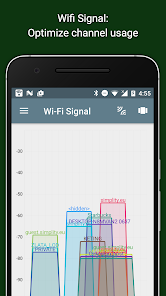
Wifi signal meter:
- Both graphical and textual representation showing network channels and signal strengths
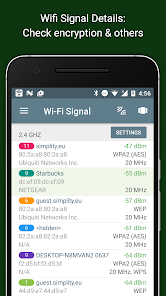
- Wifi network type (WEP, WPA, WPA2)
- Wifi encryption (AES, TKIP)
- BSSID (router MAC address), manufacturer, WPS support
- Bandwidth (Android 6 and newer only)
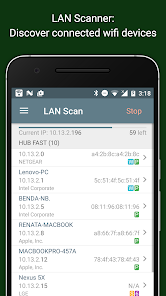
LAN scanner:
- Fast and reliable detection of all network devices
- Vendor name, IP, and MAC addresses of all discovered devices
- NetBIOS, mDNS (bonjour), LLMNR, and DNS name where available
- Pingability test of discovered devices
- Detection of IPv6 availability
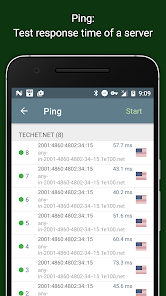
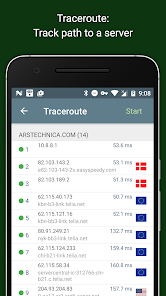
Ping & traceroute:
- Round trip delay including IP address and hostname for every network node
- Support of both for IPv4 and IPv6 (selectable)
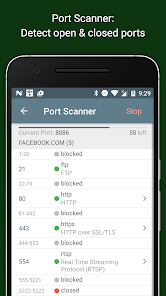
Port scanner:
- Fast, adaptive algorithm for scanning the most common ports or user specified port ranges
- Detection of closed, firewalled, and open ports
- Description of the known open port services
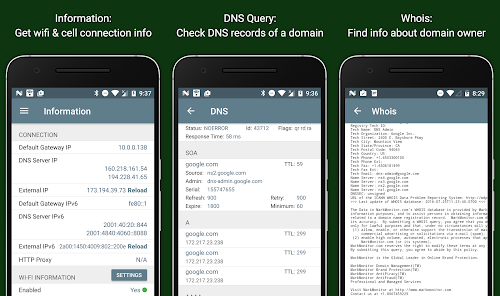
Whois:
- Whois of domains, IP addresses and AS numbers
- Support of both for IPv4 and IPv6 (selectable)
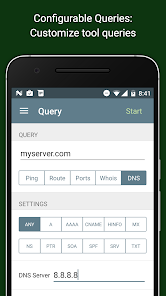
DNS lookup:
- Functionality similar to nslookup or dig
- Support for A, AAAA, SOA, PTR, MX, CNAME, NS, TXT, SPF, SRV records
- Support of both for IPv4 and IPv6 (selectable)
Network information:
- Default gateway, external IP (v4 and v6), DNS server
- Wifi network information such as SSID, BSSID, IP address, HTTP proxy, subnet mask , signal strength, etc.
- Cell (3G, LTE) network information such as IP address, signal strength, network provider, MCC, MNC, etc.
More
- Full support of IPv6
- Detailed help
- Regular updates, support page
It is equipped with a fast wifi device discovery tool, including all the LAN device's addresses, manufacturers and names. Further, Network Analyzer contains standard net diagnostic tools such as ping, traceroute, port scanner, DNS lookup, and whois. Finally, it shows all neighbouring wi-fi networks together with additional details such as signal strength, encryption and router manufacturer to help discovering the best channel for a wireless router. Everything works with both IPv4 and IPv6.
Wifi signal meter:
- Both graphical and textual representation showing network channels and signal strengths
- Wifi network type (WEP, WPA, WPA2)
- Wifi encryption (AES, TKIP)
- BSSID (router MAC address), manufacturer, WPS support
- Bandwidth (Android 6 and newer only)
LAN scanner:
- Fast and reliable detection of all network devices
- Vendor name, IP, and MAC addresses of all discovered devices
- NetBIOS, mDNS (bonjour), LLMNR, and DNS name where available
- Pingability test of discovered devices
- Detection of IPv6 availability
Ping & traceroute:
- Round trip delay including IP address and hostname for every network node
- Support of both for IPv4 and IPv6 (selectable)
Port scanner:
- Fast, adaptive algorithm for scanning the most common ports or user specified port ranges
- Detection of closed, firewalled, and open ports
- Description of the known open port services
Whois:
- Whois of domains, IP addresses and AS numbers
- Support of both for IPv4 and IPv6 (selectable)
DNS lookup:
- Functionality similar to nslookup or dig
- Support for A, AAAA, SOA, PTR, MX, CNAME, NS, TXT, SPF, SRV records
- Support of both for IPv4 and IPv6 (selectable)
Network information:
- Default gateway, external IP (v4 and v6), DNS server
- Wifi network information such as SSID, BSSID, IP address, HTTP proxy, subnet mask , signal strength, etc.
- Cell (3G, LTE) network information such as IP address, signal strength, network provider, MCC, MNC, etc.
More
- Full support of IPv6
- Detailed help
- Regular updates, support page
Updated on
Safety starts with understanding how developers collect and share your data. Data privacy and security practices may vary based on your use, region, and age. The developer provided this information and may update it over time.


Ratings and reviews
4.7
45.3K reviews

C.T. “Mighty” H
- Flag inappropriate
July 22, 2022
Very useful app. Very easy. I enjoy the fact that you do not have popup ads ever menu change. I also APPRECIATE the fact what you have in the app is what you get. You have the option to go Pro and that information is provided in the about/help page. There is no option to use something and you click on it and it takes you to another add or tells you to purchase Pro. Thank you!!
143 people found this review helpful

A Google user
- Flag inappropriate
January 25, 2020
Great app for a quick stationary glance, but it does not update real-time, just resamples frequently, so you can't walk around a building watching the signal change, looking for dead spots. As I recall, the old version (2014?) reacted real-time, or perhaps the sampling frequency was just much faster. Whatever, it's still the best Android solution I've found.
250 people found this review helpful

Ben M.
- Flag inappropriate
- Show review history
April 27, 2021
Good interface, to the point, no nonsense. Useful to a network professional looking for quick information. I initially rated this a 4, but everytime I look in it I find something else useful, like the wifi signal section. I was tweaking my wireless access point, I don't like to reach out further than I need, and it did very very well, in real time. Good job.
256 people found this review helpful
What's new
- replace DNS query ANY (which is deprecated by most DNS servers) with ALL (queries all the supported record types and merges the responses)
- various fixes and improvements
- various fixes and improvements


