

Zoom Workplace
In-app purchases

4.1star
4.29M reviews
1B+
Downloads
Editors' Choice

Everyone
info





About this app
Reimagine how you work with Zoom Workplace, an all-in-one, AI-powered collaboration platform that combines team chat, meetings, phone*, whiteboard, calendar, mail, notes, and more.
STREAMLINE COMMUNICATIONS WITH A SINGLE APP
Schedule or join a video meeting with a single tap
Share and annotate content during meetings
Chat with colleagues and external contacts
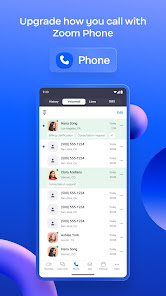
Place and receive phone calls or send SMS text messages*
KEEP PROJECTS MOVING
Brainstorm on virtual whiteboards
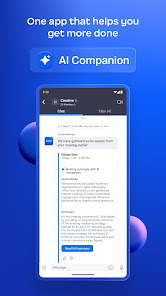
Receive automated meeting summaries with AI Companion*
Follow up after meetings and share files with team chat
Create and share editable notes
Use your existing email and calendar to schedule meetings
WORK SAFELY ON THE GO
“Hey Google” Voice Access commands for hands-free control
Keep your data secure with enterprise-grade security and SSO*
BOUNCE BETWEEN LOCATIONS
Move a live meeting or call seamlessly between devices with a single tap
Turn on virtual backgrounds to look more polished
Start a Zoom Rooms meeting and share content*
Multi-task on your Android phone with Picture in Picture or tablet with Split Screen
* A paid Zoom Workplace subscription or other license may be required to use certain product features. Upgrade your free account today to start gaining these benefits. AI Companion may not be available for all regions and industry verticals. Some features not currently available across all regions or plans and are subject to change.
UPGRADE YOUR FREE ACCOUNT TO ZOOM WORKPLACE PRO
Host unlimited meetings up to 30 hours each
Record meetings to the cloud (up to 5GB)
Assign meeting co-hosts and scheduler
Automate key tasks with AI Companion
We’d love to hear from you! Join the Zoom community: https://community.zoom.com/
Follow us on social media @zoom
Terms of Service: https://explore.zoom.us/terms/
Privacy Statement: https://explore.zoom.us/privacy/
Have a question? Contact us at https://support.zoom.com/hc
STREAMLINE COMMUNICATIONS WITH A SINGLE APP
Schedule or join a video meeting with a single tap
Share and annotate content during meetings
Chat with colleagues and external contacts
Place and receive phone calls or send SMS text messages*
KEEP PROJECTS MOVING
Brainstorm on virtual whiteboards
Receive automated meeting summaries with AI Companion*
Follow up after meetings and share files with team chat
Create and share editable notes
Use your existing email and calendar to schedule meetings
WORK SAFELY ON THE GO
“Hey Google” Voice Access commands for hands-free control
Keep your data secure with enterprise-grade security and SSO*
BOUNCE BETWEEN LOCATIONS
Move a live meeting or call seamlessly between devices with a single tap
Turn on virtual backgrounds to look more polished
Start a Zoom Rooms meeting and share content*
Multi-task on your Android phone with Picture in Picture or tablet with Split Screen
* A paid Zoom Workplace subscription or other license may be required to use certain product features. Upgrade your free account today to start gaining these benefits. AI Companion may not be available for all regions and industry verticals. Some features not currently available across all regions or plans and are subject to change.
UPGRADE YOUR FREE ACCOUNT TO ZOOM WORKPLACE PRO
Host unlimited meetings up to 30 hours each
Record meetings to the cloud (up to 5GB)
Assign meeting co-hosts and scheduler
Automate key tasks with AI Companion
We’d love to hear from you! Join the Zoom community: https://community.zoom.com/
Follow us on social media @zoom
Terms of Service: https://explore.zoom.us/terms/
Privacy Statement: https://explore.zoom.us/privacy/
Have a question? Contact us at https://support.zoom.com/hc
Updated on
Safety starts with understanding how developers collect and share your data. Data privacy and security practices may vary based on your use, region, and age. The developer provided this information and may update it over time.

No data shared with third parties
Learn more about how developers declare sharing

This app may collect these data types
Location, Personal info and 10 others

Data is encrypted in transit

You can request that data be deleted
Ratings and reviews
4.1
4M reviews

Allandy Mc Kinsley Alexis
- Flag inappropriate
- Show review history
July 15, 2024
The last version of zoom is awful! It gets on my nerves. Sometimes the app freezes. The meeting freezes. Even if you close the app and reopen it, the meeting is still frozen and the app displays the following message on a black screen: "Preparing meeting..." The only way to solve it is to completely restart the device and re-lauch zoom. It wasn't like that before. Extremely annoying!
1,223 people found this review helpful

Dwip Sarker
- Flag inappropriate
May 29, 2024
It should have include a button to select which orientation to use. It just uses the sensor and switches between landscape and portrait automatically but I can't change it without changing the position of the phone itself. It's very annoying. I single button with three options, namely, portrait, landscape and automatic would have been enough.
454 people found this review helpful

J Lark
- Flag inappropriate
July 18, 2024
Good experience with connection issues. In Zoom Phone I get an error states no network connection even though I am connected to a strong wifi signal. It's seems the app drops network connection when idle. The error does not happen once I'm interacting with the app. When I receive a call when the phone is locked I receive an error to report to zoom. I rely on zoom phone for work and a fix would be greatly appreciated. Otherwise 5 stars ☺️
766 people found this review helpful
What's new
Resolved issues
-Minor bug fixes
-Minor bug fixes


