

Zoom Workplace
In-app purchases

4.1star
4.27M reviews
1B+
Downloads
Editors' Choice

Everyone
info





About this app
Reimagine how you work with Zoom Workplace, an all-in-one, AI-powered collaboration platform that combines team chat, meetings, phone*, whiteboard, calendar, mail, notes, and more.
STREAMLINE COMMUNICATIONS WITH A SINGLE APP
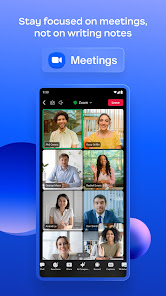
Schedule or join a video meeting with a single tap
Share and annotate content during meetings
Chat with colleagues and external contacts
Place and receive phone calls or send SMS text messages*
KEEP PROJECTS MOVING
Brainstorm on virtual whiteboards
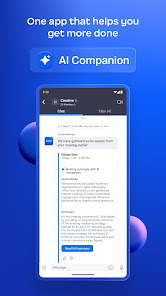
Receive automated meeting summaries with AI Companion*
Follow up after meetings and share files with team chat
Create and share editable notes
Use your existing email and calendar to schedule meetings
WORK SAFELY ON THE GO
“Hey Google” Voice Access commands for hands-free control
Keep your data secure with enterprise-grade security and SSO*
BOUNCE BETWEEN LOCATIONS
Move a live meeting or call seamlessly between devices with a single tap
Turn on virtual backgrounds to look more polished
Start a Zoom Rooms meeting and share content*
Multi-task on your Android phone with Picture in Picture or tablet with Split Screen
* A paid Zoom Workplace subscription or other license may be required to use certain product features. Upgrade your free account today to start gaining these benefits. AI Companion may not be available for all regions and industry verticals. Some features not currently available across all regions or plans and are subject to change.
UPGRADE YOUR FREE ACCOUNT TO ZOOM WORKPLACE PRO
Host unlimited meetings up to 30 hours each
Record meetings to the cloud (up to 5GB)
Assign meeting co-hosts and scheduler
Automate key tasks with AI Companion
We’d love to hear from you! Join the Zoom community: https://community.zoom.com/
Follow us on social media @zoom
Terms of Service: https://explore.zoom.us/terms/
Privacy Statement: https://explore.zoom.us/privacy/
Have a question? Contact us at https://support.zoom.com/hc
STREAMLINE COMMUNICATIONS WITH A SINGLE APP
Schedule or join a video meeting with a single tap
Share and annotate content during meetings
Chat with colleagues and external contacts
Place and receive phone calls or send SMS text messages*
KEEP PROJECTS MOVING
Brainstorm on virtual whiteboards
Receive automated meeting summaries with AI Companion*
Follow up after meetings and share files with team chat
Create and share editable notes
Use your existing email and calendar to schedule meetings
WORK SAFELY ON THE GO
“Hey Google” Voice Access commands for hands-free control
Keep your data secure with enterprise-grade security and SSO*
BOUNCE BETWEEN LOCATIONS
Move a live meeting or call seamlessly between devices with a single tap
Turn on virtual backgrounds to look more polished
Start a Zoom Rooms meeting and share content*
Multi-task on your Android phone with Picture in Picture or tablet with Split Screen
* A paid Zoom Workplace subscription or other license may be required to use certain product features. Upgrade your free account today to start gaining these benefits. AI Companion may not be available for all regions and industry verticals. Some features not currently available across all regions or plans and are subject to change.
UPGRADE YOUR FREE ACCOUNT TO ZOOM WORKPLACE PRO
Host unlimited meetings up to 30 hours each
Record meetings to the cloud (up to 5GB)
Assign meeting co-hosts and scheduler
Automate key tasks with AI Companion
We’d love to hear from you! Join the Zoom community: https://community.zoom.com/
Follow us on social media @zoom
Terms of Service: https://explore.zoom.us/terms/
Privacy Statement: https://explore.zoom.us/privacy/
Have a question? Contact us at https://support.zoom.com/hc
Updated on
Safety starts with understanding how developers collect and share your data. Data privacy and security practices may vary based on your use, region, and age. The developer provided this information and may update it over time.

No data shared with third parties
Learn more about how developers declare sharing

This app may collect these data types
Location, Personal info and 10 others

Data is encrypted in transit

You can request that data be deleted
Ratings and reviews
4.1
3.98M reviews

Brad Carpenter
- Flag inappropriate
- Show review history
April 18, 2024
It works fine for meetings except one enormous flaw: the proximity sensor turns off my screen when I try to use my phone. I always connect to the meeting with Bluetooth, so I'm using the phone while listening/talking through my earbuds. If my hand approaches the top half of the display, the screen goes black. It seems obvious that there would be a simple way to disable this bug, but this is regretfully beyond the programming capabilities of the folks at Zoom. Changing to 1 star.
1,771 people found this review helpful

Kevin Harrelson
- Flag inappropriate
March 28, 2024
This app has a major flaw. Using it is not optional, and meetings may take hours. However, when in the meeting, any time my hand goes near the top of my phone, the screen goes blank. This is even with the app running in the background and just listening to the audio. This even extends to trying to select the audio source (Bluetooth or phone speaker). That option is near the top of the screen, so when my finger gets near the button, the screen turn off. Stupid.
1,409 people found this review helpful

Mike Brooks
- Flag inappropriate
March 20, 2024
For some stupid reason, Zoom turns off your screen if your hand gets anywhere close to the camera. Further, there is no option to turn this off. This essentially ruins the usability of Zoom. Wanna add let someone into your room during a call? Good luck! Wanna adjust the volume? Oops, no screen to see anymore. It's maddening. And Zoom has known about this for at least 10 months. Horrible app. Use anything else if you have the choice.
1,460 people found this review helpful
What's new
Meeting features
-Support for additional characters in Personal Links
Resolved Issues
-Minor bug fixes
-Support for additional characters in Personal Links
Resolved Issues
-Minor bug fixes


