
KeyBank Mobile Banking
4.2star
92.8K reviews

Everyone
info
1M+
Downloads

Everyone
Learn more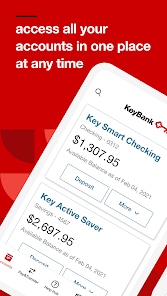
About this app
Take control of your money and bank the way you want to bank – anytime, anywhere. The KeyBank mobile banking app is free, fast, and secure with features that are streamlined for today’s on-the-go world:
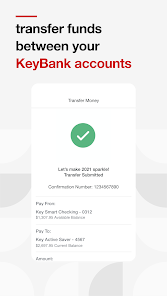
● Easily transfer funds between bank accounts
● Pay bills
● Send money to friends and family
● Open a checking or savings account
● Deposit checks on the app
● Monitor and manage bank accounts and cards
● View KeyBank credit card rewards points
Safe and Secure Online Banking
Confidently use the KeyBank mobile banking app without compromising your personal banking information. It’s backed with a multitude of safety and security features, including:
● Same high-level security used for KeyBank Online Banking
● User ID and password required to access banking app†
● Secure connection to view banking account and transaction details
● No banking information is stored on your Android™ device to minimize risk if your mobile phone or tablet is lost or stolen
Convenient Banking on the Go
Easily manage your personal finances when and where it’s most convenient for you and your schedule. With the KeyBank mobile banking app, you can:
● View account balances and recent transactions with one swipe using QuickView
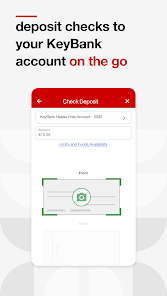
● Deposit checks right from your mobile device without having to visit a KeyBank branch or ATM
● Transfer funds between your KeyBank checking and savings accounts
● Open an account right from your mobile device
● Search and view your banking transaction history for the last 90 days
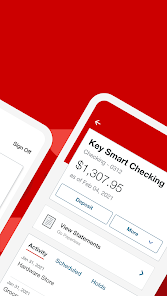
● Access your KeyBank account statements and tax forms
● Review and manage scheduled Online Bill Pay payments and transfers
● Send money to existing payees and add new payees
● Search for KeyBank branch and ATM locations
Personalized Mobile Banking Settings
Customize your in-app experience for your unique needs and preferences with account settings and seamless access to the KeyBank features and products you use:
● Add a profile picture
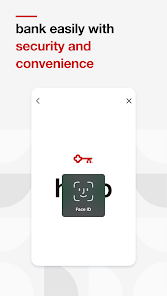
● Set up fingerprint or face ID sign in capabilities
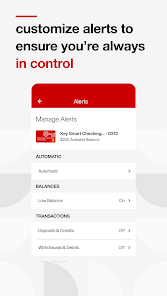
● Manage and edit account alerts
● Access your credit card Reward Points balance
Connect with KeyBank
Please call 1-800-539-1539 if you have questions about the mobile banking app or need additional help or support.
Follow KeyBank on social media:
● Twitter: twitter.com/keybank
● Facebook: facebook.com/keybank
● LinkedIn: linkedin.com/company/keybank/
● YouTube: youtube.com/user/keybankcommunity/
● Instagram: instagram.com/keybank/
Important Disclosures
† Anyone can download, but you must be enrolled in KeyBank Online Banking to use the app.
Android™ is a trademark of Google Inc. Use of this trademark is subject to Google permissions.
©2024 KeyCorp. Member FDIC.
● Easily transfer funds between bank accounts
● Pay bills
● Send money to friends and family
● Open a checking or savings account
● Deposit checks on the app
● Monitor and manage bank accounts and cards
● View KeyBank credit card rewards points
Safe and Secure Online Banking
Confidently use the KeyBank mobile banking app without compromising your personal banking information. It’s backed with a multitude of safety and security features, including:
● Same high-level security used for KeyBank Online Banking
● User ID and password required to access banking app†
● Secure connection to view banking account and transaction details
● No banking information is stored on your Android™ device to minimize risk if your mobile phone or tablet is lost or stolen
Convenient Banking on the Go
Easily manage your personal finances when and where it’s most convenient for you and your schedule. With the KeyBank mobile banking app, you can:
● View account balances and recent transactions with one swipe using QuickView
● Deposit checks right from your mobile device without having to visit a KeyBank branch or ATM
● Transfer funds between your KeyBank checking and savings accounts
● Open an account right from your mobile device
● Search and view your banking transaction history for the last 90 days
● Access your KeyBank account statements and tax forms
● Review and manage scheduled Online Bill Pay payments and transfers
● Send money to existing payees and add new payees
● Search for KeyBank branch and ATM locations
Personalized Mobile Banking Settings
Customize your in-app experience for your unique needs and preferences with account settings and seamless access to the KeyBank features and products you use:
● Add a profile picture
● Set up fingerprint or face ID sign in capabilities
● Manage and edit account alerts
● Access your credit card Reward Points balance
Connect with KeyBank
Please call 1-800-539-1539 if you have questions about the mobile banking app or need additional help or support.
Follow KeyBank on social media:
● Twitter: twitter.com/keybank
● Facebook: facebook.com/keybank
● LinkedIn: linkedin.com/company/keybank/
● YouTube: youtube.com/user/keybankcommunity/
● Instagram: instagram.com/keybank/
Important Disclosures
† Anyone can download, but you must be enrolled in KeyBank Online Banking to use the app.
Android™ is a trademark of Google Inc. Use of this trademark is subject to Google permissions.
©2024 KeyCorp. Member FDIC.
Updated on
Safety starts with understanding how developers collect and share your data. Data privacy and security practices may vary based on your use, region and age. The developer provided this information and may update it over time.


Ratings and reviews
4.2
91.2K reviews

Trysten
- Flag inappropriate
25 April 2026
App works about 30% of the time. When you open it up, it will load indefinitely. If you close and reopen the app 50+ times it might work once. Imagine being a bank and customers literally can't check their balance, access their info, or make payments like EVERY OTHER BANK APP allows. Banking with them has always been nice but not having access to my account through the app for hours at a time is ridiculous. This has been a bug for as long as I can remember 9+ years. Pathetic.
2 people found this review helpful
KeyBank, N.A.
28 April 2026
Hi Trysten - Please uninstall the application, restart your device and reinstall the app. If you are using a VPN, please temporarily pause it for the initial sign on. You may also switch between Wi-Fi and data; whichever provides a stronger connection. If the issue persists, please contact our Digital Support team at 1-800-539-1539. Thanks. ^DD

Raven L.
- Flag inappropriate
28 April 2026
App refuses to load half the time, making it almost impossible to use. The app itself is fine if it chooses to open, but often times I am left unable to even load it up, let alone log in. If thisbwas a one off issue I would have forgiven it but it has been like this for years and years, and I have seen plenty of other reviews mention the same things. If you aren't with Key already, find somewhere else to bank, honestly their app isn't the only thing that sucks about them.
1 person found this review helpful
KeyBank, N.A.
28 April 2026
Hi Raven - Please uninstall the application, restart your device and reinstall the app. If you are using a VPN, please temporarily pause it for the initial sign on. You may also switch between Wi-Fi and data; whichever provides a stronger connection. If the issue persists, please contact our Digital Support team at 1-800-539-1539. Thank you. ^DD

Elizabeth Saragoza
- Flag inappropriate
- Show review history
24 April 2026
not being able to log on is a huge inconvenience!! Especially when I used my account to make a payment & that placed charged me a return check fee. I have overdraft protection, nothing should had been not paid. I needed to see my banking to understand what was happening. Finally called the customer service after troubleshooting told me to look at it on website instead. They could see that change listed as a retry but couldn't see details about that. I ran out of personal time to be on the phone.
3 people found this review helpful
KeyBank, N.A.
24 April 2026
Hi , If you're on Wi-Fi, switch to mobile network. If you're on mobile network, switch to Wi-Fi. You may get a screen that shows Connectivity Lost. Quit the app and restart it and see if that works. If not, try a force stop of the app from the app info menu. For further assistance, call our Online Banking team at 800-539-1539. Thank you. ^LH
What's new
- Updates to maintain your security
- Bug Fixes
Thank you for using the KeyBank app!
Based on your valuable feedback, we'll continue to enhance the app through regular updates
- Bug Fixes
Thank you for using the KeyBank app!
Based on your valuable feedback, we'll continue to enhance the app through regular updates
Everyone
Learn moreApp support
phone
Phone number
+18005391539
About the developer
KeyBank National Association
fsm@keybank.com
127 Public Sq Ste 5600
Cleveland, OH 44114
United States
+1 800-539-1539


