ActionDash: Screen Time Helper
4.2star
68.7K reviewsinfo
5M+
Downloads

PEGI 3
info
About this app
✔️ Trusted Globally By Over 1 Million Users to Break Their Phone Addiction
✔️Featured by Google as an 'Essential App' on Play Store
✔️ Available in 17 Global Languages including English, German, Spanish, French etc.
ActionDash, by Sensor Tower, takes the Digital Wellbeing app as a starting point, makes it available to all Android users, but it is more than that. ActionDash is here to help you find your phone/life balance and overcome your Phone Addiction. It also helps you Self-control and boost your Productivity by showing how much time you spend on your favorite apps and set app usage limits and enter "focus mode".
With ActionDash you will:
📱 reduce screen time
🔋 stay focused
🛡 reduce distraction
🔔 detect noisy apps
💯 increase efficiency and productivity
🤳 unplug more often
⌚ stop phubbing
📈 increase your digital wellbeing
📵break phone addiction and manage your screen time
👪 spend quality time with family or yourself
💪 reduce wasted time with digital diet
✦ KEY FEATURES :
Get a daily view of your digital habits:
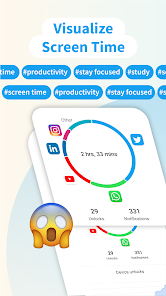
★ Screen time: how much you use each apps and total
★ App launch history: how frequently you use different apps
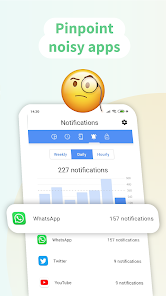
★ Notification history: how many notifications you receive
★ Unlock history: how often you check your phone or unlock your device
★ Sleep mode: Schedule your sleep time to disable apps
Stay focused and self-control:
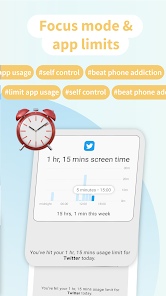
★ Focus mode: lets you pause distracting apps with a single tap so you can better focus your time. You can also set a schedule to turn on Focus mode automatically and reduce distractions while you’re at work, school, or home.
★ App usage limits: temporarily block any application that you are over-using and stay focused.
Have a deeper experience with enhanced insights:
📊 Screen time breakdown
📊 Your usage average
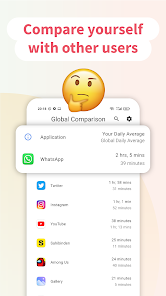
📊 Global usage average
📊 App session length breakdown
● THIS APP USES ACCESSIBILITY SERVICES
Android's Accessibility Services are used for detecting which website you are on and, in turn, blocking the websites you have requested to block. All information is maintained in accordance with our Privacy Policy and Sensor Tower is using the respective permissions with active consent by the end-user.
● YOU ARE IMPORTANT
Thanks for using the app. We'd really appreciate if you could rate us 5 stars here on Google Play. Rating is very important to us in establishing trust with our user base. If you have any concerns or suggestions, please let us know.
● CONTACT US
We love hearing from our users and getting their feedback! If you encounter any issues or have any suggestions to improve the app, please feel free to write to us at actiondashapp@gmail.com .
ActionDash is built by Sensor Tower.
✔️Featured by Google as an 'Essential App' on Play Store
✔️ Available in 17 Global Languages including English, German, Spanish, French etc.
ActionDash, by Sensor Tower, takes the Digital Wellbeing app as a starting point, makes it available to all Android users, but it is more than that. ActionDash is here to help you find your phone/life balance and overcome your Phone Addiction. It also helps you Self-control and boost your Productivity by showing how much time you spend on your favorite apps and set app usage limits and enter "focus mode".
With ActionDash you will:
📱 reduce screen time
🔋 stay focused
🛡 reduce distraction
🔔 detect noisy apps
💯 increase efficiency and productivity
🤳 unplug more often
⌚ stop phubbing
📈 increase your digital wellbeing
📵break phone addiction and manage your screen time
👪 spend quality time with family or yourself
💪 reduce wasted time with digital diet
✦ KEY FEATURES :
Get a daily view of your digital habits:
★ Screen time: how much you use each apps and total
★ App launch history: how frequently you use different apps
★ Notification history: how many notifications you receive
★ Unlock history: how often you check your phone or unlock your device
★ Sleep mode: Schedule your sleep time to disable apps
Stay focused and self-control:
★ Focus mode: lets you pause distracting apps with a single tap so you can better focus your time. You can also set a schedule to turn on Focus mode automatically and reduce distractions while you’re at work, school, or home.
★ App usage limits: temporarily block any application that you are over-using and stay focused.
Have a deeper experience with enhanced insights:
📊 Screen time breakdown
📊 Your usage average
📊 Global usage average
📊 App session length breakdown
● THIS APP USES ACCESSIBILITY SERVICES
Android's Accessibility Services are used for detecting which website you are on and, in turn, blocking the websites you have requested to block. All information is maintained in accordance with our Privacy Policy and Sensor Tower is using the respective permissions with active consent by the end-user.
● YOU ARE IMPORTANT
Thanks for using the app. We'd really appreciate if you could rate us 5 stars here on Google Play. Rating is very important to us in establishing trust with our user base. If you have any concerns or suggestions, please let us know.
● CONTACT US
We love hearing from our users and getting their feedback! If you encounter any issues or have any suggestions to improve the app, please feel free to write to us at actiondashapp@gmail.com .
ActionDash is built by Sensor Tower.
Updated on
Safety starts with understanding how developers collect and share your data. Data privacy and security practices may vary based on your use, region, and age. The developer provided this information and may update it over time.

No data shared with third parties
Learn more about how developers declare sharing

This app may collect these data types
Location, App activity and 2 others

Data is encrypted in transit

You can request that data be deleted
Ratings and reviews
4.2
66.8K reviews

Sammy Akharaz
- Flag inappropriate
January 15, 2026
this used to be a good app. i just noticed that it stopped working for a while now. (notifications are very rare except for occasional one that i reached a high level) i tried to open it today and look at my statistics but pressing anything just makes it hang and freeze up

Sylvia M
- Flag inappropriate
November 28, 2025
Love it. My question now is, is there a way to exclude pwa apps from the limits? For instance, I have a couple pwa apps, that I'm not able to use when I've run out of time on my browser. The browser is the app with a 10-minute limit, but I would like my pwa apps to be able to run, and not be included in the 10 minutes.
10 people found this review helpful

bfk2027
- Flag inappropriate
- Show review history
January 17, 2026
It does not count screen time accurately at all... it's not even consistent. 2 1/2 hours marked as 15 min, 4 hours marked as 2 hours, 1 1/2 hours marked as 2 min, TWO HOURS MARKED AS SEVENTEEN HOURS... etc. I cannot think of a reason for this. All necessary permissions are on.
8 people found this review helpful
What’s new
Smashing bugs and improving your experience
App support
About the developer
Sensortower, Inc.
support@stayfreeapps.com
2261 Market St
San Francisco, CA 94114
United States
+1 720-453-4323


