
Samsung Flow

3.5star
22.3K reviewsinfo
50M+
Downloads

PEGI 3
info
About this app
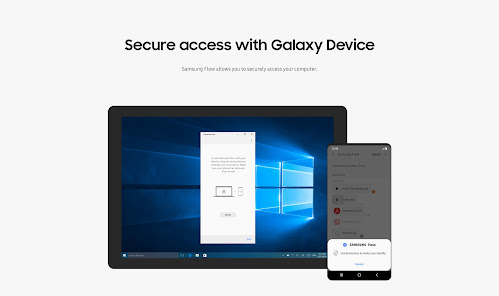
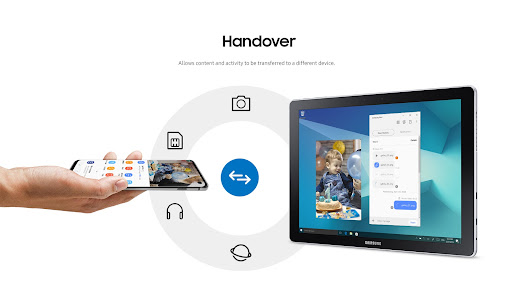
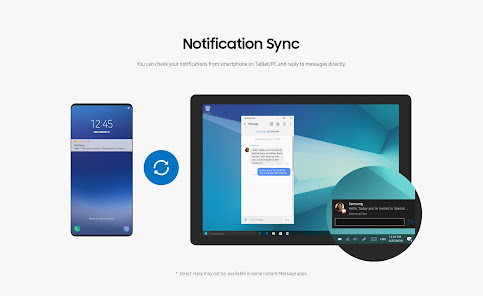
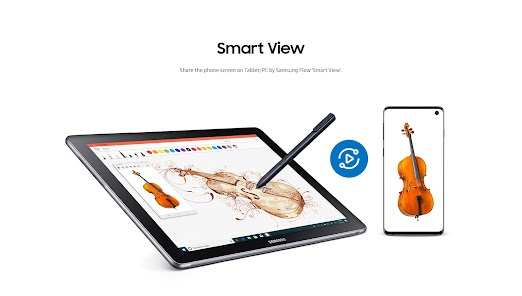
Samsung Flow is a software product that enables a seamless, secure, connected experience across your devices. You can authenticate your Tablet/PC with your smartphone, share content between devices, and sync notifications or view contents from your smartphone on your Tablet/PC. You can turn on the smartphone's Mobile Hotspot to keep your Tablet/PC connected.
You can also log in to your Tablet/PC with your biometric data (Iris, Fingerprints) if you register with Samsung Pass.
The following devices support Samsung Flow:
1. Windows Tablet/PC : Windows 10 OS Creators update (V1703) and June patch build (15063.413)
(Galaxy TabPro S, Galaxy Book, Galaxy Book2. Galaxy Book S, PC)
2. Android Tablet: Android N OS or newer
3. Android Phone : Android N OS or Newer
It may not be supported by some models, depending on the smartphone specifications.
* Samsung Flow will operate only on official software released by Samsung Electronics.
* Windows: Bluetooth (Bluetooth LE optional) or Wi-Fi/LAN, Wi-Fi direct
Windows 10 users can find the Samsung Flow app on the Windows App Store.
Go to the Samsung Flow webpage where you can find the setup guide:
www.samsung.com/samsungflow
If you have not updated the Samsung Flow app to the latest version, please go to Windows Store > Menu > Downloads and Updates to update the app.
* The PC unlock function is no longer provided because the Windows policy has changed.
The following permissions are required for the app service. For optional permissions, the default functionality of the service is turned on, but not allowed.
Required permissions
• Nearby devices: Used to find nearby devices and track registered devices
• Notifications: Used to show the connection status between your devices
• Storage: Used to store content shared among registered devices on an external storage device and view the stored content (~Android 10)
Optional permissions
• Phone: Used to answer and decline calls to your phone on your tablet or computer
• Call logs: Used to read the contact information included in the event of the incoming call when receiving a call
• Contacts: Used to obtain information about callers or senders when you receive calls or text messages on your phone
• SMS: Used to receive and reply to text messages to your phone on your tablet or computer
• Microphone: Used to record and send the audio from your phone to your computer or tablet while using Smart View
• Location: Used to search for your phone using your tablet or computer connected through Bluetooth (~Android 12)
You can also log in to your Tablet/PC with your biometric data (Iris, Fingerprints) if you register with Samsung Pass.
The following devices support Samsung Flow:
1. Windows Tablet/PC : Windows 10 OS Creators update (V1703) and June patch build (15063.413)
(Galaxy TabPro S, Galaxy Book, Galaxy Book2. Galaxy Book S, PC)
2. Android Tablet: Android N OS or newer
3. Android Phone : Android N OS or Newer
It may not be supported by some models, depending on the smartphone specifications.
* Samsung Flow will operate only on official software released by Samsung Electronics.
* Windows: Bluetooth (Bluetooth LE optional) or Wi-Fi/LAN, Wi-Fi direct
Windows 10 users can find the Samsung Flow app on the Windows App Store.
Go to the Samsung Flow webpage where you can find the setup guide:
www.samsung.com/samsungflow
If you have not updated the Samsung Flow app to the latest version, please go to Windows Store > Menu > Downloads and Updates to update the app.
* The PC unlock function is no longer provided because the Windows policy has changed.
The following permissions are required for the app service. For optional permissions, the default functionality of the service is turned on, but not allowed.
Required permissions
• Nearby devices: Used to find nearby devices and track registered devices
• Notifications: Used to show the connection status between your devices
• Storage: Used to store content shared among registered devices on an external storage device and view the stored content (~Android 10)
Optional permissions
• Phone: Used to answer and decline calls to your phone on your tablet or computer
• Call logs: Used to read the contact information included in the event of the incoming call when receiving a call
• Contacts: Used to obtain information about callers or senders when you receive calls or text messages on your phone
• SMS: Used to receive and reply to text messages to your phone on your tablet or computer
• Microphone: Used to record and send the audio from your phone to your computer or tablet while using Smart View
• Location: Used to search for your phone using your tablet or computer connected through Bluetooth (~Android 12)
Updated on
Safety starts with understanding how developers collect and share your data. Data privacy and security practices may vary based on your use, region, and age. The developer provided this information and may update it over time.

No data shared with third parties
Learn more about how developers declare sharing

No data collected
Learn more about how developers declare collection
Ratings and reviews
3.7
16.6K reviews

A Google user
- Flag inappropriate
March 8, 2019
I'm loving it so far! It lets you use your PC and not worry about checking your phone for new notifications! So it's very handy for example when your charger is far from you or you just want to move around your house with your pc while charging your phone. I'd love it even more if you added a display of the percentage of the battery on the desktop app! That would make Flow perfect for me! ;)
7 people found this review helpful

Jackson McRae
- Flag inappropriate
January 26, 2026
Garbage and pointless app. All I wanted to do was mirror my Samsung phone screen onto my larger Samsung tablets screen. Spent an hour messing with this stupid Flow app, because it says you can do exactly that. When devices are connected all it let's you do is message and share files between the 2 devices. I could've just swapped the SD card for that.
2 people found this review helpful

Brandon Berry
- Flag inappropriate
- Show review history
February 2, 2026
Connectivity issues addressed and app is now stable over both network and tethered connections. Thanks!
Samsung Electronics Co., Ltd.
February 2, 2026
We're sorry for the inconvenience you experienced. If connection is not working properly, please submit the logs through the Contac US menu in the app(or Samsung Members app). The logs will help us identify the issue and improve stability. Thank you for your understanding and feedback.
What’s new
Bug fixing and Update of some features
App support
About the developer
삼성전자(주)
mobile.biz@samsung.com
대한민국 16677 경기도 수원시
영통구 삼성로 129 (매탄동)
+82 1588-3366


