
Warpinator (unofficial)
4.2star
1.22K reviews
100K+
Downloads

Everyone
info

About this app
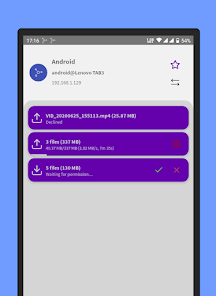
Warpinator for Android is an unofficial port of Linux Mint's file sharing tool of the same name. It is fully compatible with the original protocol and allows for easy transfer of files between Android and Linux devices.
Features:
- Automatic discovery of compatible services on local network
- Works on WiFi or hotspot, no internet connection needed
- Transfer any type of files quickly and easily
- Receive entire directories
- Run multiple transfers in parallel
- Share files from other applications
- Limit who can connect using a group code
- Option to start on boot
- Does not require your location or any other unnecessary permissions
This application is free software licensed under GNU General Public License v3.
You can obtain the source code at https://github.com/slowscript/warpinator-android
Features:
- Automatic discovery of compatible services on local network
- Works on WiFi or hotspot, no internet connection needed
- Transfer any type of files quickly and easily
- Receive entire directories
- Run multiple transfers in parallel
- Share files from other applications
- Limit who can connect using a group code
- Option to start on boot
- Does not require your location or any other unnecessary permissions
This application is free software licensed under GNU General Public License v3.
You can obtain the source code at https://github.com/slowscript/warpinator-android
Updated on
Safety starts with understanding how developers collect and share your data. Data privacy and security practices may vary based on your use, region, and age. The developer provided this information and may update it over time.

No data shared with third parties
Learn more about how developers declare sharing

No data collected
Learn more about how developers declare collection
Ratings and reviews
4.2
1.15K reviews

Joshua Savoie
- Flag inappropriate
March 29, 2025
I don't know if this is an Android 14 issue, but I can't get anything to connect, no matter if it's showing up on Windows, and it's not showing in my Steam Deck at all. I just keep getting "Connection failed, service unavailable (Couldn't establish duplex)", and it only seems to be the Android. No amount of firewalls, group code and port matching seems to get anything done. It works fine between Windows and Steam Deck.
1 person found this review helpful
slowscript
April 5, 2025
Hello, there is no need to match port numbers, it should just work. Did you try manual connection? If that works, it is a device discovery issue. I've had reports this has gotten worse after an update. I'm investigating it now. Does reverting to 1.7.x help? Please send me an email if it does.

Richard
- Flag inappropriate
January 17, 2023
For the first few months I didn't have 100% success getting the app to see my Linux computer or vice versa, but in the last couple months it seems to work all the time. As soon as the app is open on both devices, they see each other and I can easily transfer (copy) pictures and videos from the phone to the computer. I just long-press the file I want to share, tap the share icon, and choose Warpinator from the list. Haven't tried sending files from the computer to the phone, nor other file types.
9 people found this review helpful

Brian Hopson
- Flag inappropriate
June 4, 2023
I have used Warpinator before with my Steam Deck and laptop so I know how to use the program, it took a little tinkering to get the phone and computer to recognize each other; in the end I was able to transfer files after maybe 15 minutes of tinkering. If your familiar with Warpinator (file transfer between devices service) then you are probably fine. Decent app and less of a headache to set up on phone over Deck.
5 people found this review helpful
What’s new
- Ability to send and receive text messages
- Send non-file shared content from other apps as text
- Option to connect manually, rescan and reannounce also from Share activity
- Use a temp file for safer overwriting
- Updated legacy launcher icon bitmaps
- Fixed missing spacing between remote cards
- Send non-file shared content from other apps as text
- Option to connect manually, rescan and reannounce also from Share activity
- Use a temp file for safer overwriting
- Updated legacy launcher icon bitmaps
- Fixed missing spacing between remote cards
App support
About the developer
Pavel Hronek
slowscriptapps@gmail.com
Trachtova 214
386 01 Strakonice
Czechia


