
Unified Remote
Contains adsIn-app purchases

star
148K reviews

Rated for 3+
info
10M+
Downloads

Rated for 3+
Learn more


About this app
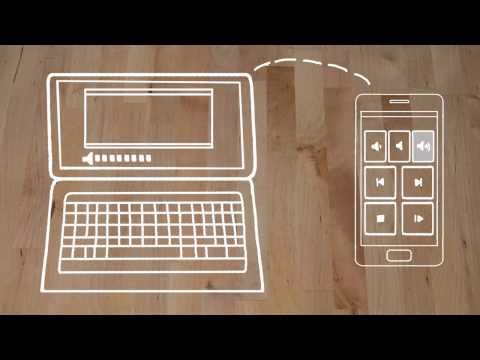
The one-and-only remote control app for your computer. Turns your device into a WiFi or Bluetooth universal remote control for Windows PC, Mac and Linux. Be lazy, you deserve it! Preloaded with support for 90+ programs including mouse & keyboard, media players, presentations, screen mirroring, power control, file manager, terminal, and much more.
Server: https://www.unifiedremote.com
“Fantastic tool for those of you who want to have a remote control for their computer for watching TV, or maybe for listening to music.” – Gizmodo
Key Features
• Easy server and app setup, that just works.
• Automatic server detection to easily find servers on your network.
• Server password protection and encryption for added security.
• Supports single and multi-touch mouse control.
• Wake On LAN to easily start your server.
• Includes light and dark color themes.
• Server is available for Windows, Mac, and Linux.
• Control other devices including Raspberry Pi and Arduino Yún.
• 18 free remotes
Full Version Features
• 90+ remotes
• Floating Remotes (use remotes over other apps)
• Custom Remotes
• Widgets & Quick Actions
• Voice commands
• Custom remotes
• IR actions
• NFC actions
• Android Wear (Quick Actions, Voice & Mouse)
• No upgrade hints
Essentials
Mouse, Keyboard, Screen, Volume, and more.
Music
Spotify, iTunes, Google Music, Winamp, etc.
Video
VLC, BSPlayer, Windows Media Player, PotPlayer, etc.
Media Center
Kodi (XBMC), Plex, Windows Media Center, Boxee, etc.
Streaming
YouTube, Netflix, Hulu
Presentations
PowerPoint, Keynote, Google Presentation
Browsers
Chrome, Internet Explorer, Firefox, Opera
Other
Power, Monitor, Files, Task Manager, Commands, etc.
All Remotes
https://www.unifiedremote.com/remotes
Note that some remotes are not available for all operating systems.
Permissions
• system alert window: for floating remotes.
• read phone status: for auto-pause when receiving calls.
• control NFC: for NFC actions.
• full network access: for server connection.
• view network connections: for server connection.
• view Wi-Fi connections: for server connection.
• pair with Bluetooth devices: for server connection.
• control vibration: for optional haptic feedback.
• prevent phone from sleeping: for optional wake-lock.
• transmit infrared: for IR remote control.
• install shortcuts: for launcher shortcuts.
Server: https://www.unifiedremote.com
“Fantastic tool for those of you who want to have a remote control for their computer for watching TV, or maybe for listening to music.” – Gizmodo
Key Features
• Easy server and app setup, that just works.
• Automatic server detection to easily find servers on your network.
• Server password protection and encryption for added security.
• Supports single and multi-touch mouse control.
• Wake On LAN to easily start your server.
• Includes light and dark color themes.
• Server is available for Windows, Mac, and Linux.
• Control other devices including Raspberry Pi and Arduino Yún.
• 18 free remotes
Full Version Features
• 90+ remotes
• Floating Remotes (use remotes over other apps)
• Custom Remotes
• Widgets & Quick Actions
• Voice commands
• Custom remotes
• IR actions
• NFC actions
• Android Wear (Quick Actions, Voice & Mouse)
• No upgrade hints
Essentials
Mouse, Keyboard, Screen, Volume, and more.
Music
Spotify, iTunes, Google Music, Winamp, etc.
Video
VLC, BSPlayer, Windows Media Player, PotPlayer, etc.
Media Center
Kodi (XBMC), Plex, Windows Media Center, Boxee, etc.
Streaming
YouTube, Netflix, Hulu
Presentations
PowerPoint, Keynote, Google Presentation
Browsers
Chrome, Internet Explorer, Firefox, Opera
Other
Power, Monitor, Files, Task Manager, Commands, etc.
All Remotes
https://www.unifiedremote.com/remotes
Note that some remotes are not available for all operating systems.
Permissions
• system alert window: for floating remotes.
• read phone status: for auto-pause when receiving calls.
• control NFC: for NFC actions.
• full network access: for server connection.
• view network connections: for server connection.
• view Wi-Fi connections: for server connection.
• pair with Bluetooth devices: for server connection.
• control vibration: for optional haptic feedback.
• prevent phone from sleeping: for optional wake-lock.
• transmit infrared: for IR remote control.
• install shortcuts: for launcher shortcuts.
The one-and-only remote control for PC, Mac, and Linux
Updated on
Safety starts with understanding how developers collect and share your data. Data privacy and security practices may vary based on your use, region, and age. The developer provided this information and may update it over time.
- This app may share these data types with third partiesDevice or other IDs
- No data collectedLearn more about how developers declare collection
- Data is encrypted in transit
- Data can’t be deleted


Ratings and reviews
142K reviews

Mike Du Plessis
- Flag inappropriate
- Show review history
January 14, 2024
This app is simply amazing, it's my mouse and keyboard for my PC. It also controls my media playback. File explorer gives me complete access to all my drives on my PC, I can shutdown or restart my PC . This is better than link to windows and Samsung Flow. No more copy and paste between clipboards, simply enter text right where it's needed. I wish the developers of this app would go teach Google how to make a proper app. Bravo! Edit: seriously, can I give this app 10 stars?
19 people found this review helpful

A Google user
- Flag inappropriate
November 5, 2020
In general I really like the app and it's server and have not had much problems with the unpaid and paid for versions of it. The app could however have a less basic user interface for each remote and the media remotes could have a back button and or an exit buttonq for certain remotes based on the program or app they operate, to allow the users to go out of one selected choice faster.
20 people found this review helpful

Gwendolyn Styers (Vatexa)
- Flag inappropriate
August 18, 2026
I've been a paid user of this app for a while now, and I dont have any plans on canceling. i use it literally every day. this app makes using your PC from bed or across the room super easy. my only complaint is that sometimes when using multiple PCs on different networks, and switching between them, the app gets stuck and won't connect to your server. ive had to reinstall it to fix the issue a few times but its not even a big enough issue to take a star because of how much I use the app.
4 people found this review helpful
Rated for 3+
Learn moreApp support
About the developer
Unified Intents AB
support@unifiedremote.com
Baltzarsgatan 14E
211 36 Malmö
Sweden
+46 8 400 548 48


