

LastPass Password Manager
In-app purchases

4.2star
235K reviewsinfo
10M+
Downloads

PEGI 3
info


About this app
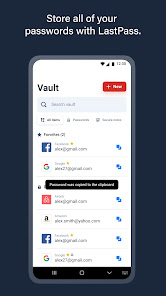
LastPass is a password manager that secures your passwords and personal information in an encrypted vault. As you visit apps and sites, LastPass autofills your login credentials. From your LastPass vault, you can store passwords and logins, create online shopping profiles, generate strong passwords, track personal information securely in notes, and more. All you have to do is remember your LastPass master password, and LastPass will autofill web browser and app logins for you.
Stop getting locked out of your online accounts or struggling with frustrating password resets. Let LastPass remember your passwords for you and keep you safe online.
NEW TO LASTPASS?
Download LastPass now and get the protection you need for your online information.
• Store usernames and passwords for all your online accounts securely in your LastPass encrypted vault.
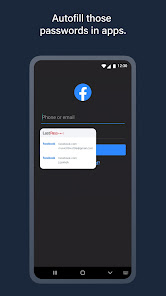
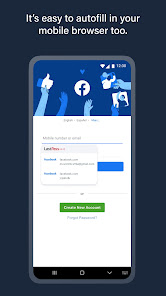
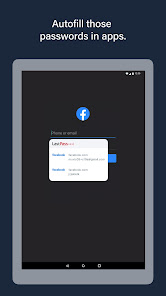
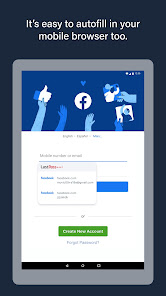
• Autofill your usernames and passwords in apps and websites. Simply launch your apps or navigate to a sign-in page and LastPass will fill in your credentials.
• For Android Oreo and future OS releases, automatically save usernames and passwords to your vault as you visit each site and app.
• Never forget a password again. Only remember your LastPass master password and LastPass secures the rest.
• With automatic device sync, anything you save on one device is instantly available on other devices.
• Securely store information like credit card numbers, health insurance cards, and notes in the encrypted vault.
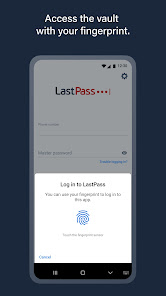
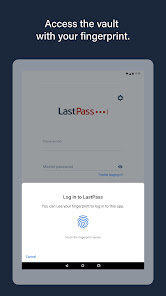
• Log in with your fingerprint or face for simple, secure access to everything in LastPass.
• Safely and conveniently share passwords with others, such as the cable login or Wi-Fi password.
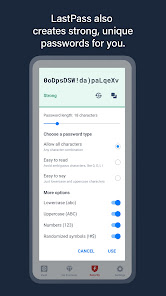
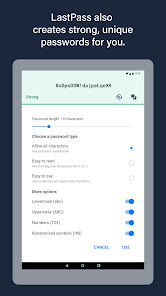
• Create secure passwords in one click with the built-in password generator.
• Multi-factor authentication (MFA) secures your password vault to add a second layer of protection to your account.
LastPass never has the key to your encrypted data, so your information is available to you, and only you. Your vault is encrypted with bank-level, AES 256-bit encryption.
Trusted by Millions
• Trusted by 30+ million users and 85,000+ businesses
• LastPass has been highlighted in PCWorld, Inc., PCMag, ITProPortal, LaptopMag, TechRadar, U.S. News & World Report, NPR, TODAY, TechCrunch, CIO, and more!
Get more with LastPass Premium:
LastPass offers a free 30-day trial of our Premium solution. With our LastPass Premium and Families, you will benefit from:
• Unlimited device type access from any operating system
• Unlimited sharing of passwords, items, and notes
• 1GB encrypted file storage
• Premium multi-factor authentication (MFA), like YubiKey
• Emergency access
• Personal support
USE OF ACCESSIBILITY
LastPass uses Android Accessibility to ensure a smooth experience filling logins across apps and websites on browsers and older versions of Android that don't support Android's Autofill feature.
Terms of service: https://www.lastpass.com/legal-center/terms-of-service/
Download LastPass today for simple, secure access to your passwords!
Give us feedback
Keep the feedback coming! Join the conversation by providing feedback, giving product suggestions, or asking questions in our online community: https://support.lastpass.com/s/community
Stop getting locked out of your online accounts or struggling with frustrating password resets. Let LastPass remember your passwords for you and keep you safe online.
NEW TO LASTPASS?
Download LastPass now and get the protection you need for your online information.
• Store usernames and passwords for all your online accounts securely in your LastPass encrypted vault.
• Autofill your usernames and passwords in apps and websites. Simply launch your apps or navigate to a sign-in page and LastPass will fill in your credentials.
• For Android Oreo and future OS releases, automatically save usernames and passwords to your vault as you visit each site and app.
• Never forget a password again. Only remember your LastPass master password and LastPass secures the rest.
• With automatic device sync, anything you save on one device is instantly available on other devices.
• Securely store information like credit card numbers, health insurance cards, and notes in the encrypted vault.
• Log in with your fingerprint or face for simple, secure access to everything in LastPass.
• Safely and conveniently share passwords with others, such as the cable login or Wi-Fi password.
• Create secure passwords in one click with the built-in password generator.
• Multi-factor authentication (MFA) secures your password vault to add a second layer of protection to your account.
LastPass never has the key to your encrypted data, so your information is available to you, and only you. Your vault is encrypted with bank-level, AES 256-bit encryption.
Trusted by Millions
• Trusted by 30+ million users and 85,000+ businesses
• LastPass has been highlighted in PCWorld, Inc., PCMag, ITProPortal, LaptopMag, TechRadar, U.S. News & World Report, NPR, TODAY, TechCrunch, CIO, and more!
Get more with LastPass Premium:
LastPass offers a free 30-day trial of our Premium solution. With our LastPass Premium and Families, you will benefit from:
• Unlimited device type access from any operating system
• Unlimited sharing of passwords, items, and notes
• 1GB encrypted file storage
• Premium multi-factor authentication (MFA), like YubiKey
• Emergency access
• Personal support
USE OF ACCESSIBILITY
LastPass uses Android Accessibility to ensure a smooth experience filling logins across apps and websites on browsers and older versions of Android that don't support Android's Autofill feature.
Terms of service: https://www.lastpass.com/legal-center/terms-of-service/
Download LastPass today for simple, secure access to your passwords!
Give us feedback
Keep the feedback coming! Join the conversation by providing feedback, giving product suggestions, or asking questions in our online community: https://support.lastpass.com/s/community
Updated on
Safety starts with understanding how developers collect and share your data. Data privacy and security practices may vary based on your use, region, and age. The developer provided this information and may update it over time.


Ratings and reviews
4.2
219K reviews

Slappi This
- Flag inappropriate
September 29, 2024
Down to 2 stars. At first, it lost a password. Now, I have to type the login email and password twice when logging into the browser extension on PC, because it never recognizes the first one. Keep going like this, and I will switch app for sure. Can not recommend neither the app, nor the browser extension.
5 people found this review helpful

A Google user
- Flag inappropriate
September 15, 2019
It might be secure, but it's definitely not simple. I have to type in my password to lastpass so often that it's such a nuisance. I thought you typed it once for every time you restarted your phone and that was it, but no, you have to type it in constantly. The autofill doesn't show up when you want it to, and keeps showing up when you don't want it to (like every time I use the camera on Google Translate) even after you tell it to go away.
12 people found this review helpful

Reuben Hunter
- Flag inappropriate
March 24, 2025
Another example of ensh!ttification of formerly reliable apps and services. The app has gotten more and more buggy over time, today it just stopped saving passwords and crashed every time I tried to add a new one. After updating the app it now doesn't give me access to my passwords on mobile at all, unless I pay for premium. Essentially holding access to all my mobile accounts to ransom for £35 a year. I'll be finding another password manager.
125 people found this review helpful
What’s new
You'll have a more reliable experience thanks to various minor bug fixes.
App support
About the developer
LastPass US LP
googlestore@lastpass.com
125 High St Ste 220
Boston, MA 02110
United States
+1 385-576-3897


