
Aegis Authenticator - 2FA App
4.8star
5.75K reviewsinfo
500K+
Downloads

PEGI 3
info

About this app
Aegis Authenticator is a free, secure and open source app to manage your 2-step verification tokens for your online services.
Compatibility
Aegis supports the HOTP and TOTP algorithms. These two algorithms are industry-standard and widely supported, making Aegis compatible with thousands of services. Any web service that supports Google Authenticator will also work with Aegis Authenticator.
Encryption and biometric unlock
All of your one-time passwords are stored in a vault. If you choose to set a password (highly recommended), the vault will be encrypted using strong cryptography. If someone with malicious intent gets a hold of the vault file, it’s impossible for them to retrieve the contents without knowing the password. Entering your password each time you need access to a one-time password can be cumbersome. Fortunately, you can also enable biometric unlock if your device has a biometrics sensor (i.e. fingerprint or face unlock).
Organization
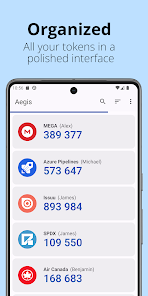
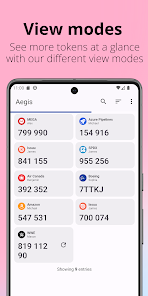
Over time, you'll likely accumulate tens of entries in your vault. Aegis Authenticator has lots of organization options to make finding the one you need at a particular moment easier. Set a custom icon for an entry to make it easier to find. Search by account name or service name. Have a lot of one-time passwords? Add them to custom groups for easier access. Personal, Work and Social can each get their own group.
Backups
To make sure you will never lose access to your online accounts, Aegis Authenticator can create automatic backups of the vault to a location of your choosing. If your cloud provider supports the Storage Access Framework of Android (like Nextcloud does), it can even create automatic backups to the cloud. Creating manual exports of the vault is also supported.
Making the switch
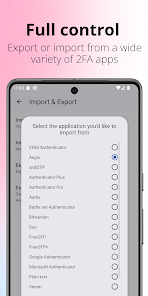
To make the switch easier, Aegis Authenticator can import the entries of lots of other authenticators, including: Authenticator Plus, Authy, andOTP, FreeOTP, FreeOTP+, Google Authenticator, Microsoft Authenticator, Steam, TOTP Authenticator and WinAuth (root access is required for the apps that don't have an option to export).
Feature overview
• Free and open source
• Secure
• Encrypted, can be unlocked with a password or biometrics
• Screen capture prevention
• Tap to reveal
• Compatible with Google Authenticator
• Supports industry standard algorithms: HOTP and TOTP
• Lots of ways to add new entries
• Scan a QR code or an image of one
• Enter details manually
• Import from other popular authenticator apps
• Organization
• Alphabetic/custom sorting
• Custom or automatically generated icons
• Group entries together
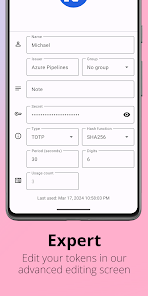
• Advanced entry editing
• Search by name/issuer
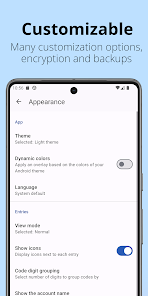
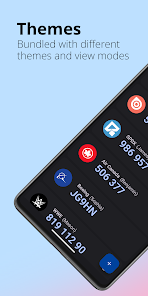
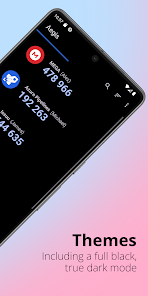
• Material design with multiple themes: Light, Dark, AMOLED
• Export (plaintext or encrypted)
• Automatic backups of the vault to a location of your choosing
Open source and license
Aegis Authenticator is open source and licensed under GPLv3. The source code is available here: https://github.com/beemdevelopment/Aegis
Compatibility
Aegis supports the HOTP and TOTP algorithms. These two algorithms are industry-standard and widely supported, making Aegis compatible with thousands of services. Any web service that supports Google Authenticator will also work with Aegis Authenticator.
Encryption and biometric unlock
All of your one-time passwords are stored in a vault. If you choose to set a password (highly recommended), the vault will be encrypted using strong cryptography. If someone with malicious intent gets a hold of the vault file, it’s impossible for them to retrieve the contents without knowing the password. Entering your password each time you need access to a one-time password can be cumbersome. Fortunately, you can also enable biometric unlock if your device has a biometrics sensor (i.e. fingerprint or face unlock).
Organization
Over time, you'll likely accumulate tens of entries in your vault. Aegis Authenticator has lots of organization options to make finding the one you need at a particular moment easier. Set a custom icon for an entry to make it easier to find. Search by account name or service name. Have a lot of one-time passwords? Add them to custom groups for easier access. Personal, Work and Social can each get their own group.
Backups
To make sure you will never lose access to your online accounts, Aegis Authenticator can create automatic backups of the vault to a location of your choosing. If your cloud provider supports the Storage Access Framework of Android (like Nextcloud does), it can even create automatic backups to the cloud. Creating manual exports of the vault is also supported.
Making the switch
To make the switch easier, Aegis Authenticator can import the entries of lots of other authenticators, including: Authenticator Plus, Authy, andOTP, FreeOTP, FreeOTP+, Google Authenticator, Microsoft Authenticator, Steam, TOTP Authenticator and WinAuth (root access is required for the apps that don't have an option to export).
Feature overview
• Free and open source
• Secure
• Encrypted, can be unlocked with a password or biometrics
• Screen capture prevention
• Tap to reveal
• Compatible with Google Authenticator
• Supports industry standard algorithms: HOTP and TOTP
• Lots of ways to add new entries
• Scan a QR code or an image of one
• Enter details manually
• Import from other popular authenticator apps
• Organization
• Alphabetic/custom sorting
• Custom or automatically generated icons
• Group entries together
• Advanced entry editing
• Search by name/issuer
• Material design with multiple themes: Light, Dark, AMOLED
• Export (plaintext or encrypted)
• Automatic backups of the vault to a location of your choosing
Open source and license
Aegis Authenticator is open source and licensed under GPLv3. The source code is available here: https://github.com/beemdevelopment/Aegis
Updated on
Safety starts with understanding how developers collect and share your data. Data privacy and security practices may vary based on your use, region, and age. The developer provided this information and may update it over time.

No data shared with third parties
Learn more about how developers declare sharing

No data collected
Learn more about how developers declare collection
Ratings and reviews
4.8
5.58K reviews

Grant Edwards
- Flag inappropriate
March 30, 2022
Exactly what I was looking for! It's open source, ad-free, and lets me control my keys. It doesn't suck all my data into the cloud and lock it up like some other authenticator apps do. I can back up my keys where and when I want to. It's not tied to a SIM or phone number, so I can move to another device any time I want. This app has worked with every site/server I've tried (4 so far)...
132 people found this review helpful

Jerry Lum (章魚)
- Flag inappropriate
August 20, 2020
Compared to other similar apps, it has more features and is more user-friendly. You can customize the user interface. You can choose multiple ways to unlock the vault. You can also backup, import and export your vault easily. Other apps like Google Auth and Authy has a lot of nasty restrictions or even impossible. Aegis is free software, it allows you to control your TOP keys truly. Download it now, no iPhone version, which is great.
19 people found this review helpful

László Nagy
- Flag inappropriate
May 26, 2022
Remember: "could" is just somebody else's computer. I personally do not want to store my private keys on the computers of third parties. This app is perfect! It can do automatic encrypted backups and they can be synchronized with other devices. Combination of Aegis + Syncthing ensures data safety, auto backups, and no third party has access to the keys. It also allows you to reveal the private keys in the app, if you need to. You can rearrange and rename the items - another extra feature that is not present in most TOTP authenticator apps. And it does not have any ads. And open source, as I heard. This is just perfect!
47 people found this review helpful
What’s new
New features:
- Support for importing from Proton Authenticator
Fixed bugs:
- The autofill service would show a prompt to save the PIN as a password
- Support for importing from Proton Authenticator
Fixed bugs:
- The autofill service would show a prompt to save the PIN as a password
App support
About the developer
Beem Development
beemdevelopment+support@gmail.com
Leerparkpromenade 363
3312 KW Dordrecht
Netherlands
+31 6 82445198


