
Fulscrn
Contains ads
2.9star
5.67K reviews
1M+
Downloads

Everyone
info


About this app
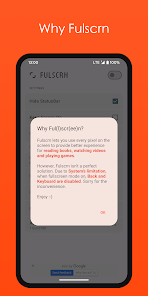
Fulscrn lets you use every pixel on the screen to provide better experience for reading books, watching videos and playing games.
However, Fulscrn isn't a perfect solution. Due to System's limitation, when fullscreen mode on, Back and Keyboard are disabled. Sorry for the inconvenience.
Enjoy :-)
FEATURES
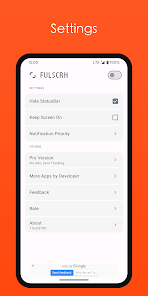
- Force all apps to Immersive Full-Screen Mode (Hide Status Bar & Navigation Bar)
- Notification Control Bar
- Material Design
MORE PRO FEATURES
- No Ads, No Tracking
- Shortcuts
- Tile
- Third party apps integration (Tasker etc.)
NOTE
Network Permissions only used by Ads.
However, Fulscrn isn't a perfect solution. Due to System's limitation, when fullscreen mode on, Back and Keyboard are disabled. Sorry for the inconvenience.
Enjoy :-)
FEATURES
- Force all apps to Immersive Full-Screen Mode (Hide Status Bar & Navigation Bar)
- Notification Control Bar
- Material Design
MORE PRO FEATURES
- No Ads, No Tracking
- Shortcuts
- Tile
- Third party apps integration (Tasker etc.)
NOTE
Network Permissions only used by Ads.
Updated on
Safety starts with understanding how developers collect and share your data. Data privacy and security practices may vary based on your use, region and age. The developer provided this information and may update it over time.

This app may share these data types with third parties
Device or other IDs

No data collected
Learn more about how developers declare collection

Data is encrypted in transit

Data can’t be deleted
Ratings and reviews
2.9
5.4K reviews

A Google user
- Flag inappropriate
12 April 2019
Does what it says and what I want it to do. I have been looking for a solution to read comics in fullscreen in my web browser. The app says when you open it that keyboard and back button will not work. This is fine for me. I load my web page and enable the fullscreen from my notification bar. If I need to use the keyboard or back button, I can just pull down the notification screen and disable it. This is probably due to limitations in Android and not the developer's fault. Thanks for the app!<3
82 people found this review helpful

Ra Gar
- Flag inappropriate
- Show review history
1 August 2024
Great app, it works as it says. If it could be activated by pressing a volume key (volume down for example) for a second to enable/disable it, it would be perfect for me. *Edit: I'm an user of button mapper but I don't know how to integrate this app into it, I can run the app but it's not that useful, I would like to run it, activate and go back to the app I was using. I'm not familiar with shell commands
8 people found this review helpful
GuoPing He
1 August 2024
Possible with third party apps(Tasker, Button Mapper, etc.) intergration. Update: It require Fulscrn Pro to integrate with other apps. You may find the introduction in pro app's store descriptions.

River Schwartz
- Flag inappropriate
18 June 2020
If your here for immersive gaming, DON'T DOWNLOAD!!! Ok I'll admit it does take away both the nav bar and notification bar, which is bless, BUT it interferes with most games and they all stay on a black screen untill I turn this app off, then they work fine, (not in full screen though *sigh*) for a moment there I thought I found an amazing app but nah, it's sadly a bust.
28 people found this review helpful
What's new
Support Android 16
App support
About the developer
何国平
dt4dev@gmail.com
瓜沥镇官一村14组48号
萧山区, 杭州市, 浙江省
China
610000


