
Screen Lock Pro

4.5star
3.48 Tsg. Rezensionen
10 Tsg.+
Downloads

Jedes Alter
info



Über diese App
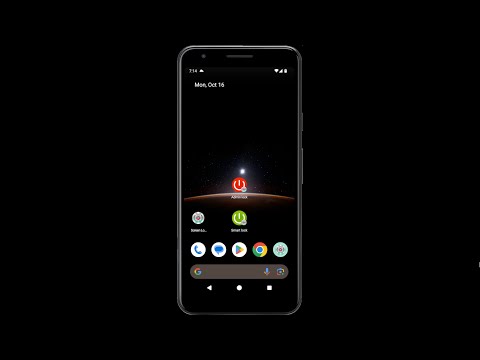
Screen Lock Pro is created to extend the life of the hardware power button by using the feature within the app. Support for both Admin lock and Smart lock system. Easy to Screen off and lock the device depending on your selected preferences.
This app uses the Device Administrator permission. Necessary for the app to lock with the Admin lock feature.
Read write system settings permission to enable the Smart lock feature of the app.
This app uses Accessibility service. It is optional for Android 9 and above. It is used only for taking advantage of the internal Screen Lock function to overcome the delay in the Smart lock feature.
One tap to off and lock the device using:
☞ Admin lock (Shortcut)
☞ Smart lock (Shortcut)
☞ Screen lock widget
☞ Admin lock and Smart lock from notification
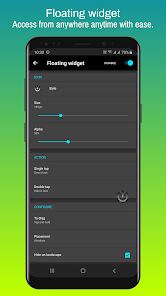
☞ Floating widget
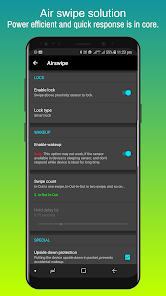
Screen lock using available device sensors for both lock and wake-up feature:
☞ Flip cover
☞ Air swipe
☞ Desk option
☞ Awesome shake
Usability enhancements:
☞ ‘Movement listener’ option for uninterrupted reading experience.
☞ ‘On home screen’ for easygoing.
☞ ‘Pause on the landscape mode’ to play games effortlessly.
☞ ‘Pause on call’ to let the device follow its default course of action.
Personalisation features:
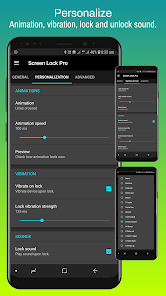
Animations to pick for Phone lock experience. Vibration feedback upon Phone locked. Lock and unlock sound at varied points to play the tone you love to hear. Sound volume is picked from notification sound as volume and can be further adjusted with ease, also respecting DND mode.
Highly customisable lock icon with an easy-to-use interface. Option to use Metallic and Material icon as a choice for both Admin lock and Smart lock.
Animation speed is adjusted with the “Transition animation scale," and “Animator duration scale”. Our advice, use 1x for the best ‘Screen Off’ experience. The changes may take place after lock and unlock.
Note 1: Device administration must be disabled before uninstalling.
Note 2: Disable default device lock and unlock sound, if applying from this app.
Any suggestions for improving the Screen lock app are most welcome. We’ll do our best to present you desired usage experience.
This app uses the Device Administrator permission. Necessary for the app to lock with the Admin lock feature.
Read write system settings permission to enable the Smart lock feature of the app.
This app uses Accessibility service. It is optional for Android 9 and above. It is used only for taking advantage of the internal Screen Lock function to overcome the delay in the Smart lock feature.
One tap to off and lock the device using:
☞ Admin lock (Shortcut)
☞ Smart lock (Shortcut)
☞ Screen lock widget
☞ Admin lock and Smart lock from notification
☞ Floating widget
Screen lock using available device sensors for both lock and wake-up feature:
☞ Flip cover
☞ Air swipe
☞ Desk option
☞ Awesome shake
Usability enhancements:
☞ ‘Movement listener’ option for uninterrupted reading experience.
☞ ‘On home screen’ for easygoing.
☞ ‘Pause on the landscape mode’ to play games effortlessly.
☞ ‘Pause on call’ to let the device follow its default course of action.
Personalisation features:
Animations to pick for Phone lock experience. Vibration feedback upon Phone locked. Lock and unlock sound at varied points to play the tone you love to hear. Sound volume is picked from notification sound as volume and can be further adjusted with ease, also respecting DND mode.
Highly customisable lock icon with an easy-to-use interface. Option to use Metallic and Material icon as a choice for both Admin lock and Smart lock.
Animation speed is adjusted with the “Transition animation scale," and “Animator duration scale”. Our advice, use 1x for the best ‘Screen Off’ experience. The changes may take place after lock and unlock.
Note 1: Device administration must be disabled before uninstalling.
Note 2: Disable default device lock and unlock sound, if applying from this app.
Any suggestions for improving the Screen lock app are most welcome. We’ll do our best to present you desired usage experience.
Aktualisiert am
Was die Sicherheit angeht, solltest du als Erstes verstehen, wie Entwickler deine Daten erheben und weitergeben. Die Datenschutz- und Sicherheitspraktiken können je nach deiner Verwendung, deiner Region und deinem Alter variieren. Diese Informationen wurden vom Entwickler zur Verfügung gestellt und können jederzeit von ihm geändert werden.


Bewertungen und Rezensionen
4.6
3.33 Tsg. Rezensionen
Neuerungen
v5.1.8p_ap
☞ Library update
Please use email for reporting issues found if any.
☞ Library update
Please use email for reporting issues found if any.
Support für diese App
Informationen zum Entwickler
MAHESH KUMAR NAYAK
t2mknayak@gmail.com
RUCHIDA,BHALUTAL,BARGARH
BARGARH, Odisha 768045
India


