BlackBerry UEM Client
2.5star
75.3ହଟି ସମୀକ୍ଷା
5ନି+
ଡାଉନଲୋଡ

ସମସ୍ତେ
info

ଏହି ଆପ୍ ବିଷୟରେ
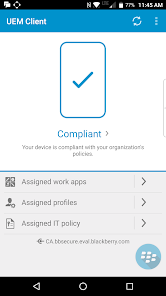
The BlackBerry® UEM Client integrates Android™ devices with your organization’s enterprise mobility management (EMM) software: BlackBerry UEM, BES®12, or BES®10. Once activated, the BlackBerry UEM Client enables:
• Secure access to work email, calendars and contacts
• Automated configuration of work-related policies, Wi-Fi® and VPN settings
• Easy installation of your organization’s approved mobile apps
• Dual business and personal use of mobile devices for Bring Your Own Device (BYOD) policies
• Activation of Android™ for Work and Samsung Knox™ features
Additional security and enterprise mobility management capabilities are available for BlackBerry UEM-managed Android devices with BlackBerry® Dynamics apps such as BlackBerry® Work installed, including:
• Secure mobile productivity apps for document editing and sharing, intranet browsing, and more…
• BlackBerry Dynamics SDK and app-wrapping and containerization for internally developed enterprise apps
• Popular enterprise apps, secured for UEM-managed Android devices
• End-to-end secure connectivity
IMPORTANT NOTE: To activate the BlackBerry UEM Client, your organization must use BlackBerry UEM, BES12, or BES10 for EMM. Please check with your organization’s mobility experts before downloading this app. You will not be able to activate the BlackBerry UEM Client unless your organization creates an account for you from a compatible EMM solution from BlackBerry.
Trademarks, including but not limited to BLACKBERRY, UEM, and EMBLEM Design are the trademarks or registered trademarks of BlackBerry Limited, its subsidiaries and/or affiliates, used under license, and the exclusive rights to such trademarks are expressly reserved. All other trademarks are the property of their respective owners.
• Secure access to work email, calendars and contacts
• Automated configuration of work-related policies, Wi-Fi® and VPN settings
• Easy installation of your organization’s approved mobile apps
• Dual business and personal use of mobile devices for Bring Your Own Device (BYOD) policies
• Activation of Android™ for Work and Samsung Knox™ features
Additional security and enterprise mobility management capabilities are available for BlackBerry UEM-managed Android devices with BlackBerry® Dynamics apps such as BlackBerry® Work installed, including:
• Secure mobile productivity apps for document editing and sharing, intranet browsing, and more…
• BlackBerry Dynamics SDK and app-wrapping and containerization for internally developed enterprise apps
• Popular enterprise apps, secured for UEM-managed Android devices
• End-to-end secure connectivity
IMPORTANT NOTE: To activate the BlackBerry UEM Client, your organization must use BlackBerry UEM, BES12, or BES10 for EMM. Please check with your organization’s mobility experts before downloading this app. You will not be able to activate the BlackBerry UEM Client unless your organization creates an account for you from a compatible EMM solution from BlackBerry.
Trademarks, including but not limited to BLACKBERRY, UEM, and EMBLEM Design are the trademarks or registered trademarks of BlackBerry Limited, its subsidiaries and/or affiliates, used under license, and the exclusive rights to such trademarks are expressly reserved. All other trademarks are the property of their respective owners.
ଗତ ଅପଡେଟର ସମୟ
ଡେଭେଲପରମାନେ ଆପଣଙ୍କ ଡାଟାକୁ କିପରି ସଂଗ୍ରହ ଏବଂ ସେୟାର କରନ୍ତି ସେହି ଧାରଣା ସହିତ ସୁରକ୍ଷା ଆରମ୍ଭ ହୁଏ। ଆପଣଙ୍କ ବ୍ୟବହାର, ଅଞ୍ଚଳ ଏବଂ ବୟସ ଆଧାରରେ, ଡାଟା ଗୋପନୀୟତା ଓ ସୁରକ୍ଷା ପ୍ରାକ୍ଟିସ ଭିନ୍ନ ହୋଇପାରେ। ଡେଭେଲପର ଏହି ସୂଚନା ପ୍ରଦାନ କରିଛନ୍ତି ଏବଂ ସେ ସମୟାନୁସାରେ ଏହାକୁ ଅପଡେଟ କରିପାରନ୍ତି।

ତୃତୀୟ ପକ୍ଷଗୁଡ଼ିକ ସହ କୌଣସି ଡାଟା ସେୟାର କରାଯାଇନାହିଁ
ଡେଭେଲପରମାନେ କିପରି ସେୟାରିଂର ଘୋଷଣା କରନ୍ତି ସେ ବିଷୟରେ ଅଧିକ ଜାଣନ୍ତୁ

ଏହି ଆପ ଏହି ପ୍ରକାର ଡାଟା ସଂଗ୍ରହ କରିପାରେ
ଲୋକେସନ, ବ୍ୟକ୍ତିଗତ ସୂଚନା ଏବଂ ଅନ୍ୟ 4ଟି

ଟ୍ରାଞ୍ଜିଟ ସମୟରେ ଡାଟା ଏନକ୍ରିପ୍ଟ କରାଯାଇଥାଏ

ଡାଟା ଡିଲିଟ କରିଦିଆଯାଉ ବୋଲି ଆପଣ ଅନୁରୋଧ କରିପାରିବେ
ମୂଲ୍ୟାଙ୍କନ ଓ ସମୀକ୍ଷା
2.5
66.5ହଟି ସମୀକ୍ଷା
ନୂଆ କଣ ଅଛି
Stability improvements and other fixes
ଆପ ସପୋର୍ଟ
ଡେଭେଲପରଙ୍କ ବିଷୟରେ
BlackBerry Limited
PlayStoreSupport@BlackBerry.com
2200 University Ave E
Waterloo, ON N2K 0A7
Canada
+1 519-888-7465


