Miracast
Contains ads
2.7star
13.9K reviews
5M+
Downloads

Everyone
info


About this app
* What's Miracast?
Cast Android device screen to Smart TV screen (The TV must support Wireless Display / Miracast).
* How to use Miracast?
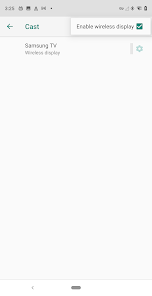
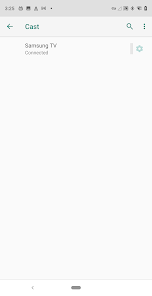
Tap "Wireless Display" to enter a setup page, At the top of this page, toggle “Wireless display” to ON and it will scan for nearby Miracast devices. After a minute, the name of your Miracast adapter should pop up. Tap it and either your device will connect, or you’ll be prompted for the PIN code display on your TV or projector by the Miracast adapter. After you connect to the adapter your screen will be mirrored onto your display.
* How to setup Smart TV?
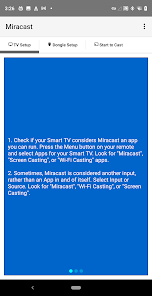
1. Check if your Smart TV considers Miracast an app you can run. Press the Menu button on your remote and select Apps for your Smart TV. Look for "Miracast", "Screen Casting", or "Wi-Fi Casting" apps.
2. Sometimes, Miracast is considered another input, rather than an App in and of itself. Select Input or Source. Look for "Miracast", "Wi-Fi Casting", or "Screen Casting".
* How to setup Miracast dongle?
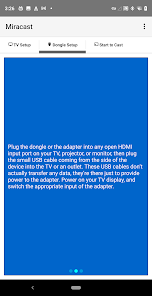
Plug the dongle or the adapter into any open HDMI input port on your TV, projector, or monitor, then plug the small USB cable coming from the side of the device into the TV or an outlet. These USB cables don’t actually transfer any data, they’re there just to provide power to the adapter. Power on your TV display, and switch the appropriate input of the adapter.
Cast Android device screen to Smart TV screen (The TV must support Wireless Display / Miracast).
* How to use Miracast?
Tap "Wireless Display" to enter a setup page, At the top of this page, toggle “Wireless display” to ON and it will scan for nearby Miracast devices. After a minute, the name of your Miracast adapter should pop up. Tap it and either your device will connect, or you’ll be prompted for the PIN code display on your TV or projector by the Miracast adapter. After you connect to the adapter your screen will be mirrored onto your display.
* How to setup Smart TV?
1. Check if your Smart TV considers Miracast an app you can run. Press the Menu button on your remote and select Apps for your Smart TV. Look for "Miracast", "Screen Casting", or "Wi-Fi Casting" apps.
2. Sometimes, Miracast is considered another input, rather than an App in and of itself. Select Input or Source. Look for "Miracast", "Wi-Fi Casting", or "Screen Casting".
* How to setup Miracast dongle?
Plug the dongle or the adapter into any open HDMI input port on your TV, projector, or monitor, then plug the small USB cable coming from the side of the device into the TV or an outlet. These USB cables don’t actually transfer any data, they’re there just to provide power to the adapter. Power on your TV display, and switch the appropriate input of the adapter.
Updated on
Safety starts with understanding how developers collect and share your data. Data privacy and security practices may vary based on your use, region, and age. The developer provided this information and may update it over time.

No data shared with third parties
Learn more about how developers declare sharing

No data collected
Learn more about how developers declare collection

Data is encrypted in transit

Data can’t be deleted
Ratings and reviews
2.6
13.6K reviews

Kevin Theekawin
- Flag inappropriate
January 28, 2026
Highly recommend the Miracast app! It allows me to mirror my phone to the big screen effortlessly, and the picture quality is fantastic. If you want a simple and effective way to share your device's screen, look no further.
2 people found this review helpful

Jarod Odum
- Flag inappropriate
August 27, 2022
Fails to connect to any of the 3 phones I have, when it finally allows me to to connect after finally recognizing them, it freezes and no longer works. This is a garbage app and I can not believe over 1M+ people use this? Well I guess 1M+ people is just a drop in the bucket to the 3.5 billion on the planet, huh? I recommend trying a different App if you have the option!
260 people found this review helpful

Dash Makes
- Flag inappropriate
January 19, 2026
App does not have any actual wireless functionality, and just opens the default cast menu that can already be accessed from settings. Miracast cannot be used with this app on pixel devices as far as I can tell.
8 people found this review helpful
What’s new
1.1.9 Update to SDK 35
App support
About the developer
吴开玉
cast4tv.ca@gmail.com
China


