

Chrome River

3.1star
244 reviews
100K+
Downloads

Everyone
info
About this app
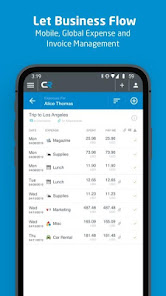
Chrome River provides highly-configurable cloud-based expense and invoice management solutions. Our suite of solutions offers a modern, elegant user experience to create, submit and approve expenses anywhere on any device. Now you can combine all the features of our solution with capabilities your mobile device provides, from biometrics to the camera, to easily access our web application. Because Chrome River is built with responsive design technology, you will always have a consistent user experience regardless of the device you are using. The Chrome River mobile app makes accessing the web application you know and love that much easier.
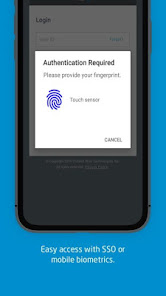
This is an optional mobile application that can be downloaded to your personal device to help provide easier access to the Chrome River web app. We have made it easier for our users to access Chrome River on the go by allowing you to easily log in with biometric authentication or leverage single sign-on capabilities required by your organization.
With Chrome River, you can:
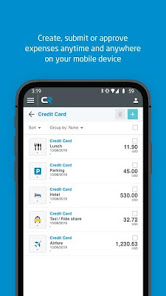
• Create, submit, and approve expense reports and invoices on-the-go
• Capture and upload photos of your receipts with complete OCR functionality
• Let business rules ensure expenses and invoices comply with spending policies.
• Access your credit card data to quickly create expense reports.
• Itemize expenses including hotel receipts with Chrome River FOLIO
• Easily log in using single sign-on authentication (SSO) or enable mobile biometrics like touch and face identification for simplified access
• Much more
Learn more at www.chromeriver.com. Must be an existing Chrome River user.
System requirements: Chrome River is committed to provide support for mainstream Android devices, but we recognize that the Android hardware is so diverse that we cannot ensure adequate testing for all devices.
This is an optional mobile application that can be downloaded to your personal device to help provide easier access to the Chrome River web app. We have made it easier for our users to access Chrome River on the go by allowing you to easily log in with biometric authentication or leverage single sign-on capabilities required by your organization.
With Chrome River, you can:
• Create, submit, and approve expense reports and invoices on-the-go
• Capture and upload photos of your receipts with complete OCR functionality
• Let business rules ensure expenses and invoices comply with spending policies.
• Access your credit card data to quickly create expense reports.
• Itemize expenses including hotel receipts with Chrome River FOLIO
• Easily log in using single sign-on authentication (SSO) or enable mobile biometrics like touch and face identification for simplified access
• Much more
Learn more at www.chromeriver.com. Must be an existing Chrome River user.
System requirements: Chrome River is committed to provide support for mainstream Android devices, but we recognize that the Android hardware is so diverse that we cannot ensure adequate testing for all devices.
Updated on
Safety starts with understanding how developers collect and share your data. Data privacy and security practices may vary based on your use, region, and age. The developer provided this information and may update it over time.


Ratings and reviews
3.1
242 reviews

Charles Stanton
- Flag inappropriate
September 2, 2025
Not just a terrible app, but also a company with a terrible overall product. They will freely admit that, even though you can set up your direct deposit account as a savings account, their system ASSUMES that everything is a checking account. This is after months of my company requesting support for why my direct deposits are being rejected by my bank, with every one support requsst returned 'resolved' with no contact from Emburse. Do not use this product!
2 people found this review helpful

Rania Labib
- Flag inappropriate
February 11, 2026
My school recently switched from Concur to Emburse. This app freezes as soon as I take a picture of a receipt. I tried force stop, clear data, and clear cache....all didn't fix the app. I gave up.

Zackery Holt
- Flag inappropriate
July 8, 2022
I had no problems with the app for the first month, I actually preferred it over the desktop version. However overnight it decided it was never going to let me log in again. No matter how many times I tried it just refreshed the login screen. I had to uninstall and then reinstall the app every time I wanted to use it. After doing that for a month I gave up and now only use the desktop app.
10 people found this review helpful
Emburse, Inc.
July 11, 2022
Hi Zackery,
We apologize for the inconvenience caused by the login bug and would like to let you know we have released fix today, in v2.0.9, that you can update now on google play. We appreciate your feedback and hope that you will try using the app again.
What’s new
• Maintenance
App support
About the developer
Emburse, Inc.
emburse-go-engineering@emburse.com
1701 N Market St Ste 330
Dallas, TX 75202
United States
+31 6 52836844


