
Chrome River SNAP
4.0star
174 reviews
100K+
Downloads

Everyone
info


About this app
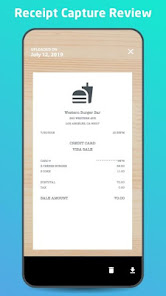
Managing paper expense receipts during a business trip can be a hassle and can slow down expense report creation and submission. Chrome River now offers Chrome River SNAP - an optional app for business travelers to eliminate the need to keep a stack of paper receipts and decrease the amount of time necessary to create an expense report later.
Note: This is a standalone utility app for capturing and uploading receipt images. To create and submit expense reports using the receipt images captured and uploaded automatically by this utility app, users should log into the Chrome River web app.
With Chrome River SNAP, you can:
• Capture and upload receipt images as expenses occur. Images will be uploaded to the Chrome River EXPENSE Receipt Gallery
• Share existing receipt images from your smartphone's photo gallery app or third-party photo apps
• Separate your business from your personal life. Images taken with Chrome River SNAP are uploaded to the EXPENSE Receipt Gallery and are not saved to your personal photo library.
Here's how Chrome River SNAP works:
• Simply take a photo of a receipt using the Chrome River SNAP app and upload!
• Share an existing receipt image, open the image in any photo gallery app and tap the "share" icon and look for the CR SNAP icon to upload your image to the EXPENSE Receipt Gallery.
• Go to the Upload Gallery to review all the pending and successfully uploaded receipts sent from your device.
CAN I USE THIS APP WITHOUT AN INTERNET CONNECTION?
Yes, whether you have an internet connection or not, you will be able to use Chrome River SNAP. There may be times when an internet connection is temporarily unavailable and in this case, the image will remain in Chrome River SNAP until you are in a location with a stronger connection, and it is then uploaded. We encourage you to not close the app until a green check mark has been designated to a photo, indicating that the photo has been successfully uploaded to Chrome River EXPENSE.
Learn more at www.chromeriver.com.
You must be an existing Chrome River EXPENSE user to use Chrome River SNAP.
System requirements: Chrome River is committed to provide support for mainstream Android devices, but we recognize that the Android hardware is so diverse that we cannot ensure adequate testing for all devices.
Note: This is a standalone utility app for capturing and uploading receipt images. To create and submit expense reports using the receipt images captured and uploaded automatically by this utility app, users should log into the Chrome River web app.
With Chrome River SNAP, you can:
• Capture and upload receipt images as expenses occur. Images will be uploaded to the Chrome River EXPENSE Receipt Gallery
• Share existing receipt images from your smartphone's photo gallery app or third-party photo apps
• Separate your business from your personal life. Images taken with Chrome River SNAP are uploaded to the EXPENSE Receipt Gallery and are not saved to your personal photo library.
Here's how Chrome River SNAP works:
• Simply take a photo of a receipt using the Chrome River SNAP app and upload!
• Share an existing receipt image, open the image in any photo gallery app and tap the "share" icon and look for the CR SNAP icon to upload your image to the EXPENSE Receipt Gallery.
• Go to the Upload Gallery to review all the pending and successfully uploaded receipts sent from your device.
CAN I USE THIS APP WITHOUT AN INTERNET CONNECTION?
Yes, whether you have an internet connection or not, you will be able to use Chrome River SNAP. There may be times when an internet connection is temporarily unavailable and in this case, the image will remain in Chrome River SNAP until you are in a location with a stronger connection, and it is then uploaded. We encourage you to not close the app until a green check mark has been designated to a photo, indicating that the photo has been successfully uploaded to Chrome River EXPENSE.
Learn more at www.chromeriver.com.
You must be an existing Chrome River EXPENSE user to use Chrome River SNAP.
System requirements: Chrome River is committed to provide support for mainstream Android devices, but we recognize that the Android hardware is so diverse that we cannot ensure adequate testing for all devices.
Updated on
Safety starts with understanding how developers collect and share your data. Data privacy and security practices may vary based on your use, region, and age. The developer provided this information and may update it over time.


Ratings and reviews
4.0
171 reviews

Nicholas Chalykoff
- Flag inappropriate
July 3, 2024
Constantly failing to upload photos of receipts, even when I have a good connection and am logged in. Even better, every few weeks it uploads old receipts that were processed and submitted months ago. And that's just issues with Snap (why is there a separate app for taking photos?) After a year+ of using CR I would say it's a downgrade from expensify
6 people found this review helpful

A Google user
- Flag inappropriate
- Show review history
March 26, 2019
Very poor - installed and removed 5 times now, repeatedly asks for a verification code, which I receive, which I enter, which is accepted. However fails to upload an photos at any point, then prompts me again for a verification code next time I launch it. Useless application, may as well just email them in as I was doing.
15 people found this review helpful

Nicholas Smith
- Flag inappropriate
February 3, 2025
I use this app for work. The pictures of my receipts don't always come out clearly. Sometimes I have to retake the pictures. It is very convenient that it uploads the photos automatically to my account.
1 person found this review helpful
What’s new
• Maintenance
App support
About the developer
Emburse, Inc.
emburse-go-engineering@emburse.com
1701 N Market St Ste 330
Dallas, TX 75202
United States
+31 6 52836844


