
RBC Mobile

star
49K reviews

Everyone
info
5M+
Downloads

Everyone
Learn more


About this app
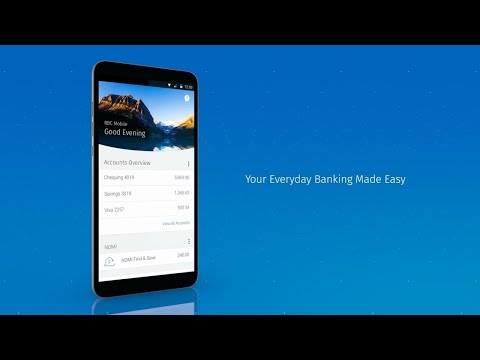
The RBC Mobile* app takes mobile banking to the next level. Everyday banking is always convenient, but our app helps make managing your money even easier. Our fresh and intuitive design gives you easy access to everything you'd expect from a banking app: account balances, money transfers, bill payments, cheque deposits, ATM locations and more. But we didn't stop there. We made it easier to find each feature with improved navigation. Our Action Button and Manage Menu take the most important tools and put them right at your fingertips. The best part? These menus are tailored to each page.
Exclusive to the RBC Mobile app, NOMI plays a big part of the app experience. NOMI Insights help you manage your day-to-day finances with personalized tips and spend trends. NOMI Find & Save helps make saving easy by taking a look at your spending habits to find a little extra money and saves it for you – so you don't have to.
We know you'll love everything the RBC Mobile app offers, and we want you to feel safe and secure using it. Starting at sign in, we've given you access to the latest in biometric identification technology, like Fingerprint, so you can securely access the app without having to remember your password. If you misplace your credit card, use the app to temporarily lock your card.
-----
PRIVACY RBC collects, uses and discloses the information that you provide to us in accordance with your account agreement(s) with us and our privacy policy, available at
http://www.rbc.com/privacysecurity/ca/our-privacy-principles.html.
Learn more about RBC digital channel privacy at http://www.rbc.com/privacysecurity/ca/online-privacy.html.
The RBC Mobile app might need to access device services for certain features, like finding nearby RBC Royal Bank® branches. For a full list of the features and for help removing the RBC Mobile app from your device, check out https://www.rbcroyalbank.com/ways-to-bank/mobile/rbc-mobile-app/android-permissions.html or you can contact mobile.feedback@rbc.com.
LEGAL
RBC does not sell, promote or otherwise provide financial services or products referred to in this app outside of Canada. You should not access this app if you are not an existing client of Royal Bank of Canada, RBC Direct Investing Inc. or RBC Dominion Securities Inc.
When you select to install the RBC Mobile app, you're consenting to any future updates or upgrades. Depending on your device, operating system or user-initiated settings, these might be automatically installed. You're able to withdraw your consent by uninstalling the RBC Mobile app from your device.
If you download the RBC Mobile app, you must review, and are subject to, the terms & conditions found under the Legal link on www.rbc.com as well as all applicable agreements between you and any RBC company, including:
- Electronic Access Agreement (Personal clients of Royal Bank of Canada)
- Business Account Agreement (Business clients of Royal Bank of Canada)
- The Operation of Account Agreement (RBC Direct Investing clients)
- General Account Agreement (RBC Dominion Securities clients)
*The RBC Mobile app is operated by:
Royal Bank of Canada
10 York Mills Rd. 3rd Floor
Toronto, ON M2P 0A2
www.rbcroyalbank.com
1-800-769-2511
mobile.feedback@rbc.com
RBC Direct Investing Inc.
Royal Bank Plaza
200 Bay Street, North Tower, P.O. Box 75
Toronto, ON, M5J 2Z5
www.rbcdirectinvesting.com
RBC Dominion Securities Inc.
155 Wellington Street West, 17th Floor
Toronto, ON, M5V 3K7
www.rbcwealthmanagement.com
®/™ Trademarks of Royal Bank of Canada. RBC and Royal Bank are registered trademarks of Royal Bank of Canada. ‡Android is a trademark of Google LLC.
Exclusive to the RBC Mobile app, NOMI plays a big part of the app experience. NOMI Insights help you manage your day-to-day finances with personalized tips and spend trends. NOMI Find & Save helps make saving easy by taking a look at your spending habits to find a little extra money and saves it for you – so you don't have to.
We know you'll love everything the RBC Mobile app offers, and we want you to feel safe and secure using it. Starting at sign in, we've given you access to the latest in biometric identification technology, like Fingerprint, so you can securely access the app without having to remember your password. If you misplace your credit card, use the app to temporarily lock your card.
-----
PRIVACY RBC collects, uses and discloses the information that you provide to us in accordance with your account agreement(s) with us and our privacy policy, available at
http://www.rbc.com/privacysecurity/ca/our-privacy-principles.html.
Learn more about RBC digital channel privacy at http://www.rbc.com/privacysecurity/ca/online-privacy.html.
The RBC Mobile app might need to access device services for certain features, like finding nearby RBC Royal Bank® branches. For a full list of the features and for help removing the RBC Mobile app from your device, check out https://www.rbcroyalbank.com/ways-to-bank/mobile/rbc-mobile-app/android-permissions.html or you can contact mobile.feedback@rbc.com.
LEGAL
RBC does not sell, promote or otherwise provide financial services or products referred to in this app outside of Canada. You should not access this app if you are not an existing client of Royal Bank of Canada, RBC Direct Investing Inc. or RBC Dominion Securities Inc.
When you select to install the RBC Mobile app, you're consenting to any future updates or upgrades. Depending on your device, operating system or user-initiated settings, these might be automatically installed. You're able to withdraw your consent by uninstalling the RBC Mobile app from your device.
If you download the RBC Mobile app, you must review, and are subject to, the terms & conditions found under the Legal link on www.rbc.com as well as all applicable agreements between you and any RBC company, including:
- Electronic Access Agreement (Personal clients of Royal Bank of Canada)
- Business Account Agreement (Business clients of Royal Bank of Canada)
- The Operation of Account Agreement (RBC Direct Investing clients)
- General Account Agreement (RBC Dominion Securities clients)
*The RBC Mobile app is operated by:
Royal Bank of Canada
10 York Mills Rd. 3rd Floor
Toronto, ON M2P 0A2
www.rbcroyalbank.com
1-800-769-2511
mobile.feedback@rbc.com
RBC Direct Investing Inc.
Royal Bank Plaza
200 Bay Street, North Tower, P.O. Box 75
Toronto, ON, M5J 2Z5
www.rbcdirectinvesting.com
RBC Dominion Securities Inc.
155 Wellington Street West, 17th Floor
Toronto, ON, M5V 3K7
www.rbcwealthmanagement.com
®/™ Trademarks of Royal Bank of Canada. RBC and Royal Bank are registered trademarks of Royal Bank of Canada. ‡Android is a trademark of Google LLC.
Better banking
Updated on
Featured stories

Safety starts with understanding how developers collect and share your data. Data privacy and security practices may vary based on your use, region, and age. The developer provided this information and may update it over time.
- No data shared with third partiesLearn more about how developers declare sharing
- This app may collect these data typesLocation, Personal info and 6 others
- Data is encrypted in transit
- You can request that data be deleted


Ratings and reviews
48.3K reviews

Emil Petkov
- Flag inappropriate
- Show review history
August 6, 2025
It works when it works 😕 I wish I could attach screenshots here... "Sorry, we are having technical issues at the moment" press "OK" "An unknown error has occurred" press "OK" Well, It's Not OK! Why can't add/modify Payees as separate function without to have to send/move finds? I wish I was able to change the transaction limit in the app. And to be able to make it more than $2000.
311 people found this review helpful

Thomas Hillyer
- Flag inappropriate
- Show review history
September 5, 2020
I have a linked US account as well as a Canadian account. The US accounts can't show up in the app. Every time I try (for the past two weeks) I just get the error "sorry were having technical issues please try later". Very annoying because it means there's no app for US accounts! Edit: rating still the same, talked to the digital team and they don't even have the steps to walk through to where the issue occurs. This issue is tied to not being able to link US & CAD accounts right now. No fix yet
18 people found this review helpful
Royal Bank of Canada
September 5, 2020
Hi Thomas! Just to confirm, do you get this error when you go into settings>linked accounts? If you sign in via the full web browser, do you see them linked in there? -- Kevin

Martin Poirier
- Flag inappropriate
- Show review history
April 8, 2025
App doesn'tload my accounts. I successfully enter my correct password. Password is accepted. App shows a loading progress bar. Then upon loading my accounts (Dominion Securities) there is a pop-up saying "Something went wrong. You'll have to sign in again" So yeah, I'm stuck in this endless loop for many weeks. Cleared app data and cache, no change. Can't use app at all. I can sign in on the website from a desktop browser with no issue. April 2025: issue above is still happening.
32 people found this review helpful
Royal Bank of Canada
April 8, 2025
Hi Martin - please ensure you've accepted the terms and conditions for each of the exchange agreements through the website. If you require assistance with this, or continue to have an issue signing in through the app, please call 1-888-820-8006 for assistance. Thanks. -- Scott
What’s new
Your security is our priority. This release includes enhanced fraud detection measures, strengthened encryption, and additional safeguards to protect your account and funds. Bank with confidence knowing your money is secure.
RBC Direct Investing
Direct Investing clients now have access to the new TipRanks Smart Score research feature with analyst consensus, price targets and more.
RBC Direct Investing
Direct Investing clients now have access to the new TipRanks Smart Score research feature with analyst consensus, price targets and more.
Everyone
Learn moreApp support
About the developer
Royal Bank of Canada
mobile.admin@rbc.com
200 Bay St
Toronto, ON M5J 2J5
Canada
+1 416-476-6405


