
Wahoo: Ride, Run, Train
3.7star
26.8K reviews
1M+
Downloads

Everyone
info
About this app
◇ Build the better athlete within yourself ◇
Wahoo harnesses the power of your phone or tablet to transform the way you ride, run, and train to reach your personalized fitness goals. Visit www.wahoofitness.com to learn more about Wahoo products.
◇ Features ◇
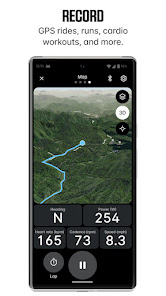
◇ Record workouts for both indoor and outdoor activities across running, cycling, strength training, and more.
◇ Visualize and manage your training zones for power and heart rate in a single place.
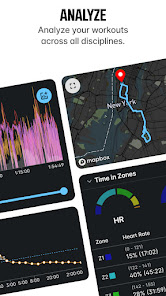
◇ Analyze your activity history from all your Wahoo devices. Get a summary of results from your entire workout, including GPS route, organized by date, and workout type.
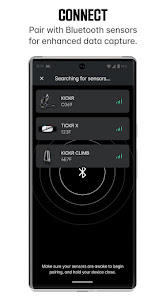
◇ Easily find and pair Bluetooth Smart sensors to track heart rate, stride rate data, cycling power, speed, cadence, and more. Even use multiple sensors at the same time.
◇ Discover, connect, and update Wahoo devices via the app. Find comprehensive setup guides to help you onboard and use Wahoo hardware.
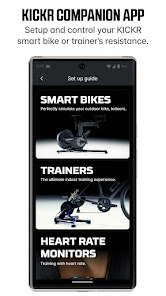
◇ Pair with KICKR smart bikes and trainers for the ultimate indoor cycling experience. Control the smart trainer in Passive, Target Power, Simulation, and Resistance modes.
◇ Get the most accurate calorie burn count when paired to a power meter or heart rate monitor. Add age, weight, and height to get your personalized caloric burn.
◇ Receive messages, phone calls, and emails on your ELEMNT devices.
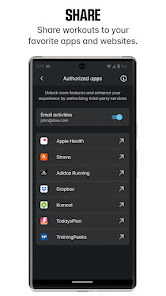
◇ Share workouts to your favorite training websites, including:
Adidas Running
Dropbox
Google Fit
Komoot
MapMyFitness
MapMyTracks
MyFitnessPal
RideWithGPS
Strava
TrainingPeaks
Share to email & export your .fit files
Please Note: Continued use of GPS running in the background can decrease battery life.
Wahoo harnesses the power of your phone or tablet to transform the way you ride, run, and train to reach your personalized fitness goals. Visit www.wahoofitness.com to learn more about Wahoo products.
◇ Features ◇
◇ Record workouts for both indoor and outdoor activities across running, cycling, strength training, and more.
◇ Visualize and manage your training zones for power and heart rate in a single place.
◇ Analyze your activity history from all your Wahoo devices. Get a summary of results from your entire workout, including GPS route, organized by date, and workout type.
◇ Easily find and pair Bluetooth Smart sensors to track heart rate, stride rate data, cycling power, speed, cadence, and more. Even use multiple sensors at the same time.
◇ Discover, connect, and update Wahoo devices via the app. Find comprehensive setup guides to help you onboard and use Wahoo hardware.
◇ Pair with KICKR smart bikes and trainers for the ultimate indoor cycling experience. Control the smart trainer in Passive, Target Power, Simulation, and Resistance modes.
◇ Get the most accurate calorie burn count when paired to a power meter or heart rate monitor. Add age, weight, and height to get your personalized caloric burn.
◇ Receive messages, phone calls, and emails on your ELEMNT devices.
◇ Share workouts to your favorite training websites, including:
Adidas Running
Dropbox
Google Fit
Komoot
MapMyFitness
MapMyTracks
MyFitnessPal
RideWithGPS
Strava
TrainingPeaks
Share to email & export your .fit files
Please Note: Continued use of GPS running in the background can decrease battery life.
Updated on
Safety starts with understanding how developers collect and share your data. Data privacy and security practices may vary based on your use, region, and age. The developer provided this information and may update it over time.


Ratings and reviews
3.7
26.2K reviews

Sam Young
- Flag inappropriate
July 8, 2024
I've been using this to track my runs and walks for a couple weeks and love all but one thing, it can't use your phone's pedometer for the cadence when running. I love the ability to analyze sections and interactive graphs. I'm also a huge fan of the customizable alerts which have allowed me to better stay in the right HR zone. Strava and MapMyFitness would use my phone pedometer and it was fairly accurate. Since Wahoo doesn't do it, when it outputs to Strava that data is lost.
1 person found this review helpful

StarlitShadows
- Flag inappropriate
June 28, 2024
I like this app. It has been consistent for me for 8 months aside from some occasional issues where I've had to force stop the app to get all my sensors to connect properly. I don't know if there is a proper channel for suggestions but it would be nice to see more customization in this app. Having used Cadence it would be nice to have more customization and metrics, the ability to add different pages and a white theme background. Map can be inconsistent and difficult to see with black background
1 person found this review helpful

Jared Meadows
- Flag inappropriate
- Show review history
June 8, 2024
Before the new UI, the app would allow sending it to the background and reading a News article when you were doing a particularly long interval and your power levels weren't going to change. That's no longer the case with this new incarnation. It is abysmal, and that is being generous! I want to read a news article during a long interval and I go back to change the power settings for the next interval. Lo and behold I am taken back to the beginning screen and the trainer starts with default vals
6 people found this review helpful
Wahoo Fitness
June 12, 2024
Hello,
Thanks for letting us know. The latest version - 6.28 - fixes the issue you are experience with recorded workouts crashing if the app is reopened from the app drawer. Please contact customer support if you continue to have issues!
- The Wahoo Team
What's new
Fixed: Bug fixes and stability improvements


