Payconiq by Bancontact
3.5star
147K reviews
1M+
Downloads

Everyone
info


About this app
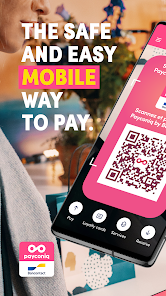
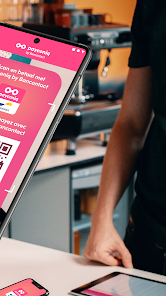
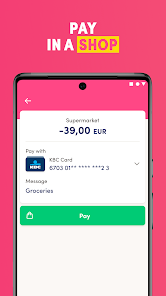
Paying friends back, buying a new pair of shoes online, paying the electricity bill quickly or settling up for those purchases in-store: it’s so quick and easy to do using the Payconiq by Bancontact app on your smartphone.
Fast, simple mobile payments are within hand’s reach. Connect your Bancontact card, link your bank account to the app and you can start making mobile payments right away. Without jeopardising security: you confirm every payment using your personal PIN code. It’s really quick and easy!
You can use the Payconiq by Bancontact app to make mobile payments anywhere you find Bancontact or Payconiq as a mobile method of payment.
This is what Payconiq by Bancontact enables you to do:
+No cash or cards needed in-store: with your smartphone in your pocket or bag, you always have your wallet with you.
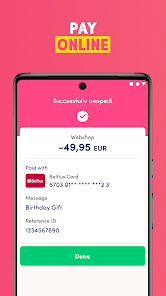
+Pay online without a card-reader: paying online has never been so simple, thanks to the app.
+Pay bills and invoices quickly by scanning a QR code.
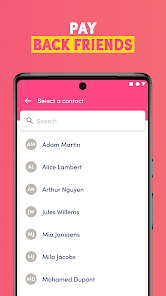
+Pay back friends and family in an instant with the app. And you can do it remotely, too!
Download the Payconiq by Bancontact app on your smartphone. For more information, visit www.payconiq.be
This Payconiq by Bancontact app stores information on your mobile device and accesses information on your mobile device to make registration and authentication possible for security reasons. The Payconiq by Bancontact app uses Google Analytics to track and analyse usage anonymously within the Payconiq by Bancontact app. By downloading, installing or using the Payconiq by Bancontact app, you agree for the Bancontact Payconiq Company to store information on your device and to access information on your device. For more information, including about how consent can be withdrawn and how you can opt out of Google Analytics, as well as your right to access, amend and object to the processing of your personal data for promotional purposes, please read the Bancontact Payconiq Company privacy regulations on www.bancontactpayconiq.com.
Fast, simple mobile payments are within hand’s reach. Connect your Bancontact card, link your bank account to the app and you can start making mobile payments right away. Without jeopardising security: you confirm every payment using your personal PIN code. It’s really quick and easy!
You can use the Payconiq by Bancontact app to make mobile payments anywhere you find Bancontact or Payconiq as a mobile method of payment.
This is what Payconiq by Bancontact enables you to do:
+No cash or cards needed in-store: with your smartphone in your pocket or bag, you always have your wallet with you.
+Pay online without a card-reader: paying online has never been so simple, thanks to the app.
+Pay bills and invoices quickly by scanning a QR code.
+Pay back friends and family in an instant with the app. And you can do it remotely, too!
Download the Payconiq by Bancontact app on your smartphone. For more information, visit www.payconiq.be
This Payconiq by Bancontact app stores information on your mobile device and accesses information on your mobile device to make registration and authentication possible for security reasons. The Payconiq by Bancontact app uses Google Analytics to track and analyse usage anonymously within the Payconiq by Bancontact app. By downloading, installing or using the Payconiq by Bancontact app, you agree for the Bancontact Payconiq Company to store information on your device and to access information on your device. For more information, including about how consent can be withdrawn and how you can opt out of Google Analytics, as well as your right to access, amend and object to the processing of your personal data for promotional purposes, please read the Bancontact Payconiq Company privacy regulations on www.bancontactpayconiq.com.
Updated on
Safety starts with understanding how developers collect and share your data. Data privacy and security practices may vary based on your use, region, and age. The developer provided this information and may update it over time.

No data shared with third parties
Learn more about how developers declare sharing

This app may collect these data types
Personal info, Financial info and 3 others

Data is encrypted in transit

You can request that data be deleted
Ratings and reviews
3.4
145K reviews

Andre Vass
- Flag inappropriate
July 4, 2024
As a Non-European person using their system at a music festival and trying to navigate a reimbursement. Wow - could it be any more horrible. Modern day torture. Who wants to spend their life on a smart phone trying to fault find multiple technical issues - with poor support communication. Horrific
1 person found this review helpful

John Smith
- Flag inappropriate
June 13, 2024
When setting up the app crashed several times then it blocked me because I tried too many times! Useless!!!
Bancontact Payconiq Company NV/SA
July 1, 2024
Dear John Smith, thank you for your feedback and our apologies for the inconvenience. Could you send us an email at support@payconiq.be with a description of your problem? We will look together with you to find a solution.
Kind regards, the Payconiq by Bancontact team.

Tim Langens
- Flag inappropriate
- Show review history
May 25, 2024
After finally succeeding in setting up my account. The app plays irritating sounds with every payment. There is no setting to turn this off.
2 people found this review helpful
Bancontact Payconiq Company NV/SA
May 27, 2024
Dear Tim Langens, thank you for your feedback and our apologies for the inconvenience. We have noted your experiences with the app and see how we can improve our product in the future. Kind regards, the Payconiq by Bancontact team.
What's new
Thank you for using our app to make mobile payments in store, online or between friends and family.
This update corrects some technical errors and introduces some visual improvements.
This update corrects some technical errors and introduces some visual improvements.


