BofA Global Card Access
1.7star
714 reviews
100K+
Downloads

Everyone
info

About this app
Manage your Corporate Card on-the-go with the BofA Global Card Access app!
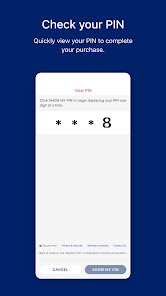
With the BofA Global Card Access mobile app, managing your Corporate, Purchasing, or Commercial Card is just a tap away! The self-service tools available help you view key account information, manage alerts, and make payments anytime, anywhere! You must have received a Bank of America Corporate, Purchasing, or Commercial Card from your employer in order to use this app.
Features Include:
•Biometric Login: compatibility with both face and fingerprint biometric options for enhanced security and seamless sign-in;
•Card Registration: register and activate your card all at once;
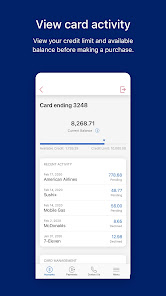
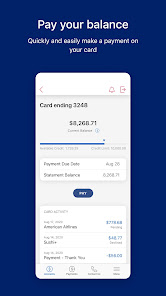
•Account Dashboard: view key card account details like credit limit, current balance, available credit, and recent activity;
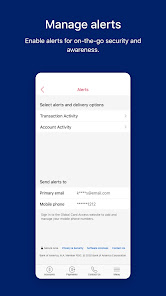
•Manage Alerts: enable key alerts for on-the-go security and awareness;
•Profile Information: view and manage your profile and contact information;
•View Statements: view, save, and share statement PDFs;
•Make Payments: manage your bank accounts and securely pay your statement balances (NA accounts only);
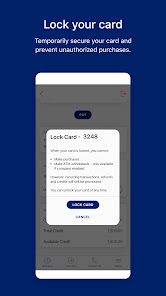
•Lock Card: temporarily lock your card to prevent unauthorized activity;
•Purchase Verification: verify your online purchases (EMEA accounts only);
Global Card Access has libraries which use VPN services only for security purposes.
With the BofA Global Card Access mobile app, managing your Corporate, Purchasing, or Commercial Card is just a tap away! The self-service tools available help you view key account information, manage alerts, and make payments anytime, anywhere! You must have received a Bank of America Corporate, Purchasing, or Commercial Card from your employer in order to use this app.
Features Include:
•Biometric Login: compatibility with both face and fingerprint biometric options for enhanced security and seamless sign-in;
•Card Registration: register and activate your card all at once;
•Account Dashboard: view key card account details like credit limit, current balance, available credit, and recent activity;
•Manage Alerts: enable key alerts for on-the-go security and awareness;
•Profile Information: view and manage your profile and contact information;
•View Statements: view, save, and share statement PDFs;
•Make Payments: manage your bank accounts and securely pay your statement balances (NA accounts only);
•Lock Card: temporarily lock your card to prevent unauthorized activity;
•Purchase Verification: verify your online purchases (EMEA accounts only);
Global Card Access has libraries which use VPN services only for security purposes.
Updated on
Safety starts with understanding how developers collect and share your data. Data privacy and security practices may vary based on your use, region, and age. The developer provided this information and may update it over time.

No data shared with third parties
Learn more about how developers declare sharing

This app may collect these data types
Personal info and Financial info

Data is encrypted in transit

You can request that data be deleted
Ratings and reviews
1.8
683 reviews

Dave Hassett
- Flag inappropriate
January 30, 2026
Pretty basic, does the job. For those struggling with the Terms and Conditions acceptance, you can scroll down by long-holding on some of the text (to enter text selection mode), then dragging down until you see the web page footer. Doesn't inspire much confidence...
3 people found this review helpful

Lily Elrick
- Flag inappropriate
February 19, 2026
I can't even get past the Terms and Conditions screen. It says I have to "scroll down to accept", but the page won't scroll. There's only a very small section at the top that will register my fingers, and once that's moved upward off the screen, the page won't scroll any further. I've tried reinstalling the app twice. That's an incredibly stupid bug that should be easy to fix.
2 people found this review helpful

adam eccles
- Flag inappropriate
February 14, 2026
Actively slowing my phone down. Samsung optimising agent keeps advising me to put it to sleep as it keeps crashing for no reason whatsoever. Additionally, un related to the app, more the card itself, I've been stuck in Germany and Kuwait on business trips before and the Bank of America crack IT teams have decided to do "maintenance" on the accounts/cards/whatever during their night/our day that effectively stopped me being able to pay with my card for anything. Terrible.
1 person found this review helpful
What’s new
Security Enhancements
- Additional measures have been introduced to further support the security of your account.
- Enhanced authentication for online transactions to help keep your payments secure (APAC Region Only).
Upgraded Experience
- Improved decline messages so you know why a payment didn't go through.
- Ongoing fixes for a smoother, more reliable app experience.
- Additional measures have been introduced to further support the security of your account.
- Enhanced authentication for online transactions to help keep your payments secure (APAC Region Only).
Upgraded Experience
- Improved decline messages so you know why a payment didn't go through.
- Ongoing fixes for a smoother, more reliable app experience.
App support
About the developer
Bank Of America, National Association
mobileappdeployment@bofa.com
17100 NW 59th Ave
Hialeah, FL 33015
United States
+1 980-683-5288


