SURFboard Central
2.1star
1.89K reviews
100K+
Downloads

Everyone
info



About this app
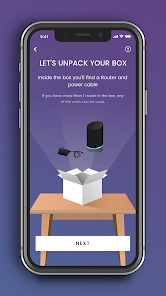
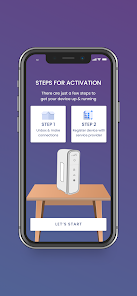
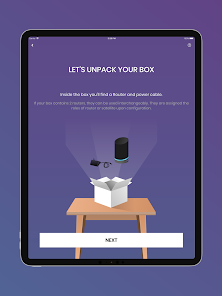
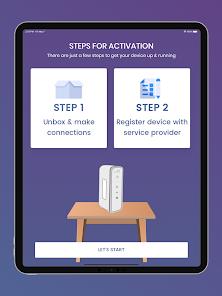
Thank you for purchasing a SURFboard product! Simply download this application, select the device model, and follow the on-screen instructions to setup your device.
This single (Central) mobile application will support all our current SURFboard devices.
Cable Modems:
- Models: S33, S34, SB6141, SB6121, SB6183, SB6190, SB8200, SBV3202, SBV2402, T25.
- Step-by-step install guide includes help for device activation by your Cable Internet Service Provider.
- Access to device information, help, and technical support.
- Quick launch the device Web Application for device configuration and management.
Cable Modems with Wi-Fi:
- Models: G18, G20, G34, G36, G54, SBG10, SBG6950, SBG7400, SBG7580, SBG7600, SBG8300
- Step-by-step install guide includes help for device activation by your Cable Internet Service Provider.
- Access to device information, help, and technical support.
- Use the device Web Application OR the mobile app for device configuration and management.
- Easy to use Wi-Fi management functions.
mAX Wi-Fi Mesh Routers:
- Models: W11, W121, W122, W21, W30, W31, W61, WC4S, WC4T
- Step-by-step install guide includes help for optimal mesh node placement in your home for performance and coverage.
- Easy to use Wi-Fi management and enhanced mAX features*.
Wi-Fi Gaming and Extenders:
- Models: W6B, W6U
- Step-by-step install guide.
- Access to device information, help, and technical support.
- Quick launch the device Web Application for device configuration and management.
--- Easy to use Wi-Fi management functions ---
- Manage your Wi-Fi network when you are at home or away.
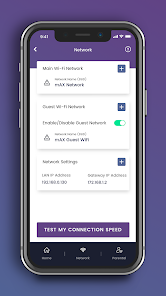
- Setup a private and secure home Wi-Fi network.
- Setup a separate Guest network for visitors.
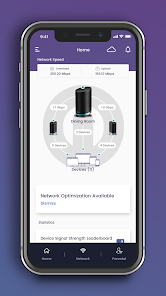
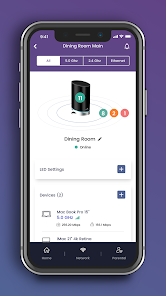
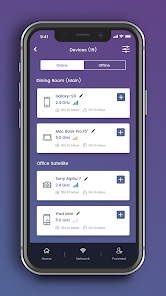
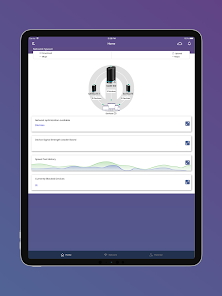
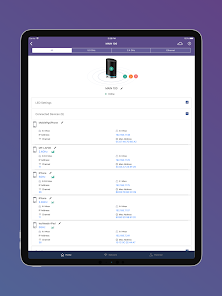
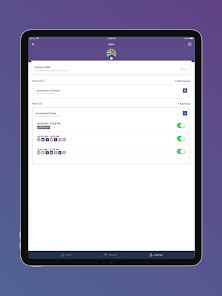
- View client devices connected to your network.
- Add friendly names for each client device.
- Check your mobile device real-time Wi-Fi speed.
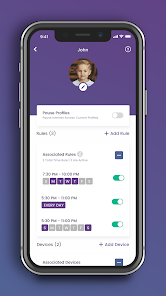
- Create profiles for your kids to manage their screen time, allowing schedule or manual Internet pause.
--- Enhanced mAX features ---
- Get notified when selected device leave or join your home network.
- Enhance your parental controls with "screen" time rewards.
- Network Health monitoring with recommendations for optimization.
For additional help, please visit the SURFboard User Community at https://community.surfboard.com/
For device technical details and support, please visit SURFboard Support at https://www.surfboard.com/support/resources/
* Not all enhanced mAX features are available on W61, WC4S, and WC4T
This single (Central) mobile application will support all our current SURFboard devices.
Cable Modems:
- Models: S33, S34, SB6141, SB6121, SB6183, SB6190, SB8200, SBV3202, SBV2402, T25.
- Step-by-step install guide includes help for device activation by your Cable Internet Service Provider.
- Access to device information, help, and technical support.
- Quick launch the device Web Application for device configuration and management.
Cable Modems with Wi-Fi:
- Models: G18, G20, G34, G36, G54, SBG10, SBG6950, SBG7400, SBG7580, SBG7600, SBG8300
- Step-by-step install guide includes help for device activation by your Cable Internet Service Provider.
- Access to device information, help, and technical support.
- Use the device Web Application OR the mobile app for device configuration and management.
- Easy to use Wi-Fi management functions.
mAX Wi-Fi Mesh Routers:
- Models: W11, W121, W122, W21, W30, W31, W61, WC4S, WC4T
- Step-by-step install guide includes help for optimal mesh node placement in your home for performance and coverage.
- Easy to use Wi-Fi management and enhanced mAX features*.
Wi-Fi Gaming and Extenders:
- Models: W6B, W6U
- Step-by-step install guide.
- Access to device information, help, and technical support.
- Quick launch the device Web Application for device configuration and management.
--- Easy to use Wi-Fi management functions ---
- Manage your Wi-Fi network when you are at home or away.
- Setup a private and secure home Wi-Fi network.
- Setup a separate Guest network for visitors.
- View client devices connected to your network.
- Add friendly names for each client device.
- Check your mobile device real-time Wi-Fi speed.
- Create profiles for your kids to manage their screen time, allowing schedule or manual Internet pause.
--- Enhanced mAX features ---
- Get notified when selected device leave or join your home network.
- Enhance your parental controls with "screen" time rewards.
- Network Health monitoring with recommendations for optimization.
For additional help, please visit the SURFboard User Community at https://community.surfboard.com/
For device technical details and support, please visit SURFboard Support at https://www.surfboard.com/support/resources/
* Not all enhanced mAX features are available on W61, WC4S, and WC4T
Updated on
Safety starts with understanding how developers collect and share your data. Data privacy and security practices may vary based on your use, region, and age. The developer provided this information and may update it over time.

No data shared with third parties
Learn more about how developers declare sharing

This app may collect these data types
Location, Personal info and 4 others

Data is encrypted in transit

You can request that data be deleted
Ratings and reviews
2.0
1.84K reviews

NCblast
- Flag inappropriate
November 24, 2025
Horrible software. Connecting the w161 mesh router to the modem requires nothing short of a miracle. It gets stuck on the "Connecting your system to the back office" screen. Want to add satellites to your mesh system? Forget about it. If by some miracle you can get it all to work, it will keep disconnecting and frustrate you even more. Stay away from this brand.
5 people found this review helpful

Jamie Prisco
- Flag inappropriate
November 24, 2025
Seriously awful app. Gives illusion of control but usually stops working and doesnt keep changes that you request. Won't properly refresh or connect, constantly prompts you to onboard, even after you already set things up. Frustrating experience. It was like this years back when I had a different SB, I don't expect they'll ever fix it. Should have bought a different brand, knowing what I know--sadly Xfinity only gives you a few choices.
6 people found this review helpful

Patrice Gremeau
- Flag inappropriate
September 28, 2025
This app is the worst thing possible to manage your router(s). I find it easier to use the Web UI to do specific settings, but this app tries to manage the credentials (email/password) and often I find out I can no longer log in and, since there is no reset password option, I have to reset the router and restart from scratch. In addition, I'm managing routers at two locations, same model, and this app makes things even more difficult. Please avoid.
20 people found this review helpful
What’s new
- Minor bug fixes.
- Update for Android 14 (and above) that caused failure in early router Bluetooth installation.
- Update for Android 14 (and above) that caused failure in early router Bluetooth installation.
App support
About the developer
Vantiva USA LLC
ganesh.nagarajan@vantiva.com
4855 Peachtree Industrial Blvd Ste 200
Norcross, GA 30092
United States
+91 98803 08337


