My TTS: Text to Speech Reader
Contains adsIn-app purchases
3.7star
777 reviews

Everyone
info
100K+
Downloads

About this app
Tired of staring at screens? Let My TTS read it for you!
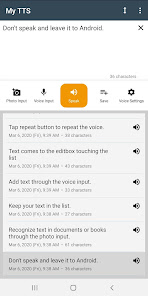
Transform any text into natural-sounding speech — perfect for commuting, multitasking, or when you simply prefer listening over reading. Read aloud emails, articles, documents, PDFs, or your favorite book. Give your eyes a break and listen comfortably, hands-free.
◆ Effortless Text Input
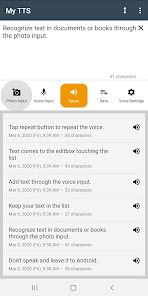
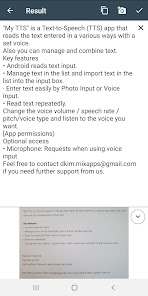
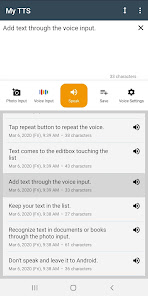
Paste text directly, use photo input (OCR) to capture text from images, or dictate using voice input. Getting text into the app is quick and easy — just sit back and let My TTS do the talking.
◆ Personalized Listening
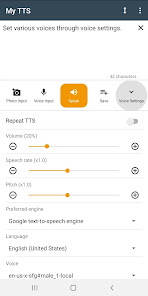
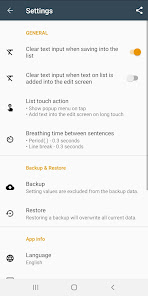
Fine-tune volume, speech rate, pitch, and voice type. Adjust breathing time between sentences for a natural listening pace. Create the perfect voice that reads just the way you like it.
◆ Manage & Organize
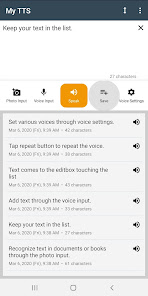
Keep your text organized with built-in list management. Save and import text for quick access and repeated listening — ideal for study notes, long articles, or important messages.
◆ Save & Share Audio
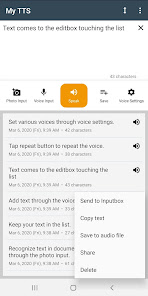
Convert text to audio files and share them with friends, family, or colleagues. Perfect for saving articles, stories, or notes to listen to later — anytime, anywhere.
◆ Hands-Free Convenience
Perfect for commuting, exercising, cooking, or relaxing. Let My TTS read aloud while you focus on other things.
Note: Starting from Samsung One UI 7.0, the Samsung TTS engine is no longer available. We recommend using the Google TTS engine instead.
Permissions (optional):
- Microphone — used for voice input only.
Need help? Contact us: dkim.mixapps@gmail.com
Transform any text into natural-sounding speech — perfect for commuting, multitasking, or when you simply prefer listening over reading. Read aloud emails, articles, documents, PDFs, or your favorite book. Give your eyes a break and listen comfortably, hands-free.
◆ Effortless Text Input
Paste text directly, use photo input (OCR) to capture text from images, or dictate using voice input. Getting text into the app is quick and easy — just sit back and let My TTS do the talking.
◆ Personalized Listening
Fine-tune volume, speech rate, pitch, and voice type. Adjust breathing time between sentences for a natural listening pace. Create the perfect voice that reads just the way you like it.
◆ Manage & Organize
Keep your text organized with built-in list management. Save and import text for quick access and repeated listening — ideal for study notes, long articles, or important messages.
◆ Save & Share Audio
Convert text to audio files and share them with friends, family, or colleagues. Perfect for saving articles, stories, or notes to listen to later — anytime, anywhere.
◆ Hands-Free Convenience
Perfect for commuting, exercising, cooking, or relaxing. Let My TTS read aloud while you focus on other things.
Note: Starting from Samsung One UI 7.0, the Samsung TTS engine is no longer available. We recommend using the Google TTS engine instead.
Permissions (optional):
- Microphone — used for voice input only.
Need help? Contact us: dkim.mixapps@gmail.com
Updated on
Safety starts with understanding how developers collect and share your data. Data privacy and security practices may vary based on your use, region, and age. The developer provided this information and may update it over time.

This app may share these data types with third parties
App info and performance

No data collected
Learn more about how developers declare collection

Data is encrypted in transit

Data can’t be deleted
Ratings and reviews
3.8
724 reviews

Sir Ben Potater
- Flag inappropriate
- Show review history
May 6, 2021
Gr8! Really good updates, well done! *my request: 1) while in "voice settings", after selecting "voice", it would be nice if you could have an on screen button that allows you to test each type of voice while on that screen. Eg. in "Language" > "English UK", the "voice" screen shows 13 options (some male, some female). If you could hear a small sample of any voice before selecting it, this would save a lot of back & forth from the reading screen in order to hear the voice for the style you need.
58 people found this review helpful

Pauline Turner
- Flag inappropriate
September 17, 2020
I've not used this app yet but straight away the ads annoyed me so I was going to upgrade to the premium version until I saw that it was a monthly subscription which, over a year, will amount to a lot; something in the region of £15 per year That doesn'tsound very much but comparing it like for like with other apps; daylight robbery and I will be deleting this app as soon as I have finished this review. Save your money people and stop encouraging "legal" robbery!!
23 people found this review helpful

Arghya Panja
- Flag inappropriate
June 2, 2020
This app is not useful as I thought. When i uploaded a handwritten image it converted to a text full of mistakes ( thats ok may be my handwriting is not that good) the minimum audio playback speed is way higher than maximum writing speed. I found this the worst drawback of this app.as the minimum playback speed is very higher so i decided to pause and resume the audio when writing in notebook but every time i resume it starts over from the beginning of the text. There should be writeable speed.
43 people found this review helpful
What’s new
- Improvements for app stability
App support
About the developer
믹스앱스
dkim.mixapps@gmail.com
대한민국 10579 경기도 고양시
덕양구 통일로 374, 104동 2101호(신원동, 신원마을1단지 우남퍼스트빌)
+82 10-8722-9700


