
LastPass Authenticator
4.4star
14.4K reviews
1M+
Downloads

Everyone
info

About this app
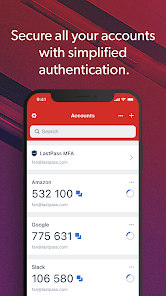
LastPass Authenticator offers effortless two-factor authentication for your LastPass account and other supported apps. With one-tap verification and secure cloud backup, LastPass Authenticator gives you all the security, without any of the frustration.
ADD MORE SECURITY
Safeguard your LastPass account by requiring two-factor authentication codes when signing in. Two-factor authentication improves your digital security by protecting your account with an additional login step. Even if your password is compromised, your account can’t be accessed without the two-factor authentication code.
You can even mark a device as “trusted”, so you won’t be prompted for codes on that device while your account remains protected by two-factor authentication.
TURNING IT ON
To turn on LastPass Authenticator for your LastPass account:
1. Download LastPass Authenticator to your mobile device.
2. Log in to LastPass on your computer and launch “Account Settings” from your vault.
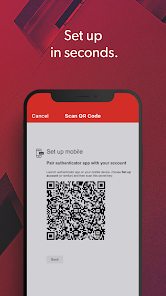
3. In “Multifactor Options”, edit LastPass Authenticator and view the barcode.
4. Scan the barcode with the LastPass Authenticator app.
5. Set your preferences and save your changes.
LastPass Authenticator can also be turned on for any service or app that supports Google Authenticator or TOTP-based two-factor authentication.
LOGGING IN
To login to your LastPass account or other supported vendor service:
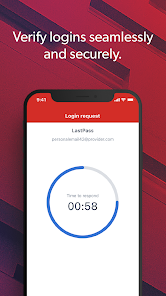
1. Open the app to generate a 6-digit, 30-second code OR approve/deny an automated push notification
2. Alternatively, send SMS code
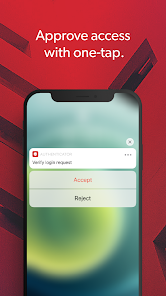
3. Enter the code into the login prompt on your device OR hit approve/deny request
FEATURES
- Generates 6-digit codes every 30 seconds
- Push notifications for one-tap approval
- Free encrypted backup to restore your tokens on a new/reinstalled device
- Support for SMS codes
- Automated set-up via QR code
- Support for LastPass accounts
- Support for other TOTP-compatible services and apps (including any that support Google Authenticator)
- Add multiple accounts
- Available on Android and iOS
ADD MORE SECURITY
Safeguard your LastPass account by requiring two-factor authentication codes when signing in. Two-factor authentication improves your digital security by protecting your account with an additional login step. Even if your password is compromised, your account can’t be accessed without the two-factor authentication code.
You can even mark a device as “trusted”, so you won’t be prompted for codes on that device while your account remains protected by two-factor authentication.
TURNING IT ON
To turn on LastPass Authenticator for your LastPass account:
1. Download LastPass Authenticator to your mobile device.
2. Log in to LastPass on your computer and launch “Account Settings” from your vault.
3. In “Multifactor Options”, edit LastPass Authenticator and view the barcode.
4. Scan the barcode with the LastPass Authenticator app.
5. Set your preferences and save your changes.
LastPass Authenticator can also be turned on for any service or app that supports Google Authenticator or TOTP-based two-factor authentication.
LOGGING IN
To login to your LastPass account or other supported vendor service:
1. Open the app to generate a 6-digit, 30-second code OR approve/deny an automated push notification
2. Alternatively, send SMS code
3. Enter the code into the login prompt on your device OR hit approve/deny request
FEATURES
- Generates 6-digit codes every 30 seconds
- Push notifications for one-tap approval
- Free encrypted backup to restore your tokens on a new/reinstalled device
- Support for SMS codes
- Automated set-up via QR code
- Support for LastPass accounts
- Support for other TOTP-compatible services and apps (including any that support Google Authenticator)
- Add multiple accounts
- Available on Android and iOS
Updated on
Safety starts with understanding how developers collect and share your data. Data privacy and security practices may vary based on your use, region, and age. The developer provided this information and may update it over time.


Ratings and reviews
4.4
14K reviews

Robby Bennett
- Flag inappropriate
- Show review history
May 9, 2024
Pros: There are so many options to export/import (QR code, JSON file, and LastPass server.) It has sorting(manually and automatically) and grouping. It can be locked with a passcode and fingerprint. It shows the next code when the current code is red and expiring. It's the best. Cons: An annoying popup appears when the nwtwork is disabled. The rows of the Accounts are too tall. The text is much larger than my default device font. Too much scrolling.
38 people found this review helpful

Rick
- Flag inappropriate
- Show review history
May 3, 2024
I've tried other Password Managers and not many have the option of using an Authenticator to set up the Password Manager account. It was pretty straight forward on setting up on my new phone also. I've had Password Manager for a couple of years now and so far I haven't had issues with it, plus there might be more robust and more secure Managers but this one is secure and it isn't as difficult to set up or use
10 people found this review helpful

Trevor Waters
- Flag inappropriate
June 17, 2024
After the most recent update to this app every time I open it my phone becomes unresponsive to touch inputs and I get a pop up saying system process is unresponsive. The only way to get around this is to restart my phone which sometimes I have to do a hard power off because even the power off screen doesn't function properly. Seriously considering switching to another password manager as how this is even possible blows my mind. OnePlus 11 running Android 14 with the March 2024 security update.
2 people found this review helpful
What's new
This version of the app includes several new features and minor UI improvements. Most notably, users are now able to display their TOTP codes in a different format. We have also built a feature that allows for users to notify us of QR codes that do not work and we now display more information on push notifications allowing for users to better determine whether to accept or reject these notification.


