
Trello: Organize anything!

3,9star
122K avis
10M+
Téléchargements
Choix de l'équipe

Tout public
info




À propos de l'application
No more lost sticky notes or searching for bookmarked messages across apps. With Trello on your phone, you can use the app while on-the-go to:
* List out your to-dos while on-the-go: Instantly capture tasks, ideas, and notes right from your phone into a Trello card—add due dates, comments, checklists, descriptions, files, and more. Save messages from popular work apps like Slack or Microsoft Teams, snap a photo, and forward emails to Trello. AI can also help summarize your saved to-dos into a Trello card so that nothing slips through the cracks.
* Centralize your work: Everything captured lands as a card in your Trello Inbox, making it easy to review, prioritize, and organize your work across boards. See your scheduled day in Trello Planner, synced with your Google or Outlook calendars. Standard and Premium users can also enable Planner to schedule focus time in completing saved to-dos.
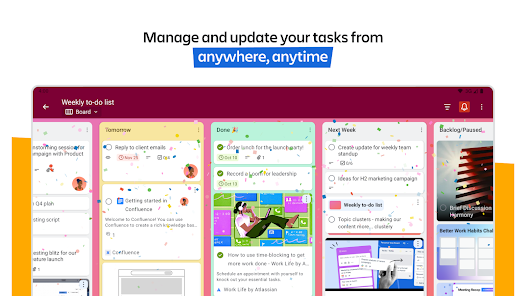
* Create beautiful, flexible boards: Organize your captured cards into customizable kanban boards and lists, tailored to your workflow. Trello’s tactile and visual mobile interface, featuring drag-and-drop gestures and smooth transitions between boards, offers a natural way to plan your work on a mobile device.
* Capture work right in the Android widget: Create new cards right from your Android phone home screen without having to open the app.
* Easily see your entire schedule: With Trello’s Planner enabled with your Google or Outlook calendar, you can see what you have scheduled for your day (and set aside focus time on what you’ve captured in Trello cards to get done later).
* Get reminders that work for you: Set up push notifications to get timely alerts for the updates you care about like due dates or changes to your card.
* Work offline: Capture ideas and update boards even without internet—your changes sync automatically when you’re back online.
Download Trello and experience a new era of personal productivity. It’s free!
Where you use features that require your device’s photos, camera, microphone, or contacts, we will request permission before accessing that data.
* List out your to-dos while on-the-go: Instantly capture tasks, ideas, and notes right from your phone into a Trello card—add due dates, comments, checklists, descriptions, files, and more. Save messages from popular work apps like Slack or Microsoft Teams, snap a photo, and forward emails to Trello. AI can also help summarize your saved to-dos into a Trello card so that nothing slips through the cracks.
* Centralize your work: Everything captured lands as a card in your Trello Inbox, making it easy to review, prioritize, and organize your work across boards. See your scheduled day in Trello Planner, synced with your Google or Outlook calendars. Standard and Premium users can also enable Planner to schedule focus time in completing saved to-dos.
* Create beautiful, flexible boards: Organize your captured cards into customizable kanban boards and lists, tailored to your workflow. Trello’s tactile and visual mobile interface, featuring drag-and-drop gestures and smooth transitions between boards, offers a natural way to plan your work on a mobile device.
* Capture work right in the Android widget: Create new cards right from your Android phone home screen without having to open the app.
* Easily see your entire schedule: With Trello’s Planner enabled with your Google or Outlook calendar, you can see what you have scheduled for your day (and set aside focus time on what you’ve captured in Trello cards to get done later).
* Get reminders that work for you: Set up push notifications to get timely alerts for the updates you care about like due dates or changes to your card.
* Work offline: Capture ideas and update boards even without internet—your changes sync automatically when you’re back online.
Download Trello and experience a new era of personal productivity. It’s free!
Where you use features that require your device’s photos, camera, microphone, or contacts, we will request permission before accessing that data.
Date de mise à jour
La sécurité, c'est d'abord comprendre comment les développeurs collectent et partagent vos données. Les pratiques concernant leur confidentialité et leur protection peuvent varier selon votre utilisation, votre région et votre âge. Le développeur a fourni ces informations et peut les modifier ultérieurement.

Aucune donnée partagée avec des tiers
En savoir plus sur la manière dont les développeurs déclarent le partage

Cette appli peut recueillir ces types de données
Informations personnelles, Photos et vidéos et 6 autres

Les données sont chiffrées lors de leur transfert

Vous pouvez demander la suppression des données
Notes et avis
4,0
113K avis
Nouveautés
- Bug fixes and performance improvements
Assistance de l'appli
À propos du développeur
ATLASSIAN PTY LTD
playstore@atlassian.com
L 6 341 George St
Sydney NSW 2000
Australia
+61 2 9189 1963


