
KeyBank Mobile Banking
4.5star
86.6K reviews
1M+
Downloads

Everyone
info
About this app
Take control of your money and bank the way you want to bank – anytime, anywhere. The KeyBank mobile banking app is free, fast, and secure with features that are streamlined for today’s on-the-go world:
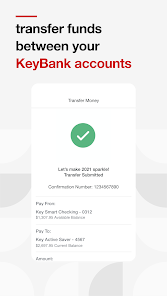
● Easily transfer funds between bank accounts
● Pay bills
● Send money to friends and family
● Open a checking or savings account
● Deposit checks on the app
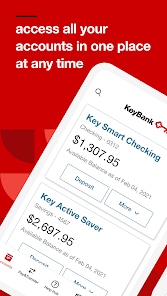
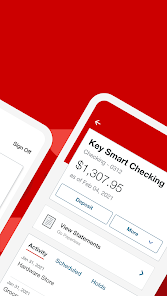
● Monitor and manage bank accounts and cards
● View KeyBank credit card rewards points
Safe and Secure Online Banking
Confidently use the KeyBank mobile banking app without compromising your personal banking information. It’s backed with a multitude of safety and security features, including:
● Same high-level security used for KeyBank Online Banking
● User ID and password required to access banking app†
● Secure connection to view banking account and transaction details
● No banking information is stored on your Android™ device to minimize risk if your mobile phone or tablet is lost or stolen
Convenient Banking on the Go
Easily manage your personal finances when and where it’s most convenient for you and your schedule. With the KeyBank mobile banking app, you can:
● View account balances and recent transactions with one swipe using QuickView
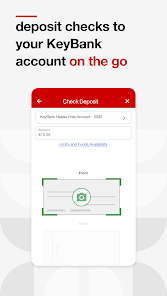
● Deposit checks right from your mobile device without having to visit a KeyBank branch or ATM
● Transfer funds between your KeyBank checking and savings accounts
● Open an account right from your mobile device
● Search and view your banking transaction history for the last 90 days
● Access your KeyBank account statements and tax forms
● Review and manage scheduled Online Bill Pay payments and transfers
● Send money to existing payees and add new payees
● Search for KeyBank branch and ATM locations
Personalized Mobile Banking Settings
Customize your in-app experience for your unique needs and preferences with account settings and seamless access to the KeyBank features and products you use:
● Add a profile picture
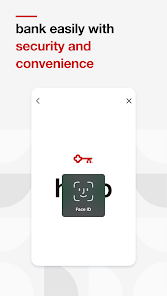
● Set up fingerprint or face ID sign in capabilities
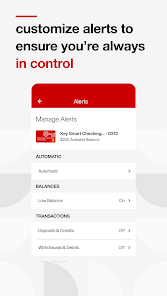
● Manage and edit account alerts
● Access your credit card Reward Points balance
Connect with KeyBank
Please call 1-800-539-1539 if you have questions about the mobile banking app or need additional help or support.
Follow KeyBank on social media:
● Twitter: twitter.com/keybank
● Facebook: facebook.com/keybank
● LinkedIn: linkedin.com/company/keybank/
● YouTube: youtube.com/user/keybankcommunity/
● Instagram: instagram.com/keybank/
Important Disclosures
† Anyone can download, but you must be enrolled in KeyBank Online Banking to use the app.
Android™ is a trademark of Google Inc. Use of this trademark is subject to Google permissions.
©2024 KeyCorp. Member FDIC.
● Easily transfer funds between bank accounts
● Pay bills
● Send money to friends and family
● Open a checking or savings account
● Deposit checks on the app
● Monitor and manage bank accounts and cards
● View KeyBank credit card rewards points
Safe and Secure Online Banking
Confidently use the KeyBank mobile banking app without compromising your personal banking information. It’s backed with a multitude of safety and security features, including:
● Same high-level security used for KeyBank Online Banking
● User ID and password required to access banking app†
● Secure connection to view banking account and transaction details
● No banking information is stored on your Android™ device to minimize risk if your mobile phone or tablet is lost or stolen
Convenient Banking on the Go
Easily manage your personal finances when and where it’s most convenient for you and your schedule. With the KeyBank mobile banking app, you can:
● View account balances and recent transactions with one swipe using QuickView
● Deposit checks right from your mobile device without having to visit a KeyBank branch or ATM
● Transfer funds between your KeyBank checking and savings accounts
● Open an account right from your mobile device
● Search and view your banking transaction history for the last 90 days
● Access your KeyBank account statements and tax forms
● Review and manage scheduled Online Bill Pay payments and transfers
● Send money to existing payees and add new payees
● Search for KeyBank branch and ATM locations
Personalized Mobile Banking Settings
Customize your in-app experience for your unique needs and preferences with account settings and seamless access to the KeyBank features and products you use:
● Add a profile picture
● Set up fingerprint or face ID sign in capabilities
● Manage and edit account alerts
● Access your credit card Reward Points balance
Connect with KeyBank
Please call 1-800-539-1539 if you have questions about the mobile banking app or need additional help or support.
Follow KeyBank on social media:
● Twitter: twitter.com/keybank
● Facebook: facebook.com/keybank
● LinkedIn: linkedin.com/company/keybank/
● YouTube: youtube.com/user/keybankcommunity/
● Instagram: instagram.com/keybank/
Important Disclosures
† Anyone can download, but you must be enrolled in KeyBank Online Banking to use the app.
Android™ is a trademark of Google Inc. Use of this trademark is subject to Google permissions.
©2024 KeyCorp. Member FDIC.
Updated on
Safety starts with understanding how developers collect and share your data. Data privacy and security practices may vary based on your use, region, and age. The developer provided this information and may update it over time.


Ratings and reviews
4.5
85.1K reviews

Jeannine Hannum
- Flag inappropriate
- Show review history
November 25, 2025
I would give 5 stars except the feature to deposit checks via the app no longer works for me. It crashes every time I try to take a picture of the check. Sometimes I can take a picture of the front of the check successfully but it can never take the back picture without crashing. I've tried uninstalling and reinstalling the app and it makes no difference.
2 people found this review helpful
KeyBank, N.A.
November 25, 2025
Hello Jeannine, thank you for reaching out. We are sorry to hear about your difficulties. Please make sure that you are in a well lit room, that the camera lens is clean and that you have a strong WiFi signal. That should fix this issue for you. Please call 1-800-539-1539 if you require further assistance. We are here to help. Thank you.^CH

Jeff Christensen1
- Flag inappropriate
- Show review history
December 4, 2025
ETA: After I logged in on my laptop I was able to log in through the app as well. whether or not my VPN was the problem I can't say. But I am signed in this morning with my VPN engaged, so... all's well that ends well. Thank you for the assist. Original: It's been a good app, but it suddenly just started freezing on the opening page with the name and the logo. It won't go any further - It will not load. I finally deleted the app and reinstalled it. It's still frozen and won't open for me.
1 person found this review helpful
KeyBank, N.A.
December 4, 2025
Hi Jeff - If you are using a VPN app on your device, please temporarily pause the VPN and attempt to sign on to the KeyBank App again. Feel free to email us at KeyBank_Help@KeyBank.com for additional troubleshooting or call to speak with a Digital Specialist at 1-800-539-1539. Thanks, ^DD

Cory Sheaffer
- Flag inappropriate
November 12, 2025
App doesn't open 90% of the time requiring a re-install to get access. I've reverted to using the website in many cases. When it works, it's great. I have nothing weird setup: I'm not using a VPN, I have 2 Gigabit internet speeds, clearing cache doesn't fix it, restarting the phone occasionally does, I'm on a Galaxy S24 plus. App just sits and loads indefinitely. Probably the 8th time I've reinstalled this year.
31 people found this review helpful
KeyBank, N.A.
November 13, 2025
Hi Cory - Please give our Digital Specialists a call to further review your online banking profile. They can be reached at 1-800-539-1539 available Monday through Friday: 7:00am-Midnight ET; Saturday and Sunday: 8:00am-9:00pm ET. Thank you, ^DD
What’s new
- Updates to maintain your security
- Bug Fixes
Thank you for using the KeyBank app!
Based on your valuable feedback, we'll continue to enhance the app through regular updates
- Bug Fixes
Thank you for using the KeyBank app!
Based on your valuable feedback, we'll continue to enhance the app through regular updates
App support
phone
Phone number
+18005391539
About the developer
KeyBank National Association
fsm@keybank.com
127 Public Sq Ste 5600
Cleveland, OH 44114
United States
+1 800-539-1539


