
HERE WeGo: Maps & Navigation
3.6star
501K reviews
10M+
Downloads

PEGI 3
info


About this app
Welcome to the new HERE WeGo!
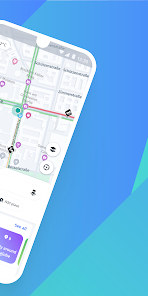
HERE WeGo is a free navigation app that guides local and global travelers on journeys both familiar and foreign. The app now has a fresh, new design and clearer, easier to use navigation.
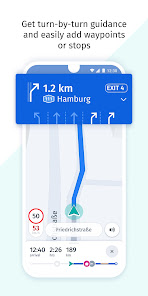
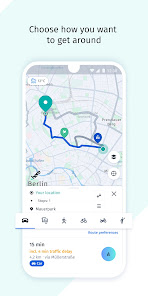
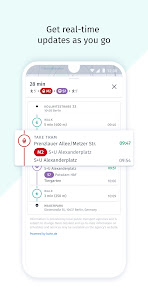
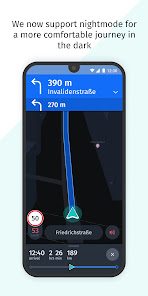
Enjoy a more carefree journey and reach your destination effortlessly, however you need to get there. Get there on foot with easy-to-follow walk guidance. Take public transport in more than 1,900 cities around the world. Or use turn-by-turn voice guidance with accurate driving directions and go by car. You can even find parking at your destination and get guided directly to it.
Visit the same places often? Save them in a collection to stay organised and find them easier. Or use shortcuts to get directions to them in one click
Need to make an extra stop or want to go a specific way? Simply add waypoints to your routes and HERE WeGo guides you there.
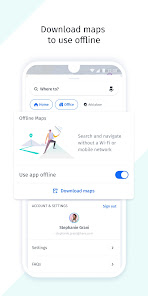
Want to save your mobile data and stay on course even without an internet connection when travelling? Download a map of a region, country or continent and complete your journey while staying totally offline.
And what's next
- More ways to get around, such as bike and car-sharing
- Services you can enjoy on the go, such as hotel booking and parking
- A way to find places of common interest and organise trips with others
- And much more!
Stay tuned, and don't forget to send your feedback to appsupport@here.com. We hope you enjoy your journey with HERE WeGo
HERE WeGo is a free navigation app that guides local and global travelers on journeys both familiar and foreign. The app now has a fresh, new design and clearer, easier to use navigation.
Enjoy a more carefree journey and reach your destination effortlessly, however you need to get there. Get there on foot with easy-to-follow walk guidance. Take public transport in more than 1,900 cities around the world. Or use turn-by-turn voice guidance with accurate driving directions and go by car. You can even find parking at your destination and get guided directly to it.
Visit the same places often? Save them in a collection to stay organised and find them easier. Or use shortcuts to get directions to them in one click
Need to make an extra stop or want to go a specific way? Simply add waypoints to your routes and HERE WeGo guides you there.
Want to save your mobile data and stay on course even without an internet connection when travelling? Download a map of a region, country or continent and complete your journey while staying totally offline.
And what's next
- More ways to get around, such as bike and car-sharing
- Services you can enjoy on the go, such as hotel booking and parking
- A way to find places of common interest and organise trips with others
- And much more!
Stay tuned, and don't forget to send your feedback to appsupport@here.com. We hope you enjoy your journey with HERE WeGo
Updated on
Safety starts with understanding how developers collect and share your data. Data privacy and security practices may vary based on your use, region, and age. The developer provided this information and may update it over time.

No data shared with third parties
Learn more about how developers declare sharing

This app may collect these data types
Location, Personal info and 3 others

Data is encrypted in transit

You can request that data be deleted
Ratings and reviews
3.6
476K reviews

Maurice Caler
- Flag inappropriate
October 26, 2025
I am looking for a map app to replace Google Maps. this is the winner so far. however, there are odd differences between the Android app and the browser versions. The big difference is that the Android app will search by business name but the browser version does not. Saving places works well except the names appear different between app and browser. but these differences are not a deal killer. So I am happy to switch.
43 people found this review helpful

Alby LC
- Flag inappropriate
September 4, 2025
At the very beginning I loved this app but the whole point of having a GPS through a map app is to get good itineraries. I used it for 3 months and realized it always gave longer itineraries than google maps. I don't like google maps very much but when I have to drive 20 minutes and 15km more for a 2 hours drive on HERE, I'll use google maps instead. It gets even worse when I do motorcycle itineraries avoiding highways. It once gave me a 4h ride instead of the usual 3h.
23 people found this review helpful

Jamie Tomkin
- Flag inappropriate
December 17, 2025
Looks good - For a start. Nothing sets it apart from Google Maps, and the offline feature requires a 22GB download, I assume of the entire world as a map and not just one area? And if there is a way to just do your own area, I'm not sure where that option is, so it isn't easy enough for users to find. Formatting is good, and I want to use the app, but the offline feature is this app's strong point to attracting new users; I think it should be worked on to show bus routes and stuff!
HERE Europe B.V.
December 17, 2025
Thanks for the feedback! Offline maps can be downloaded by country or state, depending on the size, so that users can download only what they need. Please contact us again with more feedback after you've had a chance to test the app!
What’s new
New features in this release:
Road signs on head units
Road sign and danger zone alerts can now be viewed on vehicular head units. Enable both via "Settings".
Saved routes from WeGo Web are now accessible on your mobile phone. Be logged in and use "Collections" on both devices.
Road signs on head units
Road sign and danger zone alerts can now be viewed on vehicular head units. Enable both via "Settings".
Saved routes from WeGo Web are now accessible on your mobile phone. Be logged in and use "Collections" on both devices.
App support
About the developer
HERE Europe B.V.
app.store@here.com
Kennedyplein 222
5611 ZT Eindhoven
Netherlands
+31 6 24332476


