
KeyBank Mobile Banking
4.5star
91.7K reviews
1M+
Downloads

Everyone
info
About this app
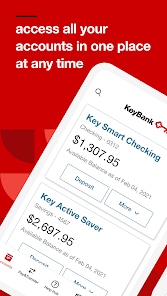
Take control of your money and bank the way you want to bank – anytime, anywhere. The KeyBank mobile banking app is free, fast, and secure with features that are streamlined for today’s on-the-go world:
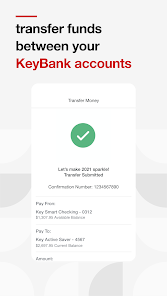
● Easily transfer funds between bank accounts
● Pay bills
● Send money to friends and family
● Open a checking or savings account
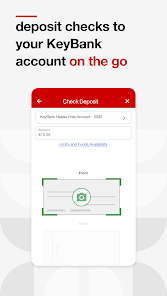
● Deposit checks on the app
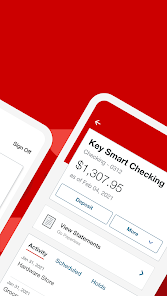
● Monitor and manage bank accounts and cards
● View KeyBank credit card rewards points
Safe and Secure Online Banking
Confidently use the KeyBank mobile banking app without compromising your personal banking information. It’s backed with a multitude of safety and security features, including:
● Same high-level security used for KeyBank Online Banking
● User ID and password required to access banking app†
● Secure connection to view banking account and transaction details
● No banking information is stored on your Android™ device to minimize risk if your mobile phone or tablet is lost or stolen
Convenient Banking on the Go
Easily manage your personal finances when and where it’s most convenient for you and your schedule. With the KeyBank mobile banking app, you can:
● View account balances and recent transactions with one swipe using QuickView
● Deposit checks right from your mobile device without having to visit a KeyBank branch or ATM
● Transfer funds between your KeyBank checking and savings accounts
● Open an account right from your mobile device
● Search and view your banking transaction history for the last 90 days
● Access your KeyBank account statements and tax forms
● Review and manage scheduled Online Bill Pay payments and transfers
● Send money to existing payees and add new payees
● Search for KeyBank branch and ATM locations
Personalized Mobile Banking Settings
Customize your in-app experience for your unique needs and preferences with account settings and seamless access to the KeyBank features and products you use:
● Add a profile picture
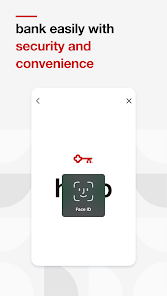
● Set up fingerprint or face ID sign in capabilities
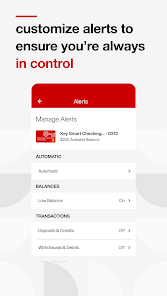
● Manage and edit account alerts
● Access your credit card Reward Points balance
Connect with KeyBank
Please call 1-800-539-1539 if you have questions about the mobile banking app or need additional help or support.
Follow KeyBank on social media:
● Twitter: twitter.com/keybank
● Facebook: facebook.com/keybank
● LinkedIn: linkedin.com/company/keybank/
● YouTube: youtube.com/user/keybankcommunity/
● Instagram: instagram.com/keybank/
Important Disclosures
† Anyone can download, but you must be enrolled in KeyBank Online Banking to use the app.
Android™ is a trademark of Google Inc. Use of this trademark is subject to Google permissions.
©2024 KeyCorp. Member FDIC.
● Easily transfer funds between bank accounts
● Pay bills
● Send money to friends and family
● Open a checking or savings account
● Deposit checks on the app
● Monitor and manage bank accounts and cards
● View KeyBank credit card rewards points
Safe and Secure Online Banking
Confidently use the KeyBank mobile banking app without compromising your personal banking information. It’s backed with a multitude of safety and security features, including:
● Same high-level security used for KeyBank Online Banking
● User ID and password required to access banking app†
● Secure connection to view banking account and transaction details
● No banking information is stored on your Android™ device to minimize risk if your mobile phone or tablet is lost or stolen
Convenient Banking on the Go
Easily manage your personal finances when and where it’s most convenient for you and your schedule. With the KeyBank mobile banking app, you can:
● View account balances and recent transactions with one swipe using QuickView
● Deposit checks right from your mobile device without having to visit a KeyBank branch or ATM
● Transfer funds between your KeyBank checking and savings accounts
● Open an account right from your mobile device
● Search and view your banking transaction history for the last 90 days
● Access your KeyBank account statements and tax forms
● Review and manage scheduled Online Bill Pay payments and transfers
● Send money to existing payees and add new payees
● Search for KeyBank branch and ATM locations
Personalized Mobile Banking Settings
Customize your in-app experience for your unique needs and preferences with account settings and seamless access to the KeyBank features and products you use:
● Add a profile picture
● Set up fingerprint or face ID sign in capabilities
● Manage and edit account alerts
● Access your credit card Reward Points balance
Connect with KeyBank
Please call 1-800-539-1539 if you have questions about the mobile banking app or need additional help or support.
Follow KeyBank on social media:
● Twitter: twitter.com/keybank
● Facebook: facebook.com/keybank
● LinkedIn: linkedin.com/company/keybank/
● YouTube: youtube.com/user/keybankcommunity/
● Instagram: instagram.com/keybank/
Important Disclosures
† Anyone can download, but you must be enrolled in KeyBank Online Banking to use the app.
Android™ is a trademark of Google Inc. Use of this trademark is subject to Google permissions.
©2024 KeyCorp. Member FDIC.
Updated on
Safety starts with understanding how developers collect and share your data. Data privacy and security practices may vary based on your use, region, and age. The developer provided this information and may update it over time.


Ratings and reviews
4.5
90.1K reviews

Carmen Thorsen
- Flag inappropriate
- Show review history
March 28, 2026
the app used to work fine, but for the last couple of months it doesnt load. To get it to work again, I have to clear cache, clear data, remove the app, restart my phone, then reinstall the app. But this is only a temporary fix, and I need to repeat this process every couple of days. Very frustrating! EDIT: stuck in the HELLO screen AGAIN!! I guess I am supposed to be happy it worked for almost 3 weeks this time? SMH
2 people found this review helpful
KeyBank, N.A.
March 5, 2026
Hi Carmen, Please clear the cache and data of the application through your device settings. Once completed, uninstall the app, restart your device and reinstall the app. If you're using a VPN, temporarily disable it for the initial sign on. For further troubleshooting, call our Online Banking Support team at 1-800-539-1539. Thank you. ^LH

Brittany O
- Flag inappropriate
February 9, 2026
just seeing all the reviews, I'll add my own. rarely does the app actually load. I also am not able to get into the web app. It sends me to the app to verify my identity, and guess what, it won't load. so frustrating. I've had this account for years and I'm pretty done with it. I also had issues with their bill payment. I'm not sure if it was my title company or keybank, but multiple money orders were lost, and it was a huge battle to get partially refunded. just unacceptable all around
23 people found this review helpful
KeyBank, N.A.
February 9, 2026
Hello Brittany! thank you for reaching out. We are sorry to hear about your difficulties. Please remove the app, restart your device (this is very important!) and then install again. That should fix this issue for you. Please email keybank_help@keybank.com or call 1-800-539-1539 if you require further assistance. Thank you.^CH

A Google user
- Flag inappropriate
- Show review history
January 4, 2026
It's great once you log in, all features are available easily and intuitively. The problem stems on being able to actually log in. Most of the time, it'll get stuck on the "Hello" screen when you launch it, staying there preventing the login screen from showing, even when you force close it doesn't help. The only way I can get logged in when this happens is to go to Android Settings, Apps, Select KeyBank, force stop it, then clear the app's cache. I shouldn't have to do this to log in each time.
152 people found this review helpful
KeyBank, N.A.
January 5, 2026
Hello - Please clear the cache and data of the application through your device settings. Once completed, uninstall the app, restart your device and reinstall the app. If you're using a VPN, temporarily disable it for the initial sign on. For further troubleshooting, call our Online Banking Support team at 1-800-539-1539. Thank you. ^AS
What’s new
- Updates to maintain your security
- Bug Fixes
Thank you for using the KeyBank app!
Based on your valuable feedback, we'll continue to enhance the app through regular updates
- Bug Fixes
Thank you for using the KeyBank app!
Based on your valuable feedback, we'll continue to enhance the app through regular updates
App support
phone
Phone number
+18005391539
About the developer
KeyBank National Association
fsm@keybank.com
127 Public Sq Ste 5600
Cleveland, OH 44114
United States
+1 800-539-1539


