Google Pixel Buds
3.0star
23.7K reviewsinfo
100M+
Downloads

PEGI 3
info

About this app
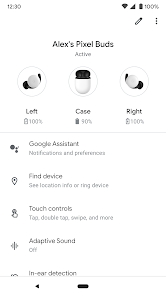
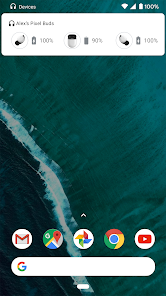
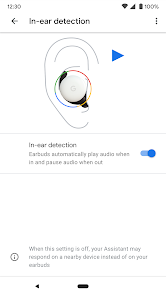
Set up and manage your Pixel Buds right from your Android 6.0+ device with the Google Pixel Buds app. You can easily check your earbuds and case battery levels, and control features like Adaptive Sound, in-ear detection, find device, Google Assistant, and spoken notifications.
Here are some of the things you can do with the Google Pixel Buds app:
• Check battery levels
• Learn how to use touch controls
• Turn on/off Adaptive Sound
• Turn on/off in-ear detection
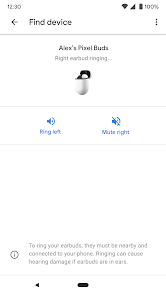
• Ring your earbuds to help find them
• Control your Assistant and spoken notifications
• Get tips & support
To open the Pixel Buds app:
• On Pixel, connect your earbuds > Bluetooth settings > tap the ⚙️next to Pixel Buds.
• On other Android phones, look for the Pixel Buds app icon on your Home screen.
Note: This app is for Google Pixel Buds (2nd Gen)
Here are some of the things you can do with the Google Pixel Buds app:
• Check battery levels
• Learn how to use touch controls
• Turn on/off Adaptive Sound
• Turn on/off in-ear detection
• Ring your earbuds to help find them
• Control your Assistant and spoken notifications
• Get tips & support
To open the Pixel Buds app:
• On Pixel, connect your earbuds > Bluetooth settings > tap the ⚙️next to Pixel Buds.
• On other Android phones, look for the Pixel Buds app icon on your Home screen.
Note: This app is for Google Pixel Buds (2nd Gen)
Updated on
Safety starts with understanding how developers collect and share your data. Data privacy and security practices may vary based on your use, region, and age. The developer provided this information and may update it over time.

No data shared with third parties
Learn more about how developers declare sharing

This app may collect these data types
Personal info, App activity and 2 others

Data is encrypted in transit

You can request that data be deleted
Ratings and reviews
3.1
23.4K reviews

Andrew Boyd
- Flag inappropriate
September 26, 2025
I was asleep with pixel buds pro in, woke up and couldn't find them, the "find device" button was nowhere in the app.... Get up, and search to find them manually.... Put the missing one in the case, and then the find device button appears. This was driving me insane, because I used the feature before with no problem, and on Google it says "open app, tap find device" except that option literally no longer exists, if my ear buds are outside of the case.
53 people found this review helpful
Google LLC
September 26, 2025
Hey there, we care about your experience with the "Find device" feature in the Pixel Buds app, and we're sorry it hasn't been what we want for you. We'd like to hear from you; please share your opinion following our Help Center article: https://support.google.com/googlepixelbuds/answer/9122983?hl=en-GB&sjid=28632861783749466-NA

Jimmy DeCoster
- Flag inappropriate
- Show review history
October 30, 2024
Well, I did eventually get some a-series buds. They're decent, but it doesn't have touch for notifications anymore. I use these when riding my bike, running, and other exercises, and trying to talk to the Google Assistant to get notifications is cumbersome and impractical during almost every activity I use them for.
6 people found this review helpful
Google LLC
October 30, 2024
Hi Jimmy, thanks for sharing your thoughts. We understand your concern about the touch-and-hold feature function. We'd be happy to hear your feedback by following the steps in this article: https://support.google.com/googlepixelbuds/answer/9122983?hl=en

Tim Parker
- Flag inappropriate
- Show review history
October 7, 2024
Edit: another update to the app, and the touch to hear notifications feature is still absent. Google doesn't listen to their customers. The latest update removed a key function I liked a lot: touch and hold for notifications. To now be forced to speak that command out loud when I maybe in a situation were that is not appropriate is a stupid retrograde step. Google, what were you thinking? You continually do this to your products.
81 people found this review helpful
What’s new
Welcome to your new Google Pixel Buds
App support
About the developer
Google LLC
support@google.com
1600 Amphitheatre Pkwy
Mountain View, CA 94043
United States
+1 650-253-0000


