

BIG SMS for Seniors
In-app purchases

3.9star
775 reviews
100K+
Downloads

Everyone
info

About this app
Messaging editor with large fonts
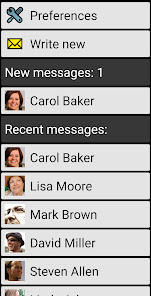
💬 large font and different colors used to display the message thread.
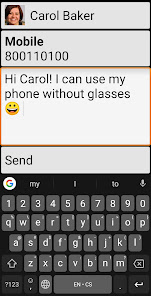
✉️ reply easily to any message with the easy to use SMS editor.
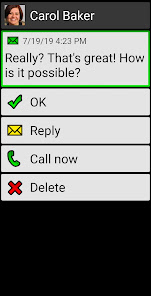
🔔 optional full-screen SMS notifications allow you to rapidly call back or reply to the message (not available on Android 10 or higher)
🚫 please note that multimedia messages (MMS) are not supported
📦 BIG Apps Suite
Simple apps for seniors and people with vision problems.
🔹 Android 10 and Android Go compatible
🔹 100% accessible
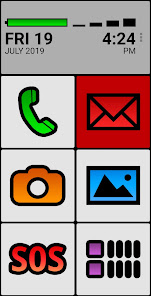
🔹 high contrast color schemes and three different font sizes allow you to use your phone without glasses.
🔹 additional color themes and icon packs are available for download
🔹 extended support for Talkback screen reader allows legally blind users to use their phone with ease and confidence
🔹 all the apps can also be controlled by a hardware keyboard or via the Tecla wheelchair interface, enabling users with paralysis to have full and precise control of the smartphone without touching the screen.
🔹 compatible with Android 2.2 or higher. BIG SMS requires Android 4.4 or higher
🔸 BIG Launcher - Your new home screen
🔸 BIG Phone - Easy to use phone and contacts
🔸 BIG SMS - Messaging editor with large fonts
🔸 BIG Alarm - Alarm as simple as possible
🔸 BIG Notifications - Make all the Android notifications really big
🆓 BIG SMS free version limitations
- only 5 most recent message threads are visible
- after 20 SMS sent a link to biglauncher.com is appended to every SMS
🤔 Questions? Problems?
See the help and video tutorials.
Visit www.biglauncher.com
🌟 Winner of the Vodafone Smart Accesibility Awards
🌏 69 languages: Afrikaans, Shqip, አማርኛ, العربية, հայերէն, Azərbaycan dili, বাংলা, български, မြန်မာစာ, Català, 简体中文, 繁體中文, hrvatski, česky, dansk, nederlands, english, eesti, Filipino, suomi, français, Galego, ქართული, deutsch, ελληνικά, ગુજરાતી, halshen hausa, עברית, हिन्दी, magyar, bahasa indonesia, italiano, 日本語, basa jawa, ಕನ್ನಡ, 한국어, Kurdî, latviešu, lietuvių, मैथिली, bahasa melayu, मराठी, norsk, ଓଡ଼ିଆ, فارسی, polski, português, português brasileiro, ਪੰਜਾਬੀ, پن٘جابی, română, русский, српски, srpski, سنڌي, slovenčina, slovenščina, español, svenska, Tagalog, தமிழ், తెలుగు, ภาษาไทย, türkçe, українська мова, اُردُو, Oʻzbekcha, tiếng việt, Yorùbá
💬 large font and different colors used to display the message thread.
✉️ reply easily to any message with the easy to use SMS editor.
🔔 optional full-screen SMS notifications allow you to rapidly call back or reply to the message (not available on Android 10 or higher)
🚫 please note that multimedia messages (MMS) are not supported
📦 BIG Apps Suite
Simple apps for seniors and people with vision problems.
🔹 Android 10 and Android Go compatible
🔹 100% accessible
🔹 high contrast color schemes and three different font sizes allow you to use your phone without glasses.
🔹 additional color themes and icon packs are available for download
🔹 extended support for Talkback screen reader allows legally blind users to use their phone with ease and confidence
🔹 all the apps can also be controlled by a hardware keyboard or via the Tecla wheelchair interface, enabling users with paralysis to have full and precise control of the smartphone without touching the screen.
🔹 compatible with Android 2.2 or higher. BIG SMS requires Android 4.4 or higher
🔸 BIG Launcher - Your new home screen
🔸 BIG Phone - Easy to use phone and contacts
🔸 BIG SMS - Messaging editor with large fonts
🔸 BIG Alarm - Alarm as simple as possible
🔸 BIG Notifications - Make all the Android notifications really big
🆓 BIG SMS free version limitations
- only 5 most recent message threads are visible
- after 20 SMS sent a link to biglauncher.com is appended to every SMS
🤔 Questions? Problems?
See the help and video tutorials.
Visit www.biglauncher.com
🌟 Winner of the Vodafone Smart Accesibility Awards
🌏 69 languages: Afrikaans, Shqip, አማርኛ, العربية, հայերէն, Azərbaycan dili, বাংলা, български, မြန်မာစာ, Català, 简体中文, 繁體中文, hrvatski, česky, dansk, nederlands, english, eesti, Filipino, suomi, français, Galego, ქართული, deutsch, ελληνικά, ગુજરાતી, halshen hausa, עברית, हिन्दी, magyar, bahasa indonesia, italiano, 日本語, basa jawa, ಕನ್ನಡ, 한국어, Kurdî, latviešu, lietuvių, मैथिली, bahasa melayu, मराठी, norsk, ଓଡ଼ିଆ, فارسی, polski, português, português brasileiro, ਪੰਜਾਬੀ, پن٘جابی, română, русский, српски, srpski, سنڌي, slovenčina, slovenščina, español, svenska, Tagalog, தமிழ், తెలుగు, ภาษาไทย, türkçe, українська мова, اُردُو, Oʻzbekcha, tiếng việt, Yorùbá
Updated on
Safety starts with understanding how developers collect and share your data. Data privacy and security practices may vary based on your use, region, and age. The developer provided this information and may update it over time.

No data shared with third parties
Learn more about how developers declare sharing

No data collected
Learn more about how developers declare collection

Data is encrypted in transit
Ratings and reviews
3.9
707 reviews

Ryan Paul
- Flag inappropriate
- Show review history
April 23, 2024
Overall great. I'm using this on an android flip phone since it's the one that uses the dpad the best and has an interface that mimics a dumb phone the best. The only issue is that it doesn't do any MMS or group messages. It is the only thing stopping me from keeping it as my main SMS app. It would be perfect if it did. The developer seems to have spent 4 years saying no to MMS support, despite the user feedback. So take that large grain of salt when using this app.
5 people found this review helpful
BIG Launcher
April 24, 2024
Thank you for the review. Our apps are mainly developed for blind persons so the multimeda messages has a low priority in our todo list. You can forward a message in it's detail, it could help to send more messages (instead of a group sending). Thank you.

Tomas Takac
- Flag inappropriate
July 3, 2025
Love this app. Gave it to elderly parents to & they love it. Price is great. How would I improve it? 1. Add smaller fonts for mainstream - even I would use it (50). Increase your customer potential - I would love simple messaging app with bigger fonts. But the default font is too big for me. 2. Support most languages. 3. Make sure it fully works on most phones. 4. Support RCS? Don't know if possible. Good luck & Thank you!
2 people found this review helpful
BIG Launcher
July 3, 2025
Hello, thank you for the review. There is hidden function for testers to set any font size you want. Please contact me at contact@biglauncher.com and I will help you. The app should work without limitations on Android 6 and newer I think. RCS is in todo list with lower priority. Thank you.

Rob Retter
- Flag inappropriate
September 13, 2021
terrible handling of messages containing pictures. accessing the pics requires far too much clicking through menu items for an old person to keep track of. and yes, i know sms isn't mms, but pics are so much a part of messaging now that the app is worthless without better handling of them. also, the entire "big" app suite suffers from having to use its "big" clunky interface to configure it. see, if one could configure this particular kind of app, one wouldn't *need* it in the first place.
87 people found this review helpful
BIG Launcher
September 14, 2021
Hello, you can configure the BIG SMS without any other app. There is Preferences button on the top. The inferface is really specific because this app is not for everyone. It makes the smartphone suitable for seniors and people with eye diseases, motor problems or the legally blind. Thank you
What’s new
Set targetSDK=35 (Android 15) and fix what it needs:
+ added empty padding to screen under bars because A15's Edge to edge functionality
+ added full screen permission request to messages list
* fixed rare crash on Motorola Potter when black navigation bar is enabled
- removed all components for old and legacy preferences
+ added empty padding to screen under bars because A15's Edge to edge functionality
+ added full screen permission request to messages list
* fixed rare crash on Motorola Potter when black navigation bar is enabled
- removed all components for old and legacy preferences
App support
About the developer
2BIG s.r.o.
contact@biglauncher.com
686 Chelčického
533 51 Pardubice
Czechia
+420 734 803 710


