Google Assistant Go
4.3star
492K reviews

Everyone
info
1B+
Downloads

Everyone
Learn more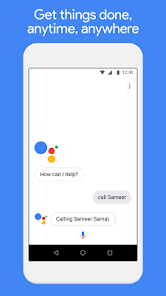

About this app
Lightweight and fast, yet still packed with your favorite features, the Google Assistant is now available on Android (Go edition).
Use your voice to get directions to the nearest coffee shop, make calls hands free during your commute, and unwind by playing your favorite tunes. You personal Google is here to help. Ask your Google Assistant questions and get things done. Use it anytime, anywhere.
With the Google Assistant Go, you can:
• Make quick phone calls on the go (“Call Sameer”)
• Send text messages (“Text Sara I am running late”)
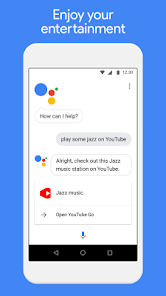
• Play music (“Play some jazz on YouTube”)
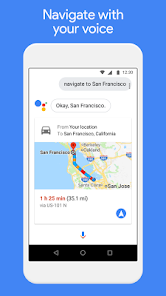
• Navigate places (“Get me directions to the nearest coffee shop”)
• Preview your upcoming events (“Tell me about my day”)
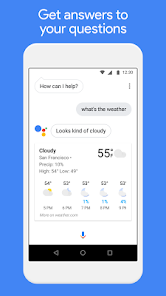
• Weather information (“Do I need an umbrella today?”)
• Answers (“How tall is Mount Everest?”)
* You can quickly access the Google Assistant for Android (Go edition) by tapping on the Assistant app icon or long-pressing the home button on your phone running Android (Go edition).
* Certain features available on the Google Assistant for standard Android phones are currently not supported on the Google Assistant for Android (Go edition), such as reminders, controls for smart home devices, Actions on Google, and Device Actions.
* The Google Assistant for Android (Go edition) currently supports English.
Use your voice to get directions to the nearest coffee shop, make calls hands free during your commute, and unwind by playing your favorite tunes. You personal Google is here to help. Ask your Google Assistant questions and get things done. Use it anytime, anywhere.
With the Google Assistant Go, you can:
• Make quick phone calls on the go (“Call Sameer”)
• Send text messages (“Text Sara I am running late”)
• Play music (“Play some jazz on YouTube”)
• Navigate places (“Get me directions to the nearest coffee shop”)
• Preview your upcoming events (“Tell me about my day”)
• Weather information (“Do I need an umbrella today?”)
• Answers (“How tall is Mount Everest?”)
* You can quickly access the Google Assistant for Android (Go edition) by tapping on the Assistant app icon or long-pressing the home button on your phone running Android (Go edition).
* Certain features available on the Google Assistant for standard Android phones are currently not supported on the Google Assistant for Android (Go edition), such as reminders, controls for smart home devices, Actions on Google, and Device Actions.
* The Google Assistant for Android (Go edition) currently supports English.
Updated on
Safety starts with understanding how developers collect and share your data. Data privacy and security practices may vary based on your use, region, and age. The developer provided this information and may update it over time.

No data shared with third parties
Learn more about how developers declare sharing

This app may collect these data types
Location, Personal info and 10 others

Data is encrypted in transit

You can request that data be deleted
Ratings and reviews
4.3
480K reviews

JD (Jason)
- Flag inappropriate
January 9, 2026
Sometimes, it just tells me stuff out loud instead of showing it on screen, even if I say search in Google Chrome, and want to SEE results. I'm not going to be able to memorize the addresses of my three closest Walgreen locations, when it tells me through the audio only. The absolute worst part is that I can't put it in dark mode. every time I open the app it takes over the entire screen and hits me with a pure white screen. I am mostly indoors, or in low light areas.
59 people found this review helpful
Google LLC
January 9, 2026
Hi there. Thank you for reporting this issue. Can you please submit a feedback report and tell us a little bit more about what you're experiencing so we can investigate further? Open Google Assistant Go App - More (three-dot menu) - Send feedback, this will help us ensure that this gets reviewed by the right team. Thank you!

Asiel Sam Nelson
- Flag inappropriate
May 3, 2026
please Google LLC, update this app to almost be like the Google assistant app, for low phones of 1 GB RAM, at least having call to answer feature thanks, after this has been granted I'd come back to give it a five star, rate good about it, and most importantly, be happy using my favorite Google apps 😀✨
Google LLC
May 4, 2026
Hi Asiel. Thanks for your review! We'd like to know how to improve your Google Assistant experience. Let us know more about your feedback. Alternatively, if you continue to experience issues with this please create a post in our Google Assistant Help Community for our experts to assist: https://goo.gle/2Ts2BnR. Appreciate it.

Vivian Sam-Nelson
- Flag inappropriate
May 2, 2026
please Google we love your apps and all but please update Google assistant go for us that enjoy our favorite google apps to seem almost like the latest us because using old ones leaves us in the dark please. Thank you, ones this has been done, I'd come back to give it a five star, thanks.
1 person found this review helpful
Google LLC
May 3, 2026
Hi Vivian. Thank you for reporting this issue. Can you please submit a feedback report and tell us a little bit more about what you're experiencing so we can investigate further? Open Google Assistant Go App - More (three-dot menu) - Send feedback, this will help us ensure that this gets reviewed by the right team. Appreciate it.
What’s new
• General bug fixes and improvements.
Everyone
Learn moreApp support
About the developer
Google LLC
support@google.com
1600 Amphitheatre Pkwy
Mountain View, CA 94043
United States
+1 650-253-0000


