Kodak Luma
1.6star
475 reviews
50K+
Downloads

Everyone
info

About this app
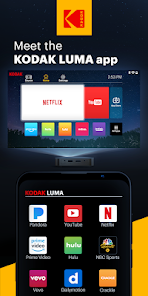
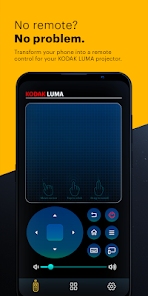
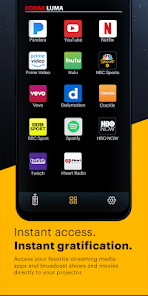
The KODAK LUMA app is designed to work seamlessly as a companion to your KODAK LUMA 350 and 450 portable smart projector. Easily turn your phone into a remote, so you can navigate between menus, open apps, adjust settings, and connect wirelessly to share and project your phone screen. We’ve even made it extra convenient for you by adding the ability to reverse-mirror your KODAK LUMA screen onto your phone! Download the KODAK LUMA companion app today and experience the next level in projection perfection.
Updated on
Safety starts with understanding how developers collect and share your data. Data privacy and security practices may vary based on your use, region, and age. The developer provided this information and may update it over time.

No data shared with third parties
Learn more about how developers declare sharing

No data collected
Learn more about how developers declare collection
Ratings and reviews
1.5
455 reviews

A Google user
- Flag inappropriate
March 21, 2020
App won't stay connected to projector for more than 15 seconds a go. I can barely make it to YouTube and attempt to tap "Sign In" before it disconnects with a sarcastic "bye bye" flashing on screen. When I get lucky and actually am able to open the app and click "Sign In", the login screen doesn't appear, it begins playing some children's program. The Kodak Luma itself is absolutely amazing. However, until Kodak can fix it, this app is trash.
27 people found this review helpful
C&A Marketing Inc.
March 23, 2020
Hello! I am sorry to hear this. What FW version are you on the projector? Please be sure you are on the latest update. You can go to https://www.kodakphotoplus.com/pages/luma-350-portable-smart-projector-support for instructions on how to update your projector. If you need further assistance contact us at RND@CAGlobal.com. - Rose

Kris Cole
- Flag inappropriate
- Show review history
May 21, 2021
Won't connect. Tried to mirror my phone on the projector and the app closes out and gives me a notification telling me to "push the button to connect" and nothing happens when I push the button. It should just auto connect since my phone is controlling it. This app is garbage if I could rate 0 stars I would. Also the settings are stupid, why would "buy a projector" be in settings, I ALREADY HAVE ONE. Settings should be customization and ease of access. Fire whoever made the app.
16 people found this review helpful

Joshua Smitherman
- Flag inappropriate
November 5, 2023
My kodak Luma projector 350 has had issues since the day I opened it with the Bluetooth not working and none of the apps that come pre-installed will not update it says my device isn't compatible. This app will not link to it over half the time. Kodak should really fix these issues. Not sure how many of these where sold but everyone I've met that has one has the same exact issues. Lost my receipt or I would be getting a refund for it.
1 person found this review helpful
What’s new
Support capture audio while mirroring to Projector. This feature uses the API released since Android 10. For users who have not upgraded to Android 10 or later, this feature is not available, unfortunately.
App support
About the developer
C&A Marketing, Inc.
rnd@caglobal.com
114 Tived Ln E
Edison, NJ 08837
United States
+1 848-244-2213


