Trello: Personal Planner App
3.9star
122K reviews
10M+
Downloads
Editors' Choice

Everyone
info




About this app
Work smarter and do more with your personal productivity powerhouse, Trello. Capture, organize, and tackle your to-dos from anywhere. No more chaotic schedules, lost sticky notes, or searching for bookmarked messages across apps. Stay organized and efficient with Inbox, Boards, and Planner. Every personal or work-related to-do, idea, or responsibility—no matter how small—finds its place, keeping you at the top of your game, all from your phone for smarter task management.
Trello lets you instantly capture tasks, ideas, and notes right from your phone into a Trello card for a seamless schedule and to-do organizer. Add due dates, comments, checklists, descriptions, files, and more. Save messages from popular work apps like Slack or Microsoft Teams, snap a photo, and forward emails to Trello. Upgrade to unlock AI features that summarize your saved to-dos into a Trello card so that nothing slips through the cracks.
Everything captured lands as a card in your Trello Inbox, making it easy to review, prioritize, and organize your work across boards. See your scheduled day in Trello Planner, synced with your Google or Outlook calendars. Standard and Premium users can also enable Planner to schedule focus time for completing saved to-dos.
Get reminders that work for you by setting up push notifications for your work tasks or personal to-dos. Get timely alerts for the updates you care about, like due dates or changes to your card.
Download today to seamlessly start turning your to-do list into action.
TO-DO LIST TURNED INTO SEAMLESS TASK MANAGEMENT
- Capture, edit and sort your to-dos from your Trello Inbox.
- Connect your Google or Outlook calendars.
- See what you have scheduled for your day (and set aside focus time on what you’ve captured in Trello cards to get done later).
- Use the Trello widget to add more to your to-dos without ever opening the app.
- View all your to-dos from multiple boards in one place.
PERSONAL & WORK SCHEDULE ORGANIZER
- Trello Inbox: Add reminders, forward emails, and save messages in your Trello Inbox.
- Trello Boards: No-code automation is built into every Trello board for intelligent task management.
- Trello Planner: Place your top tasks into your calendar, and make time for what truly matters in your schedule organizer.
- Notifications: Get timely alerts for the updates you care about, like due dates or changes to your card.
- Work offline: Capture ideas and update boards even without internet. Your changes sync automatically when you’re back online.
AI TOOLS FOR TASK AND SCHEDULE SUMMARIES
- Let AI tools turn your ideas into action with Trello task management.
- AI can extract the action items and due dates, enabling you to create a plan of action, a checklist, or simply gain clarity on what needs to be done.
- Generate, summarize, and improve spelling and grammar of work, copywriting, or personal content.
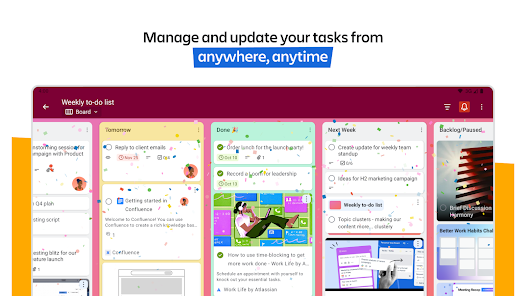
Create beautiful, flexible boards: Organize your captured cards into customizable kanban boards and lists, tailored to your workflow. Trello’s tactile, visual mobile interface, with drag-and-drop gestures and smooth transitions between boards, offers a natural way to plan your work on a mobile device.
Download Trello and experience a new era of personal productivity management. It’s free!
When you use features that require your device’s photos, camera, microphone, or contacts, we will request permission before accessing that data.
Trello lets you instantly capture tasks, ideas, and notes right from your phone into a Trello card for a seamless schedule and to-do organizer. Add due dates, comments, checklists, descriptions, files, and more. Save messages from popular work apps like Slack or Microsoft Teams, snap a photo, and forward emails to Trello. Upgrade to unlock AI features that summarize your saved to-dos into a Trello card so that nothing slips through the cracks.
Everything captured lands as a card in your Trello Inbox, making it easy to review, prioritize, and organize your work across boards. See your scheduled day in Trello Planner, synced with your Google or Outlook calendars. Standard and Premium users can also enable Planner to schedule focus time for completing saved to-dos.
Get reminders that work for you by setting up push notifications for your work tasks or personal to-dos. Get timely alerts for the updates you care about, like due dates or changes to your card.
Download today to seamlessly start turning your to-do list into action.
TO-DO LIST TURNED INTO SEAMLESS TASK MANAGEMENT
- Capture, edit and sort your to-dos from your Trello Inbox.
- Connect your Google or Outlook calendars.
- See what you have scheduled for your day (and set aside focus time on what you’ve captured in Trello cards to get done later).
- Use the Trello widget to add more to your to-dos without ever opening the app.
- View all your to-dos from multiple boards in one place.
PERSONAL & WORK SCHEDULE ORGANIZER
- Trello Inbox: Add reminders, forward emails, and save messages in your Trello Inbox.
- Trello Boards: No-code automation is built into every Trello board for intelligent task management.
- Trello Planner: Place your top tasks into your calendar, and make time for what truly matters in your schedule organizer.
- Notifications: Get timely alerts for the updates you care about, like due dates or changes to your card.
- Work offline: Capture ideas and update boards even without internet. Your changes sync automatically when you’re back online.
AI TOOLS FOR TASK AND SCHEDULE SUMMARIES
- Let AI tools turn your ideas into action with Trello task management.
- AI can extract the action items and due dates, enabling you to create a plan of action, a checklist, or simply gain clarity on what needs to be done.
- Generate, summarize, and improve spelling and grammar of work, copywriting, or personal content.
Create beautiful, flexible boards: Organize your captured cards into customizable kanban boards and lists, tailored to your workflow. Trello’s tactile, visual mobile interface, with drag-and-drop gestures and smooth transitions between boards, offers a natural way to plan your work on a mobile device.
Download Trello and experience a new era of personal productivity management. It’s free!
When you use features that require your device’s photos, camera, microphone, or contacts, we will request permission before accessing that data.
Updated on
Safety starts with understanding how developers collect and share your data. Data privacy and security practices may vary based on your use, region, and age. The developer provided this information and may update it over time.

No data shared with third parties
Learn more about how developers declare sharing

This app may collect these data types
Personal info, Photos and videos and 6 others

Data is encrypted in transit

You can request that data be deleted
Ratings and reviews
3.9
114K reviews

Lt_Lefty15
- Flag inappropriate
- Show review history
February 4, 2025
A very good organization app. I primarily use it for my to-do lists and organizing other personal info, but I have also used it to collaborate with my friends/colleagues on some personal projects. My only gripe is that formatting the descriptions of cards on the mobile version is different than on the Web version, and any formatting you do on the mobile version will not appear correctly on the Web version. But aside from that, it is a great app.
182 people found this review helpful

Debbie Medina
- Flag inappropriate
March 31, 2025
I enjoy using this program. I decided to start using it as a notebook for notes. One card per idea. I love the card color options, and the ability to create a notebook cover for each topic. I found a way to make the program management into a note taking management. However, my main concern is when I enter information in the description, even after saving it, it won't always save it in the app. I hope this can be fixed. Now I copy what I type before saving it in case it gets lost.
73 people found this review helpful
Atlassian
April 2, 2025
Hi Debbie! Thanks for the review. We’re sorry to hear you’re running into issues with saving card descriptions in Trello. Would you mind reaching out to us on our contact form? We'd be happy to help investigate this with you further - https://support.atlassian.com/contact/

A Google user
- Flag inappropriate
September 19, 2018
The fact that not all the power ups are available on mobile just really bugs me. So I'm paying $5 per month for Gold and most of those benefits don't carry over to mobile? Yes I can load Trello in the mobile browser but constantly going back and forth between the mobile browser and the app is a goofy broken experience. For example, repeating car detail does not show up on the mobile app. Also annoying approach to notifications. Notifications should be standard without having to add myself as a member. I use my mobile device more than my computer. What don't companies get about this?
16 people found this review helpful
What’s new
- Bug fixes and performance improvements
App support
About the developer
ATLASSIAN PTY LTD
playstore@atlassian.com
L 6 341 George St
Sydney NSW 2000
Australia
+61 2 9189 1963


