
YouTube
Contains adsIn-app purchases

3.6star
168M reviews
10B+
Downloads

Teen
info

About this app
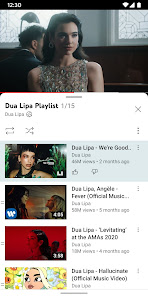
Get the official YouTube app on Android phones and tablets. See what the world is watching -- from the hottest music videos to what’s popular in gaming, fashion, beauty, news, learning and more. Subscribe to channels you love, create content of your own, share with friends, and watch on any device.
Watch and subscribe
● Browse personal recommendations on Home
● See the latest from your favorite channels in Subscriptions
● Look up videos you’ve watched, liked, and saved for later in Library
Explore different topics, what’s popular, and on the rise (available in select countries)
● Stay up to date on what’s popular in music, gaming, beauty, news, learning and more
● See what’s trending on YouTube and around the world on Explore
● Learn about the coolest Creators, Gamers, and Artists on the Rise (available in select countries)
Connect with the YouTube community
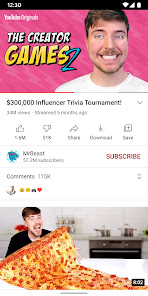
● Keep up with your favorites creators with Posts, Stories, Premieres, and Live streams
● Join the conversation with comments and interact with creators and other community members
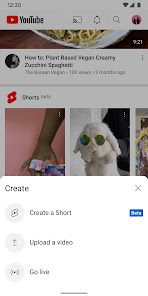
Create content from your mobile device
● Create or upload your own videos directly in the app
● Engage with your audience in real time with live streaming right from the app
Find the experience that fits you and your family (available in select countries)
● Every family has their own approach to online video. Learn about your options: the YouTube Kids app or a new parent supervised experience on YouTube at youtube.com/myfamily
Support creators you love with channel memberships (available in select countries)
● Join channels that offer paid monthly memberships and support their work
● Get access to exclusive perks from the channel & become part of their members community
● Stand out in comments and live chats with a loyalty badge next to your username
Upgrade to YouTube Premium (available in select countries)
● Watch videos uninterrupted by ads, while using other apps, or when the screen is locked
● Save videos for when you really need them – like when you’re on a plane or commuting
● Get access to YouTube Music Premium as part of your benefits
Watch and subscribe
● Browse personal recommendations on Home
● See the latest from your favorite channels in Subscriptions
● Look up videos you’ve watched, liked, and saved for later in Library
Explore different topics, what’s popular, and on the rise (available in select countries)
● Stay up to date on what’s popular in music, gaming, beauty, news, learning and more
● See what’s trending on YouTube and around the world on Explore
● Learn about the coolest Creators, Gamers, and Artists on the Rise (available in select countries)
Connect with the YouTube community
● Keep up with your favorites creators with Posts, Stories, Premieres, and Live streams
● Join the conversation with comments and interact with creators and other community members
Create content from your mobile device
● Create or upload your own videos directly in the app
● Engage with your audience in real time with live streaming right from the app
Find the experience that fits you and your family (available in select countries)
● Every family has their own approach to online video. Learn about your options: the YouTube Kids app or a new parent supervised experience on YouTube at youtube.com/myfamily
Support creators you love with channel memberships (available in select countries)
● Join channels that offer paid monthly memberships and support their work
● Get access to exclusive perks from the channel & become part of their members community
● Stand out in comments and live chats with a loyalty badge next to your username
Upgrade to YouTube Premium (available in select countries)
● Watch videos uninterrupted by ads, while using other apps, or when the screen is locked
● Save videos for when you really need them – like when you’re on a plane or commuting
● Get access to YouTube Music Premium as part of your benefits
Updated on
Safety starts with understanding how developers collect and share your data. Data privacy and security practices may vary based on your use, region, and age. The developer provided this information and may update it over time.

No data shared with third parties
Learn more about how developers declare sharing

This app may collect these data types
Location, Personal info and 9 others

Data is encrypted in transit

You can request that data be deleted

Independent security review
Ratings and reviews
3.6
157M reviews

Cinnamin Wells-Cranston
- Flag inappropriate
- Show review history
January 19, 2026
I 💕 love YouTube! Who doesn't? it's got everything that you could possibly ever want. It's social media's powerhouse app. I enjoy everything available onthe app. The only thing I really could possibly think 🤔 of that I would like would be having the option to use the music 🎶 that you have saved on your playlists or any music on the app. for that matter, to be able to use a clipping of the media as a ringtone. Maybe even being able to save the music on your phone (the device storage).
140 people found this review helpful

Dennie Bolster
- Flag inappropriate
- Show review history
January 17, 2026
On my other devices, I have no issues but for some reason on my Galaxy S9, the brightness of videos is extremely dim (regardless of bitrate), to the point watching the videos is impossible. The brightness dim is strictly on the video alone, thumbnails in portrait mode are two to three times brighter than the video playing above on the same screen. Not a device issue, only affecting video playback in the YouTube app and every video attempted Tried every setting possible, nothing helps.
32 people found this review helpful

Iain Marley
- Flag inappropriate
January 20, 2026
Update removed "manage videos" from channel profile for "organization" and apparently put it in studio without telling anyone, but it's really not in studio, the simple ability to select multiple of your uploads to put into a playlist is gone, the only way is to manually add to each playlist which is so time consuming it effectively ruins channel playlists, in an update for "organization" untill this is fixed 1 star from a long time channel.
51 people found this review helpful
What’s new
For new features, look for in-product education & notifications sharing the feature and how to use it!
App support
About the developer
Google LLC
support@google.com
1600 Amphitheatre Pkwy
Mountain View, CA 94043
United States
+1 650-253-0000


