
Android Device Policy
3.1star
38,8K reviews
100M+
Downloads

Everyone
info


About this app
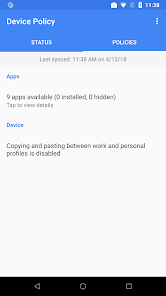
Android Device Policy helps your IT admin keep your organization's data secure. Your admin can use the app to manage security policies and settings. Use the Android Enterprise demo (https://android.com/enterprise/demo) to generate a demo code.
Android Device Policy offers:
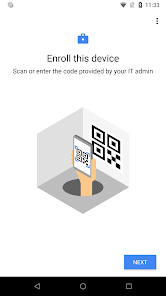
• Easy enrollment
• Access to managed Google Play
• Access to email and work resources
Developers, use the Android Management API (https://g.co/dev/androidmanagement) to manage devices with Android Device Policy.
Permissions Notice
• Camera: optionally used to scan QR codes for enterprise enrollment
• Contacts: used to add your work account to the device, required for access to managed Google Play
• Phone: used for device registration, to report device identifiers to your IT admin
• Location: used to query available WiFi networks, to align with IT policy and offer a new network if current configuration is broken
You can opt out of optional permission requests and still use the app.
Android Device Policy offers:
• Easy enrollment
• Access to managed Google Play
• Access to email and work resources
Developers, use the Android Management API (https://g.co/dev/androidmanagement) to manage devices with Android Device Policy.
Permissions Notice
• Camera: optionally used to scan QR codes for enterprise enrollment
• Contacts: used to add your work account to the device, required for access to managed Google Play
• Phone: used for device registration, to report device identifiers to your IT admin
• Location: used to query available WiFi networks, to align with IT policy and offer a new network if current configuration is broken
You can opt out of optional permission requests and still use the app.
Updated on
Android Device Policy is included with your device to provide system services. To learn more, see the developer's site and privacy policy.
Ratings and reviews
3.1
37,4K reviews

C L
- Flag inappropriate
- Show review history
23 December 2024
Stop forcing me to update when I don't want to. I was using maps when I was FORCED into a 15 minute update (even after having one last week) and went the wrong way. Had to pull over and wait forever for it to finish and was late to an appointment and got a $25 late/no show fee. I was literally using the device when you disabled my phone. Ridiculous. This makes me want to throw this phone away and switch to something else. Stop forcing unwanted and unnecessary updates on people.
1 019 people found this review helpful

Flif._.Ferret Lilly
- Flag inappropriate
- Show review history
27 January 2026
I came back to edit my review, but I can't find it. Again, I am a high school student, and I don't need this on my phone, but it automatically installed. I uninstalled it. But guess what? It's still active on my phone. kind of crazy. The notification will not go away, I can't turn notifications off, and I cannot disable it. It is taking up memory, using battery, and is overall just an inconvenience. It resembles malware, really. Get it off my phone, Google.
1 person found this review helpful

caleb holcomb
- Flag inappropriate
28 November 2025
unused, it's just bloatware for many users, shouldn't be mandatory to install. for those of us who don't have a use for the app we shouldn't be required to have it installed, those that do use it well be able to provide better feedback, unfortunately since my company doesn't have this feature requirement it's just wasted space
545 people found this review helpful
App support
About the developer
Google LLC
support@google.com
1600 Amphitheatre Pkwy
Mountain View, CA 94043
United States
+1 650-253-0000


