Total Connect Comfort
3.8star
84.4K reviews
1M+
Downloads

Everyone
info



About this app
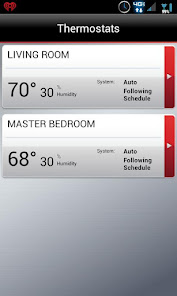
The Honeywell Total Connect Comfort app allows users to remotely monitor and manage their heating and cooling system – at anytime, from anywhere. Honeywell’s Total Connect Comfort works with Honeywell Wi-Fi Thermostats and with Prestige®, Prestige® IAQ, Wireless FocusPRO® and EConnect™ Comfort Systems when used in conjunction with Honeywell’s Internet Gateway.
With the Honeywell Total Connect Comfort app users can:
View and change the schedule (for thermostats that support this feature)
Utilize the Demo Mode before purchasing a thermostat
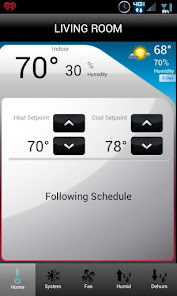
View and change heating and cooling system settings
View and set the indoor temperature
View and change system fan (for thermostats that support this feature)
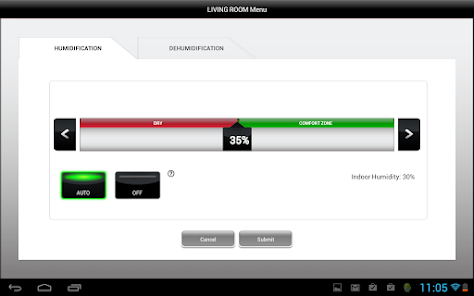
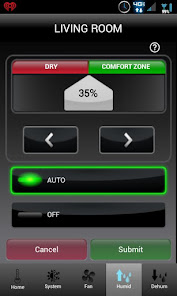
View and change humidifier and dehumidifier settings (for thermostats that support this feature)
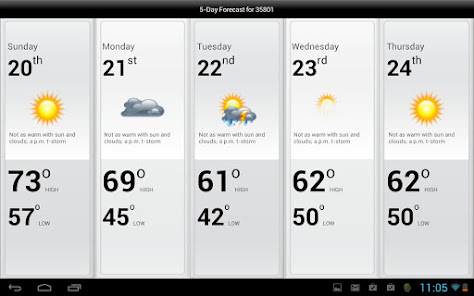
View 5-Day weather forecast
View outdoor temperature and humidity (when used with an outdoor sensor)
Access multiple smart thermostats
Access multiple locations if more than one system is registered
View thermostat alerts such as high or low temperature
Automatically upgrade to new features once they become available
Whether a homeowner, business owner or both – users will find comfort in Total Connect Comfort
With the Honeywell Total Connect Comfort app users can:
View and change the schedule (for thermostats that support this feature)
Utilize the Demo Mode before purchasing a thermostat
View and change heating and cooling system settings
View and set the indoor temperature
View and change system fan (for thermostats that support this feature)
View and change humidifier and dehumidifier settings (for thermostats that support this feature)
View 5-Day weather forecast
View outdoor temperature and humidity (when used with an outdoor sensor)
Access multiple smart thermostats
Access multiple locations if more than one system is registered
View thermostat alerts such as high or low temperature
Automatically upgrade to new features once they become available
Whether a homeowner, business owner or both – users will find comfort in Total Connect Comfort
Updated on
Safety starts with understanding how developers collect and share your data. Data privacy and security practices may vary based on your use, region, and age. The developer provided this information and may update it over time.

This app may share these data types with third parties
App info and performance and Device or other IDs

No data collected
Learn more about how developers declare collection

Data is encrypted in transit

You can request that data be deleted
Ratings and reviews
3.8
80.4K reviews

JP
- Flag inappropriate
- Show review history
June 30, 2024
This app works reliably. That's how it gets 3 stars. The rest? The UI is straight out of 2012 with zero attempts to modernize. You have to manually tap 15 minutes at a time to make a scheduled temperature adjustment. Is it really that hard to include a fast dial animation? EDIT - their response, lmao 2024 addition - sometimes you simply cannot connect to their app. No reason why, just doesn't feel like connecting. Now down to 2 stars.
2 people found this review helpful
Resideo Technologies, Inc.
June 30, 2024
Hi, JP. Thanks for taking the time to rate the App, please feel free to visit our App support page by tapping the link below for assistance. https://www.honeywellhome.com/us/en/support/apps/ -Alex

Arjan Gupta
- Flag inappropriate
June 26, 2024
It just says "connecting" endlessly when I open the app. I've tried killing the app and relaunching it, but same thing. Sometimes it does connect and lets me control the thermostat, but most of the time it doesn't. Really frustrating. Also the user interface is laughable, looks like an undergrad computer science capstone project or something. I'd expect a lot better from a big name like Honeywell.
1 person found this review helpful
Resideo Technologies, Inc.
June 26, 2024
Hi Arjan, thank you for bringing this to our attention. We appreciate your feedback and take your comments as we move forward. -Maria

Victor Barbarino
- Flag inappropriate
June 26, 2024
Good when it works. Something changed in the last month or so. I never had issues connecting to my thermostat until recently. The app times out trying to connect and I get a web server error. Sometimes, I get an error stating that too many connection attempts were made. When the app is working correctly, it does allow remote control of your thermostat.
1 person found this review helpful
Resideo Technologies, Inc.
June 26, 2024
Hi Victor, we are sorry to hear about this. We appreciate your feedback and will be happy to help making sure that everything is working as intended. Feel free to contact our tech support team at (800) 633-3991 or via Private Message at our Honeywell Home Facebook account. -Maria
What's new
New Feature:
Localytics library upgrade
Bug fixes and improvements
Localytics library upgrade
Bug fixes and improvements


