
QuickBooks Online Accounting
In-app purchases

4.0star
60.7K reviews
5M+
Downloads
Editors' Choice

Everyone
info

About this app
Whether you’re a self-employed business of one looking to organize business finances, or a growing small business with accounting needs, QuickBooks has the right sized solution for your business.
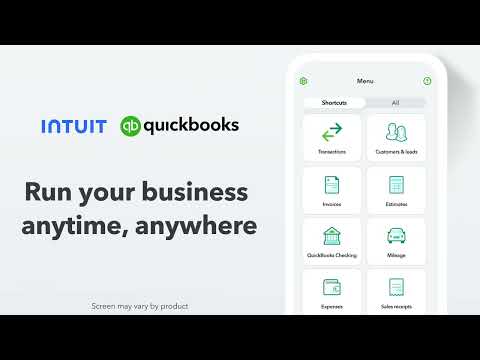
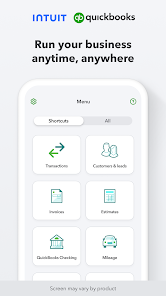
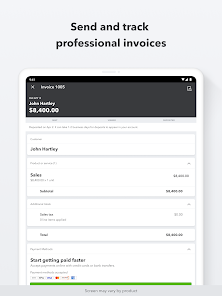
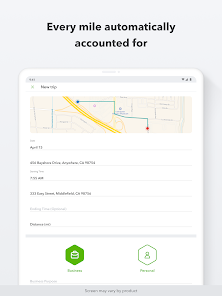
With the QuickBooks mobile app, run your business anytime, anywhere. Organize your self-employed or small business finances, manage your cash flows and expenses, and access tools to help drive growth - all in one place. Use automatic mileage tracking to maximize tax deductions, invoicing and estimates to help you get paid, and even more features to manage your bookkeeping.
Organize Business Finances
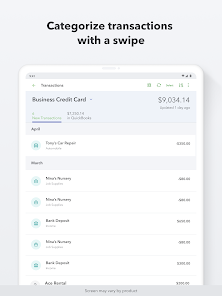
• Automatically separate business from personal transactions
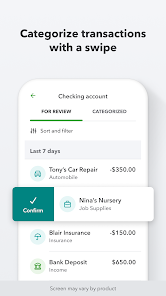
• Categorize business transactions on the go for more detailed accounting needs
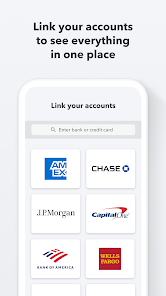
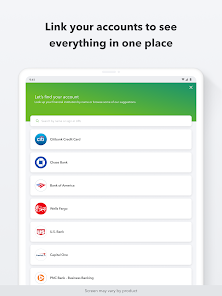
• Connect your bank and credit card accounts in one place to see the bigger financial picture
Manage Cash Flows and Expenses
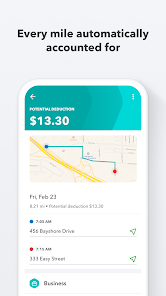
• Track miles automatically to maximize your tax deductions
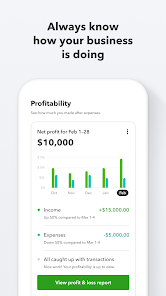
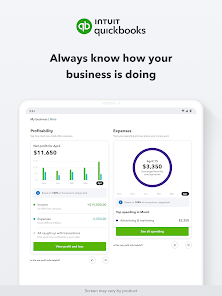
• View and manage your cash flow from anywhere to know where your business stands
• Get insights into what you make and spend to help you make better business decisions
Grow Your Business
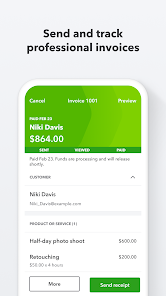
• Create and send custom invoices and estimates wherever you do business
• Add new customers, products, and services with a few taps
• Run business reports to always know how your business is performing
Get even more QuickBooks benefits and features to help you run your self-employed or small business through QuickBooks on the web, included with your QuickBooks mobile app subscription.
Not compatible with QuickBooks Desktop for Windows or Mac.
Some features, such as Receipt Capture, may not be available in all QuickBooks products.
Terms, conditions, pricing, special features, and service and support options subject to change without notice.
From INTUIT
Makers of: QuickBooks, TurboTax, Credit Karma & Mailchimp
Visit:
• https://www.intuit.com/privacy/statement/ to learn how Intuit protects your privacy.
• https://www.intuit.com/legal/terms/en-us/quickbooks/online/ to read the Intuit terms of service.
SUBSCRIPTION INFORMATION
• Your Google Play account will be charged when you confirm the purchase.
• Your subscription will automatically renew unless you turn off auto-renew at least 24 hours before the end of the current period.
• Your Google Play account will be charged for renewal within 24 hours prior to the end of the current period.
• You can manage your subscription and turn off auto-renewal by going to your Google Play account after purchase. On your device, go to the Google Play app, tap your Account, then Payments & Subscriptions, and tap Cancel subscription.
• You'll give up any unused portion of a free trial period when you purchase a subscription.
Intuit, 2700 Coast Ave, Mountain View, CA 94043
With the QuickBooks mobile app, run your business anytime, anywhere. Organize your self-employed or small business finances, manage your cash flows and expenses, and access tools to help drive growth - all in one place. Use automatic mileage tracking to maximize tax deductions, invoicing and estimates to help you get paid, and even more features to manage your bookkeeping.
Organize Business Finances
• Automatically separate business from personal transactions
• Categorize business transactions on the go for more detailed accounting needs
• Connect your bank and credit card accounts in one place to see the bigger financial picture
Manage Cash Flows and Expenses
• Track miles automatically to maximize your tax deductions
• View and manage your cash flow from anywhere to know where your business stands
• Get insights into what you make and spend to help you make better business decisions
Grow Your Business
• Create and send custom invoices and estimates wherever you do business
• Add new customers, products, and services with a few taps
• Run business reports to always know how your business is performing
Get even more QuickBooks benefits and features to help you run your self-employed or small business through QuickBooks on the web, included with your QuickBooks mobile app subscription.
Not compatible with QuickBooks Desktop for Windows or Mac.
Some features, such as Receipt Capture, may not be available in all QuickBooks products.
Terms, conditions, pricing, special features, and service and support options subject to change without notice.
From INTUIT
Makers of: QuickBooks, TurboTax, Credit Karma & Mailchimp
Visit:
• https://www.intuit.com/privacy/statement/ to learn how Intuit protects your privacy.
• https://www.intuit.com/legal/terms/en-us/quickbooks/online/ to read the Intuit terms of service.
SUBSCRIPTION INFORMATION
• Your Google Play account will be charged when you confirm the purchase.
• Your subscription will automatically renew unless you turn off auto-renew at least 24 hours before the end of the current period.
• Your Google Play account will be charged for renewal within 24 hours prior to the end of the current period.
• You can manage your subscription and turn off auto-renewal by going to your Google Play account after purchase. On your device, go to the Google Play app, tap your Account, then Payments & Subscriptions, and tap Cancel subscription.
• You'll give up any unused portion of a free trial period when you purchase a subscription.
Intuit, 2700 Coast Ave, Mountain View, CA 94043
Updated on
Safety starts with understanding how developers collect and share your data. Data privacy and security practices may vary based on your use, region, and age. The developer provided this information and may update it over time.

No data shared with third parties
Learn more about how developers declare sharing

This app may collect these data types
Location, Personal info and 8 others

Data is encrypted in transit

You can request that data be deleted
Ratings and reviews
3.9
55.7K reviews

molon labe
- Flag inappropriate
- Show review history
June 30, 2024
If it worked, it would be great. But it's not. If you do not currently have any quickbooks software, find other software. It costs more time than it saves. I don't have the space to explain all my complaints. But here's several. It doesn't always save Estimates or Invoices (I've had to retype many of each). It also changes them on their own. The receipt scanner in the mobile app works 2/10 times. If you are using the scanner, make sure you have QBO open and confirm it's actually saving it.
81 people found this review helpful
Intuit Inc
January 5, 2024
Hi, Molon. You'll be happy to hear that our developers have rolled out a fix in the latest update for the Receipt Snap feature. Please go ahead and update if you haven't already. If you're still facing issues after, please let us know at QBCares@Intuit.com. Thanks. -Caitlyn

Michael Falcetti
- Flag inappropriate
- Show review history
May 7, 2024
Terrible. App is just terrible. I'm about to go back to paper invoices. Appears there may have been a recent update maybe and can no longer make invoice on the go. If I can, can't even actually enter a number for hours on the job. Add customer on the app, they just disappear. But also the app personally has been on the decline since launch. Wish I could get most of my money back. Desktop version was ok. Technology is supposed to make life easier, this thing is pure stress.
70 people found this review helpful
Intuit Inc
May 7, 2024
We're here to help, Michael! We have a few steps that should help resolve this. Please try uninstalling/reinstalling the app, clearing the app's cache (Settings > Apps > QuickBooks > Storage > Clear Cache), then logging out/back in. Email us at QBCares@Intuit.com if you still have issues. Thanks. -Caitlyn

Beth Lightbourn
- Flag inappropriate
May 28, 2024
Used this for the last two years, went to open it after a few weeks and it showed me a blank screen. Uninstalled, couldn't find the same app (name) in the store to reinstall. Followed the website to get the right one, now it says my email account doesn't have access to these features. I just want to send an invoice, this is ridiculous.
15 people found this review helpful
Intuit Inc
May 29, 2024
Hello, Beth. It sounds like you've been using QBSE instead of QBO. This would explain why you're unable to access your account using the QBO app. The QBSE mobile app was recently discontinued. You can still use your account on the go by logging in via a mobile web browser. Hope this helps to clarify. -Myshka


