
Galaxy Buds+ Manager
3.6star
8.88K reviews
1M+
Downloads

Everyone
info
About this app
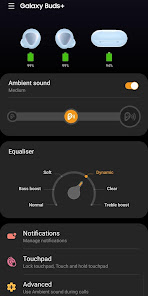
The Galaxy Buds+ Manager allows you to use features such as device settings and status view when connected to a Galaxy Buds+ device.
This application does not work alone because this is a component of the Galaxy Wearable application.
The Galaxy Wearable application has to be installed first for the Galaxy Buds+ Manager application to operate normally.
※ Please allow the permissions of the Galaxy Buds+ Manager in Android Settings to use all the features in Android 6.0 or later.
Settings > Applications > Galaxy Buds+ Manager > Permissions
※ Access rights information
The following permissions are required for the app service. For optional permissions, the default functionality of the service is turned on, but not allowed.
[Required Permissions]
- Notifications : Purpose for confirming voice notification function
- Contacts : Purpose for confirming Contacts information for voice notification function
- Phone : Purpose for confirming Contacts information for voice notification function
- Calendar : Purpose for checking Calendar information for using voice notification function
- Call logs : Purpose for confirming Call logs information for voice notification function
- Nearby devices : Purpose for confirming to search Buds Devices
- SMS: Purpose for confirming SMS contents for voice notification
[Optional Permissions]
-None
If your system software version is lower than Android 6.0, please update the software to configure App permissions.
Previously allowed permissions can be reset on Apps menu in device settings after software update.
This application does not work alone because this is a component of the Galaxy Wearable application.
The Galaxy Wearable application has to be installed first for the Galaxy Buds+ Manager application to operate normally.
※ Please allow the permissions of the Galaxy Buds+ Manager in Android Settings to use all the features in Android 6.0 or later.
Settings > Applications > Galaxy Buds+ Manager > Permissions
※ Access rights information
The following permissions are required for the app service. For optional permissions, the default functionality of the service is turned on, but not allowed.
[Required Permissions]
- Notifications : Purpose for confirming voice notification function
- Contacts : Purpose for confirming Contacts information for voice notification function
- Phone : Purpose for confirming Contacts information for voice notification function
- Calendar : Purpose for checking Calendar information for using voice notification function
- Call logs : Purpose for confirming Call logs information for voice notification function
- Nearby devices : Purpose for confirming to search Buds Devices
- SMS: Purpose for confirming SMS contents for voice notification
[Optional Permissions]
-None
If your system software version is lower than Android 6.0, please update the software to configure App permissions.
Previously allowed permissions can be reset on Apps menu in device settings after software update.
Updated on
Safety starts with understanding how developers collect and share your data. Data privacy and security practices may vary based on your use, region, and age. The developer provided this information and may update it over time.

No data shared with third parties
Learn more about how developers declare sharing

No data collected
Learn more about how developers declare collection
Ratings and reviews
3.5
8.78K reviews

Andrew Carper
- Flag inappropriate
January 23, 2021
I would love to give this 5 stars. Up until lately, they were almost perfect! I was super pleased with sound quality of music, ease of use & call quality. Lately they have become a bit of a hastle to use for phone calls (which is the #1 reason I purchased). It's hit or miss, I haven't noticed a pattern or reason for the calling issues. Example, last night my dad called, I answered but the quality was horrible & worst of all, they weren't in sync. Left ear then 1 or 2 seconds later, right ear.
61 people found this review helpful

Marco Tricarico
- Flag inappropriate
August 4, 2020
Please add a custom EQ setting! I get you're proud of the AKG tuning of the sound profiles, but a limited number of presets won't cut it just for everyone. The product at the base is solid, I don't see the reason for obstructing the ability to get the perfect sound for everyone. I don't want to use another app just for the EQ. It's such a low effort addition but it can completely change the experience for many users.
5 people found this review helpful

Random Account
- Flag inappropriate
- Show review history
May 18, 2022
I can understand forcing users to update their apps, but disabling the use of the product completely when it doesn't need the update is absolutely malicious. I had an incident where one of my earbuds(which was working three hours before) was completely disabled and would not turn on. The app told me to update. I would not update on mobile data, so I shut my data off and lo and behold, the earbud magically started working again. In conclusion, the buds are great. The company policy is terrible.
60 people found this review helpful
What’s new
Improved system stability and reliability
App support
About the developer
삼성전자(주)
mobile.biz@samsung.com
대한민국 16677 경기도 수원시
영통구 삼성로 129 (매탄동)
+82 1588-3366


