

Authenticator App - OneAuth

2.6star
3.77k reviews
1m+
Downloads

PEGI 3
info


About this app
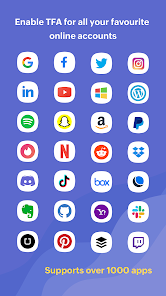
OneAuth is an industry standard authenticator app developed by Zoho. You can now enable TFA and secure all your online accounts like Twitter, Facebook, LinkedIn, and more.
Over 1 million users trust OneAuth to enable 2FA and secure their online accounts.
Take charge of your online security with two factor authentication
- Add online accounts to OneAuth easily by either scanning a QR code or manually entering the details.
- Authenticate your online accounts using time-based OTPs. These OTPs can be accessed offline too.
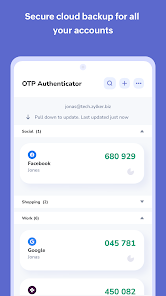
- Backing up your online accounts in OneAuth is easy. We offer encrypted backup for all your online accounts and they can be recovered securely with passphrase. The passphrase is unique and known only to you and aids in recovery in case of lost or broken devices.
- OneAuth syncs your OTP secrets across all your devices, making it easy for you to access OTPs from anywhere.
- Experience OneAuth's secure authentication on Android and Wear OS devices.
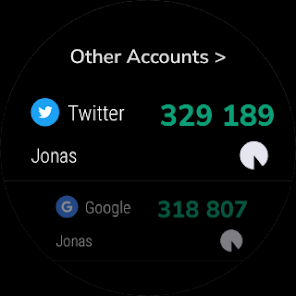
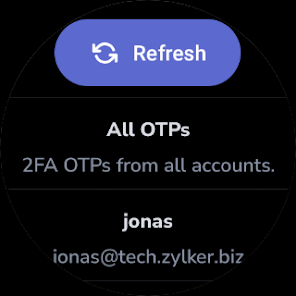
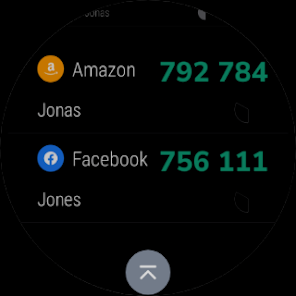
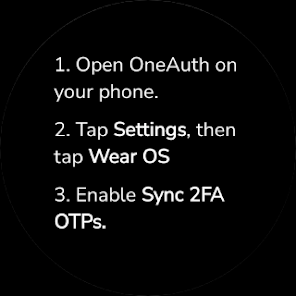
- See your 2FA OTPs on the Wear OS app, and approve sign-in push notification on the go.
App shortcuts: Quickly reach and perform key actions on OneAuth directly from the home screen.
Dark theme: Reduce strain and improve your user experience by turning on dark mode.
An authenticator app that provides enhanced user experience
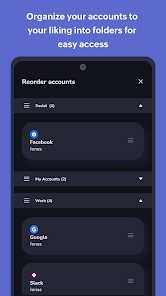
- Create folders to organize your TFA accounts to your convenience. You can create and reorder personal and work folders separately for easy access. You can also move accounts within and in between folders.
- Identify your 2FA accounts easily by associating them with their brand logos.
- Search and find your accounts quicker with OneAuth's inbuilt search.
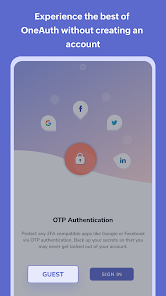
- Explore OneAuth to its fullest potential without creating an account. Guest users can use the export and import option while switching to a new device.
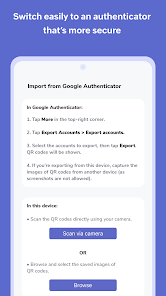
- Users can also migrate their existing online accounts to OneAuth easily from Google Authenticator.
Greater security for your Zoho accounts with multi-factor authentication
Passwords are just not enough. You need additional layers to ensure your account is properly safeguarded. OneAuth does that for you!
- With OneAuth, you can enable MFA for all your Zoho accounts.
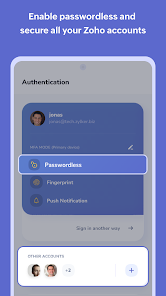
- Set up passwordless sign-in. Avoid the everyday hassle of typing out your passwords.
- Choose from multiple sign-in modes. You can select from sign-in options like push notification (to your phone or Wear OS device), QR code, and time-based OTP. In case you're offline, you can access your account with time-based OTPs.
- Toughen up your account security. Ensure only you can access your account by enabling biometric authentication (fingerprint recognition).
- Monitor devices and sessions in OneAuth, track login locations and designate devices into primary and secondary.
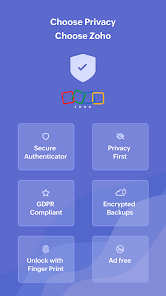
Think Privacy. Think Zoho.
At Zoho, data privacy and security is core to our business.
We believe that every individual has a right to access the internet securely and thus our authenticator app OneAuth will be free forever.
SUPPORT
Our help channels are available 24*7 for customers. Email us at support@zohoaccounts.com
Download today!
Over 1 million users trust OneAuth to enable 2FA and secure their online accounts.
Take charge of your online security with two factor authentication
- Add online accounts to OneAuth easily by either scanning a QR code or manually entering the details.
- Authenticate your online accounts using time-based OTPs. These OTPs can be accessed offline too.
- Backing up your online accounts in OneAuth is easy. We offer encrypted backup for all your online accounts and they can be recovered securely with passphrase. The passphrase is unique and known only to you and aids in recovery in case of lost or broken devices.
- OneAuth syncs your OTP secrets across all your devices, making it easy for you to access OTPs from anywhere.
- Experience OneAuth's secure authentication on Android and Wear OS devices.
- See your 2FA OTPs on the Wear OS app, and approve sign-in push notification on the go.
App shortcuts: Quickly reach and perform key actions on OneAuth directly from the home screen.
Dark theme: Reduce strain and improve your user experience by turning on dark mode.
An authenticator app that provides enhanced user experience
- Create folders to organize your TFA accounts to your convenience. You can create and reorder personal and work folders separately for easy access. You can also move accounts within and in between folders.
- Identify your 2FA accounts easily by associating them with their brand logos.
- Search and find your accounts quicker with OneAuth's inbuilt search.
- Explore OneAuth to its fullest potential without creating an account. Guest users can use the export and import option while switching to a new device.
- Users can also migrate their existing online accounts to OneAuth easily from Google Authenticator.
Greater security for your Zoho accounts with multi-factor authentication
Passwords are just not enough. You need additional layers to ensure your account is properly safeguarded. OneAuth does that for you!
- With OneAuth, you can enable MFA for all your Zoho accounts.
- Set up passwordless sign-in. Avoid the everyday hassle of typing out your passwords.
- Choose from multiple sign-in modes. You can select from sign-in options like push notification (to your phone or Wear OS device), QR code, and time-based OTP. In case you're offline, you can access your account with time-based OTPs.
- Toughen up your account security. Ensure only you can access your account by enabling biometric authentication (fingerprint recognition).
- Monitor devices and sessions in OneAuth, track login locations and designate devices into primary and secondary.
Think Privacy. Think Zoho.
At Zoho, data privacy and security is core to our business.
We believe that every individual has a right to access the internet securely and thus our authenticator app OneAuth will be free forever.
SUPPORT
Our help channels are available 24*7 for customers. Email us at support@zohoaccounts.com
Download today!
Updated on
Events and offers

Safety starts with understanding how developers collect and share your data. Data privacy and security practices may vary based on your use, region and age. The developer provided this information and may update it over time.

No data shared with third parties
Learn more about how developers declare sharing

This app may collect these data types
Personal info, Photos and videos and 3 others

Data is encrypted in transit

You can request that data be deleted
Ratings and reviews
2.6
3.7k reviews

Virendra
- Flag inappropriate
19 November 2025
I am satisfied with all the other features, but there is one major problem with the Zoho OneAuth app. If the app is uninstalled from the mobile device or if I log out of the app, all the 2FA codes are deleted and there is no option for backup or recovery. Please fix this issue so that if the app is uninstalled, the device is changed, or we log out by mistake, we can recover our 2FA codes. This causes a lot of trouble for users who lose access to their accounts due to the missing 2FA codes.
Zoho Corporation
19 November 2025
Thank you for your review! We understand your concern about losing 2FA codes if the app is uninstalled or logged out. We recommend using the 'Backup Secrets' option in the 'Authenticator' tab for cloud sync, which sync data. For further assistance, feel free to email us at feedback-oneauth@zohoaccounts.com. We're here to help!

Kailasa Nathan K
- Flag inappropriate
- Show review history
10 November 2025
This application acts as an easy way to use Zoho logins but very hard to import and export logins from different vault. For overall usage, Aegis Authenticator feels better. EDIT: I do not have much to say but I like Aegis, It would be better if it is similar to it.
1 person found this review helpful
Zoho Corporation
10 November 2025
Apologies for any difficulties you experienced with the setup/ features of the app. We would be happy to take a look into this for you, please contact us at feedback-oneauth@zohoaccounts.com to discuss further.

Adriano Sanchez
- Flag inappropriate
11 November 2025
I love zoho services but I hate this app, it is useless, it is always prompting a message saying could not connect to server, neaning that I can't access my account. Since I was forced into using this app and I get this problem, I started asking myself why do I still use this service?, I am not far to quit and go somewhere else.
2 people found this review helpful
Zoho Corporation
13 November 2025
We sincerely apologize for the troubles you have had with the app. We will have our support executive reach out to you as soon as possible. You can leave your good callback number, email ID, and available time for a call at feedback-oneauth@zohoaccounts.com so that our support agent will call you to solve the issue.
What's new
Bug fixes and performance improvements
App support
About the developer
Zoho Corporation
mobileapp-support@zohocorp.com
4141 Hacienda Dr
Pleasanton, CA 94588-8566
United States
+1 903-221-2616


