
Android Auto

star
6.22M reviews

Everyone
info
10B+
Downloads

Everyone
Learn more


About this app
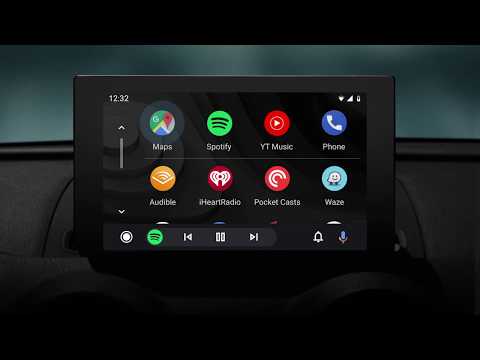
Android Auto is your smart driving companion that helps you stay focused, connected, and entertained with the Google Assistant. With a simplified interface, large buttons, and powerful voice actions, Android Auto is designed to make it easier to use apps that you love from your phone while you’re on the road.
Just say “Ok Google” to...
• Route to your next destination using Google Maps or Waze with real-time GPS navigation and traffic alerts.
• Get updates on your route, ETA, and hazards in real-time.
• Have the Google Assistant check your calendar for you so you know where you need to be.
• Set reminders, get updates on the news, and check last night’s score.
• Avoid distractions while driving by setting a custom do not disturb message while driving.
• Make calls using Google Assistant and answer incoming calls with just a tap.
• Access your contacts folder and send and receive messages with the Google Assistant using SMS, Hangouts, WhatsApp, Skype, Telegram, WeChat, Kik, Google Allo, and many more messaging apps.
• Manage your infotainment system like never before. Listen to your favorite media apps including Spotify, Pandora, iHeartRadio, Google Play Music, Amazon Music, SiriusXM, TIDAL - High Fidelity Music Streaming, Napster Music, and Deezer. Many more music, radio, news, sports news, audiobook, and podcast apps are also supported.
The number of compatible apps is always growing! For a full list of compatible apps, go to http://g.co/androidauto
To use Android Auto, you’ll need a phone running Android 6.0 or higher and an active data connection.
Over 400 car models now support Android Auto! To find out if your car display is compatible and how to enable it, check your owner’s manual or contact your car’s manufacturer. Once enabled, use a high quality USB cable to connect your phone to your car, then launch Android Auto to get going!
Learn more about Android Auto and compatible cars at http://android.com/auto
For support: http://support.google.com/androidauto
Get help from our community: https://productforums.google.com/forum/#!forum/android-auto
Just say “Ok Google” to...
• Route to your next destination using Google Maps or Waze with real-time GPS navigation and traffic alerts.
• Get updates on your route, ETA, and hazards in real-time.
• Have the Google Assistant check your calendar for you so you know where you need to be.
• Set reminders, get updates on the news, and check last night’s score.
• Avoid distractions while driving by setting a custom do not disturb message while driving.
• Make calls using Google Assistant and answer incoming calls with just a tap.
• Access your contacts folder and send and receive messages with the Google Assistant using SMS, Hangouts, WhatsApp, Skype, Telegram, WeChat, Kik, Google Allo, and many more messaging apps.
• Manage your infotainment system like never before. Listen to your favorite media apps including Spotify, Pandora, iHeartRadio, Google Play Music, Amazon Music, SiriusXM, TIDAL - High Fidelity Music Streaming, Napster Music, and Deezer. Many more music, radio, news, sports news, audiobook, and podcast apps are also supported.
The number of compatible apps is always growing! For a full list of compatible apps, go to http://g.co/androidauto
To use Android Auto, you’ll need a phone running Android 6.0 or higher and an active data connection.
Over 400 car models now support Android Auto! To find out if your car display is compatible and how to enable it, check your owner’s manual or contact your car’s manufacturer. Once enabled, use a high quality USB cable to connect your phone to your car, then launch Android Auto to get going!
Learn more about Android Auto and compatible cars at http://android.com/auto
For support: http://support.google.com/androidauto
Get help from our community: https://productforums.google.com/forum/#!forum/android-auto
Control maps, media and messaging, with the Google Assistant while you drive
Updated on
Featured stories

Safety starts with understanding how developers collect and share your data. Data privacy and security practices may vary based on your use, region, and age. The developer provided this information and may update it over time.
- No data shared with third partiesLearn more about how developers declare sharing
- This app may collect these data typesLocation, Personal info and 6 others
- Data is encrypted in transit
- Data can’t be deleted


Ratings and reviews
6.16M reviews

David Hollis
- Flag inappropriate
April 8, 2026
Early on, many years ago, there were bugs of course. Now I rarely have an issue. I also used different models of rental cars (about 10) and it worked perfectly in all of them. I only wish my current car I own would connect via Bluetooth, but that's not an android issue.. That feature is great so you don't have to travel with different usb cords.
53 people found this review helpful

Rachel Massaglia
- Flag inappropriate
- Show review history
April 13, 2026
Almost every time I use the button on my steering wheel or say "ok, Google" there is no response. The words "How can I help" show up on my vehicle screen, but the color bar doesn't show. Also, if I get anything to record it goes blank and doesn't send the message. Sometimes, it even reads the message back and then goes blank. Very unreliable, and creates a safety hazard because of the multiple attempts needed to process a request.
42 people found this review helpful
Google LLC
July 3, 2018
Hi Rachel. Thanks for your feedback. We’d like to understand the issue better and help troubleshooting. When you have a moment, visit our user community https://goo.gl/uJYCRt and tell us more. You can also check out Android Auto FAQ here: https://goo.gl/viJZW4.

Katherine Tombs
- Flag inappropriate
- Show review history
January 31, 2025
One star for the good concept. One star for the slick user interface. I would love to rate this higher but it crashes without fail, usually multiple times in a drive. It's also very inconvenient that I can't use Google maps on my phone. I *have* to use the Android Auto app, which is especially irritating because the search function voice command doesn't work. Great idea, terrible execution. Edit: Changing to one star because it has stopped working out of the blue. "USB device is not responing."
950 people found this review helpful
Everyone
Learn moreApp support
About the developer
Google LLC
support@google.com
1600 Amphitheatre Pkwy
Mountain View, CA 94043
United States
+1 650-253-0000


