
Google Admin
In-app purchases
3.7star
30.7k reviews
5m+
Downloads

Everyone
info


About this app
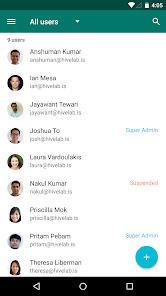
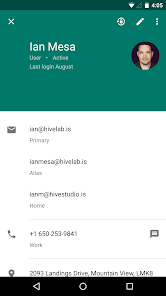
Google Admin lets you manage your Google Cloud account on-the-go. Add and manage users and groups, contact support, and view audit logs for your organization.
FOR WHOM? - This app is only for administrators of Google Cloud products, including G Suite Basic, G Suite Business, Education, Government, Google Coordinate, and Chromebooks.
It provides the following features:
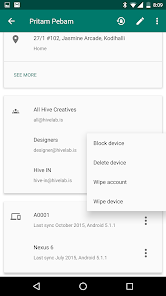
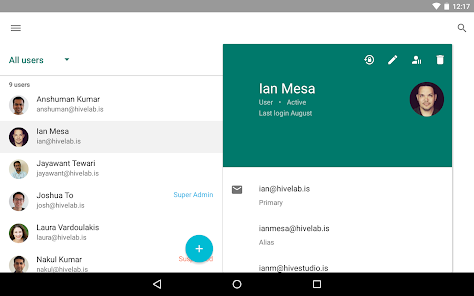
• User Management Features - Add/Edit user, Suspend user, Restore user, Delete user, Reset password
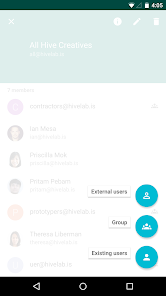
• Group Management Features - Add/Edit Group, Add members, Delete group, View group members
• Mobile Device Management - Manage Android and iOS devices for your domain
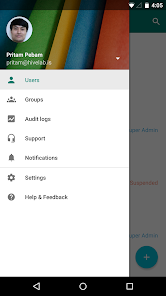
• Audit Logs - Review Audit logs
• Notifications - Read and Delete notifications
Permissions Notice
Contacts: Needed to create a User from your phone contacts.
Phone: Needed to call a User directly from the Application.
Storage: Needed to update User's photo via Gallery.
Accounts: Needed to display the list of accounts on the device.
FOR WHOM? - This app is only for administrators of Google Cloud products, including G Suite Basic, G Suite Business, Education, Government, Google Coordinate, and Chromebooks.
It provides the following features:
• User Management Features - Add/Edit user, Suspend user, Restore user, Delete user, Reset password
• Group Management Features - Add/Edit Group, Add members, Delete group, View group members
• Mobile Device Management - Manage Android and iOS devices for your domain
• Audit Logs - Review Audit logs
• Notifications - Read and Delete notifications
Permissions Notice
Contacts: Needed to create a User from your phone contacts.
Phone: Needed to call a User directly from the Application.
Storage: Needed to update User's photo via Gallery.
Accounts: Needed to display the list of accounts on the device.
Updated on
Safety starts with understanding how developers collect and share your data. Data privacy and security practices may vary based on your use, region and age. The developer provided this information and may update it over time.

No data shared with third parties
Learn more about how developers declare sharing

This app may collect these data types
Location, Personal info and 5 others

Data is encrypted in transit

You can request that data be deleted

Independent security review
Ratings and reviews
3.7
28.8k reviews

Nate Red (Interrobang)
- Flag inappropriate
- Show review history
18 December 2025
Misses several major features from the web version. Most notably, there is no option to give created users their organizational unit. It's so dumb. There are some other some ease of use features that are nice to have on mobile but this app just seems ignored. Update: Despite having made this review years ago, none of these issues have been fixed. It has not reasonably changed in years, making it preferable to simply open your mobile browser instead.
52 people found this review helpful

dffMOG
- Flag inappropriate
18 December 2025
It is useful but the UI is way too simple and looks very out of Google spect of colorfulness, additionally; pretty hard to use in few cases i guess.

F Deeb
- Flag inappropriate
- Show review history
9 December 2025
It's such a clunky, ugly looking and limited app compared to the website version. It covers the bare bones essentials and that's it.
6 people found this review helpful
What's new
• New look and enhanced functionality for group management. Do more with dynamic groups and edit groups, chat, and schedule meetings directly from the groups list.
• Performance improvements and bug fixes.
• Performance improvements and bug fixes.
App support
About the developer
Google LLC
support@google.com
1600 Amphitheatre Pkwy
Mountain View, CA 94043
United States
+1 650-253-0000


